
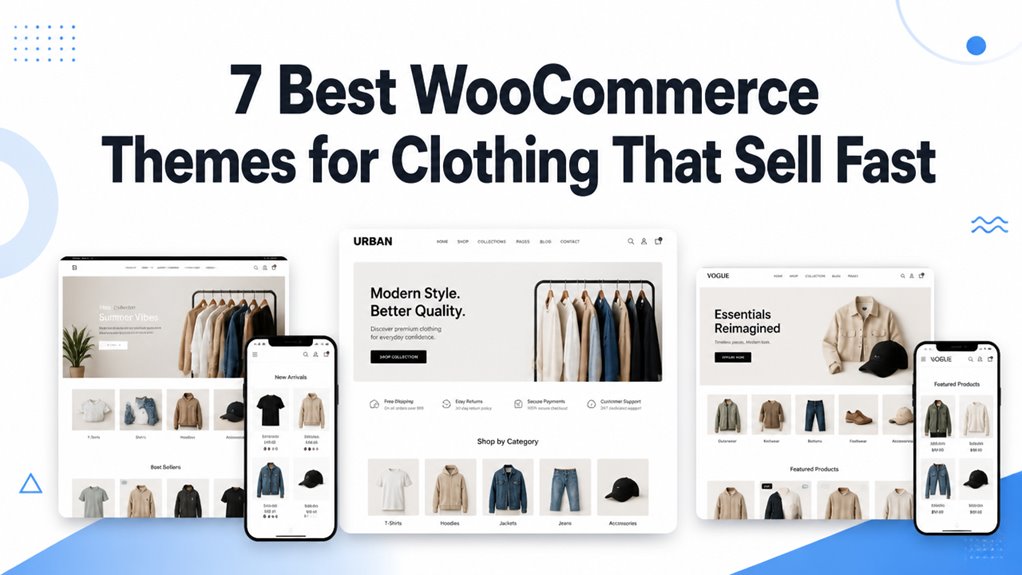
7 Best WooCommerce Themes for Clothing That Sell Fast is a focused guide for ecommerce website design and online stores.
We researched clothing themes for design quality, mobile responsiveness, speed, and customization.
You will see how each option supports product discovery, layout control, and store performance.
I evaluated the important factors so you can compare features, compatibility, and usability with more confidence.
You’ll learn which theme fits your store goals and helps you make an informed decision.
| Boutique – Clothes Store WooCommerce Theme | 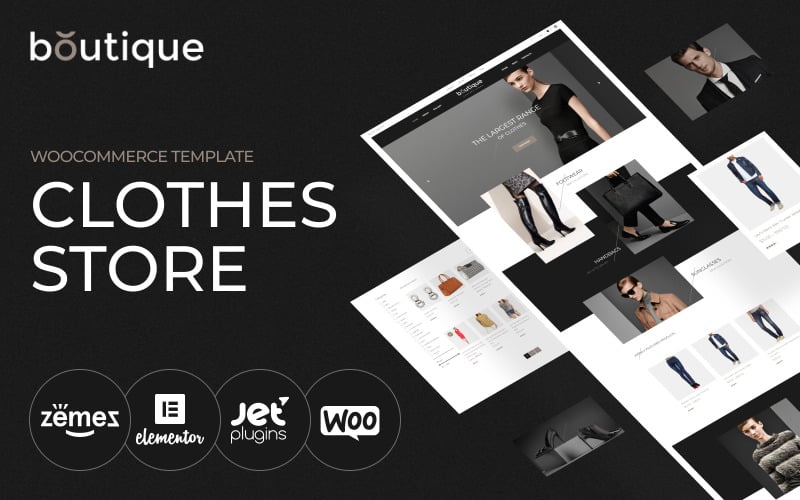 | Best for Boutiques | Page Builder: Elementor | WooCommerce: Compatible | Responsive Design: Fully responsive | VIEW LATEST PRICE | Read Our Analysis |
| Posh – Urban Fashion WooCommerce Theme | 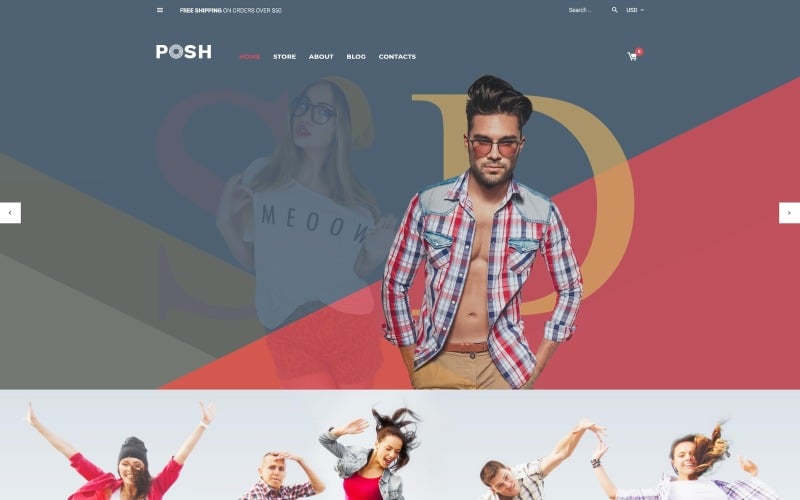 | Urban Style Pick | Page Builder: Elementor | WooCommerce: Compatible | Responsive Design: Responsive | VIEW LATEST PRICE | Read Our Analysis |
| Fabulous – Fashion Store WooCommerce Theme | 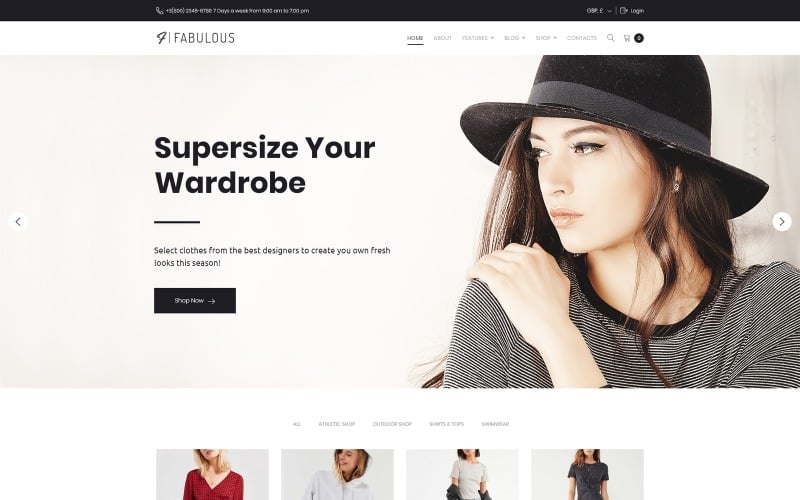 | Most Polished | Page Builder: Elementor | WooCommerce: Compatible | Responsive Design: Fully responsive | VIEW LATEST PRICE | Read Our Analysis |
| Fashura – Responsive Fashion WooCommerce Theme | 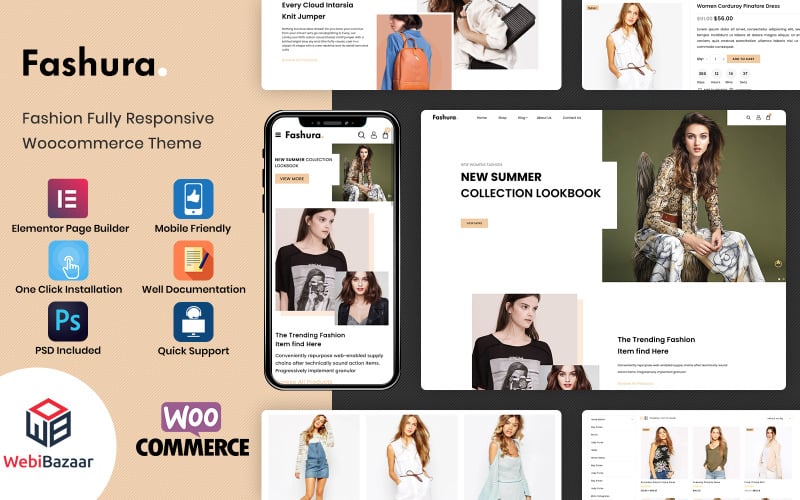 | Feature Packed | Page Builder: Features builder | WooCommerce: Compatible | Responsive Design: Responsive | VIEW LATEST PRICE | Read Our Analysis |
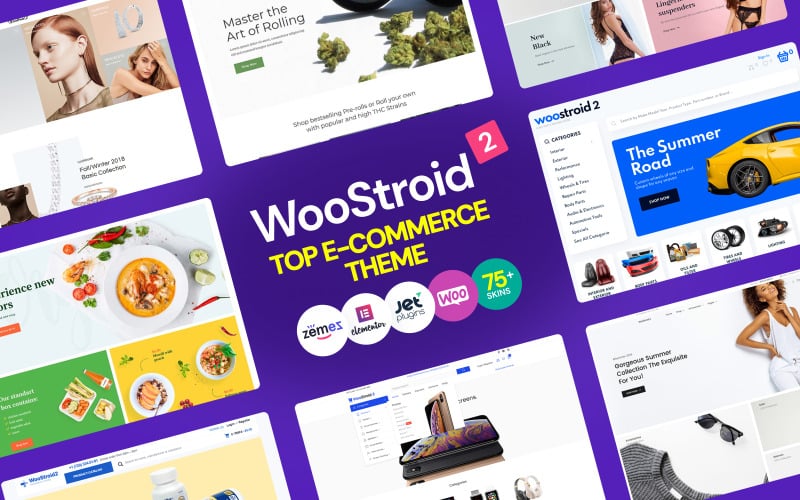
| Woostroid2 – Multipurpose Elementor WooCommerce Theme | 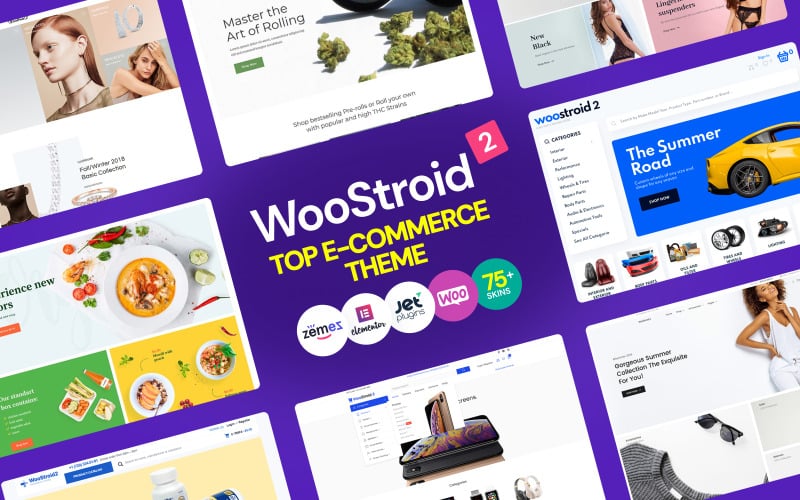 | Best Overall | Page Builder: Elementor | WooCommerce: Compatible | Responsive Design: Fully responsive | VIEW LATEST PRICE | Read Our Analysis |
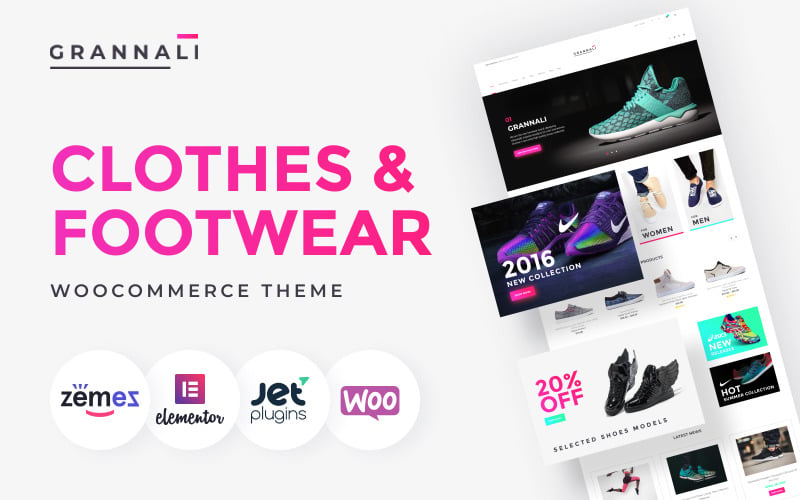
| GrannaLi – Clothes & Footwear WooCommerce Theme | 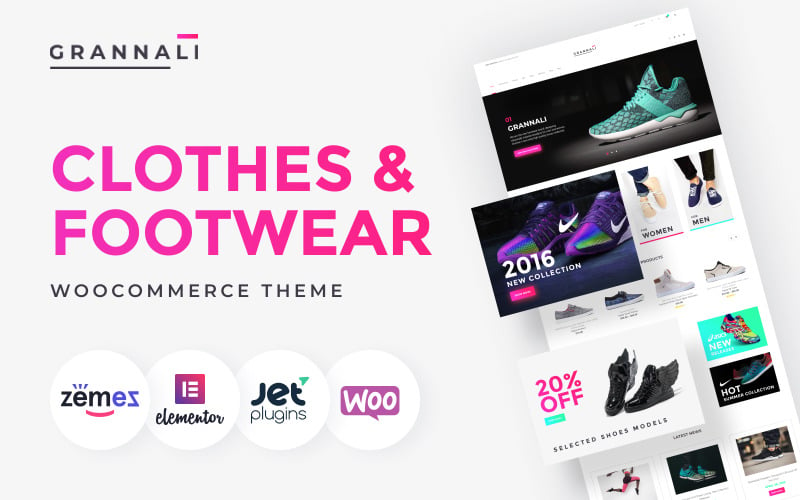 | Best for Footwear | Page Builder: WordPress Builder | WooCommerce: Compatible | Responsive Design: Fully responsive | VIEW LATEST PRICE | Read Our Analysis |
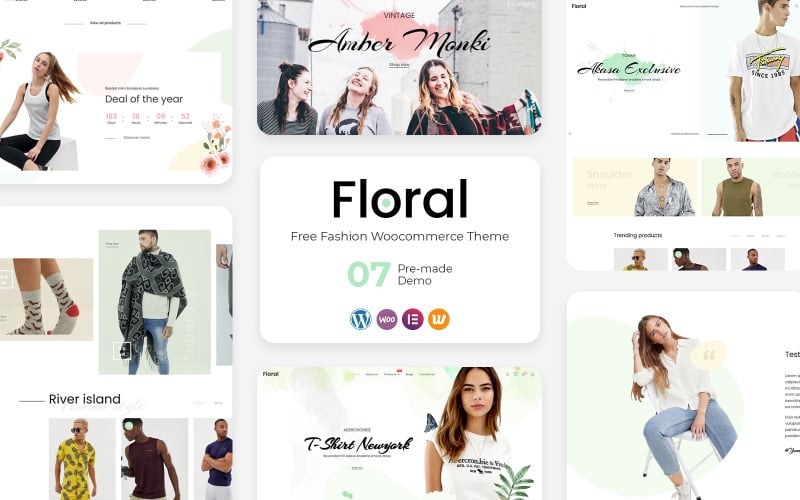
| Floral – Fashion & Clothing eCommerce WordPress Theme | 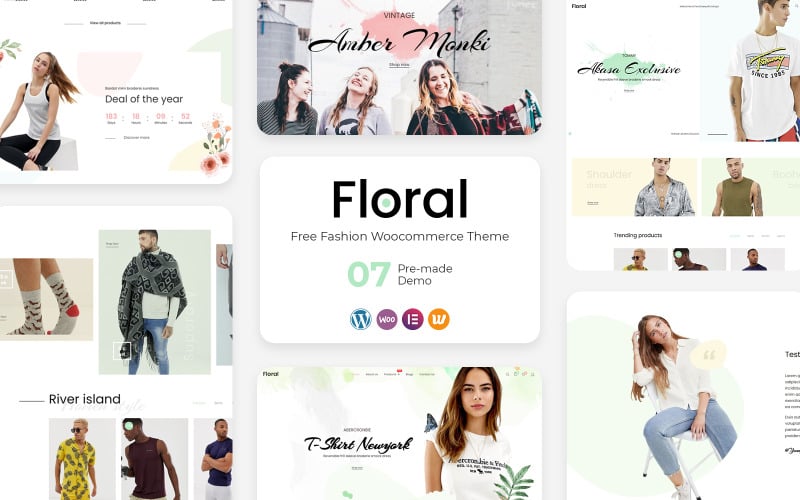 | Best Newcomer | Page Builder: Elementor Free | WooCommerce: Responsive template | Responsive Design: Fully responsive | VIEW LATEST PRICE | Read Our Analysis |
More Details on Our Top Picks
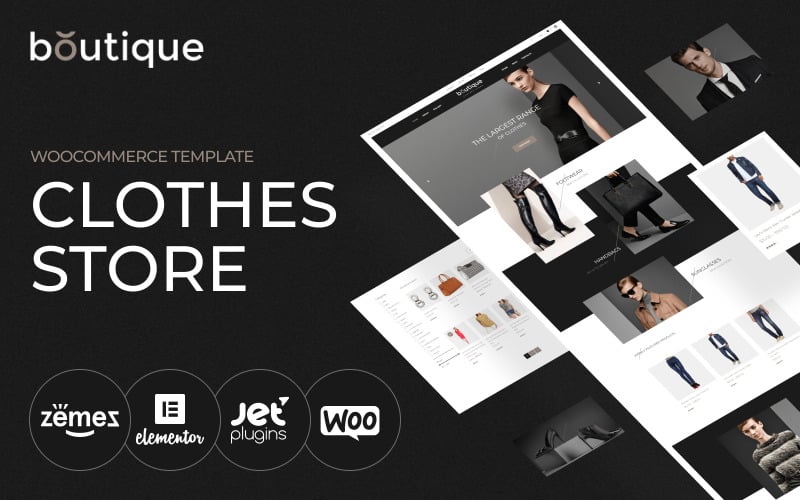
Boutique – Clothes Store WooCommerce Theme
Boutique is a minimalist, luxury-focused fashion theme designed for high-end designer apparel, contemporary clothing labels, and bespoke accessories stores. Featuring clean editorial typography, full-width lookbook sliders, and multi-currency compatibility, it showcases seasonal fashion lookbooks without visual distraction.
Boutique is a stylish WooCommerce theme made for clothing stores, fashion boutiques, and online shops that want a polished, modern look. I found it especially useful if you want to build or refresh a store with Elementor, since editing feels simple and visual.
We noticed it also goes beyond design, with Jet Plugins from Crocoblock adding dynamic content and extra store features. You’ll appreciate the responsive layout, SEO-friendly structure, fast loading, and one-click demo import for a quicker start.
Features.
- Elementor drag-and-drop page editing
- WooCommerce integration for online selling
- Responsive, modern fashion-focused design
- Jet Plugins support for dynamic content and advanced features
- Advanced mega menu and one-click demo import
Pros.
- Easy to customize without coding
- Clean, professional design suited to fashion brands
- Built for speed and mobile responsiveness
Cons.
- Licensed for one website only
- Requires admin panel and FTP access
Pricing: Licensed for 1 website only; pricing depends on the seller’s current plan.
Best For: Ideal for fashion boutiques and clothing stores that want a modern WooCommerce site with flexible visual editing.
- Page Builder:Elementor
- WooCommerce:Compatible
- Responsive Design:Fully responsive
- SEO Optimized:SEO friendly
- One-click Import:Included
- Mobile Ready:Mobile-ready
- Additional Feature:Jet Plugins integration
- Additional Feature:Advanced mega menu
- Additional Feature:Fashion blog included
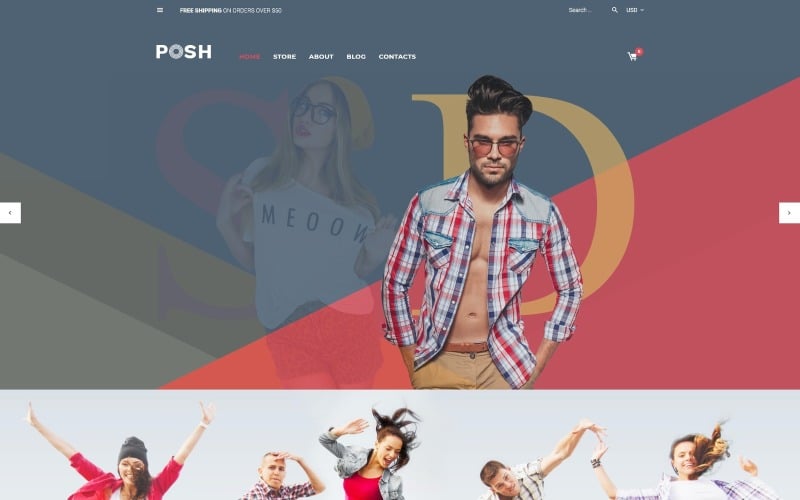
Posh – Urban Fashion WooCommerce Theme
Posh combines modern urban aesthetics with robust eCommerce functionality tailored for streetwear brands, sneaker drops, and youth apparel collections. Powered by Elementor, it provides dynamic countdown flash sales, interactive size guide modals, and fast AJAX add-to-cart drawers that accelerate purchase velocity.
Posh is an urban-style WooCommerce theme for WordPress that works well for clothing shops and other fashion-focused stores. I found it especially appealing if you want a clean store design with strong e-commerce support and a responsive layout that adapts nicely to different screens.
It also includes SEO-friendly features, Retina-ready display support, custom post types, and page templates. If you need multilingual reach, you’ll appreciate the WPML support for foreign-language content.
Features.
- WooCommerce support for online selling
- Responsive design for mobile and desktop
- Retina-ready display support
- SEO plugin compatibility
- WPML support for multilingual sites
Pros.
- Strong fit for fashion and urban-style branding
- Flexible enough for different store layouts
- Helpful compatibility with common WordPress tools
Cons.
- Older theme update history may matter to some buyers
- Design is more niche, so it may not suit every store
Pricing: TemplateMonster lists the theme with sales and review history, but pricing depends on the current marketplace offer.
Best For: Ideal for fashion stores and boutiques that want an urban look with reliable WooCommerce support.
- Page Builder:Elementor
- WooCommerce:Compatible
- Responsive Design:Responsive
- SEO Optimized:SEO friendly
- One-click Import:Not stated
- Mobile Ready:Retina-ready
- Additional Feature:Retina-ready displays
- Additional Feature:MotoPress Slider
- Additional Feature:WPML multilingual support
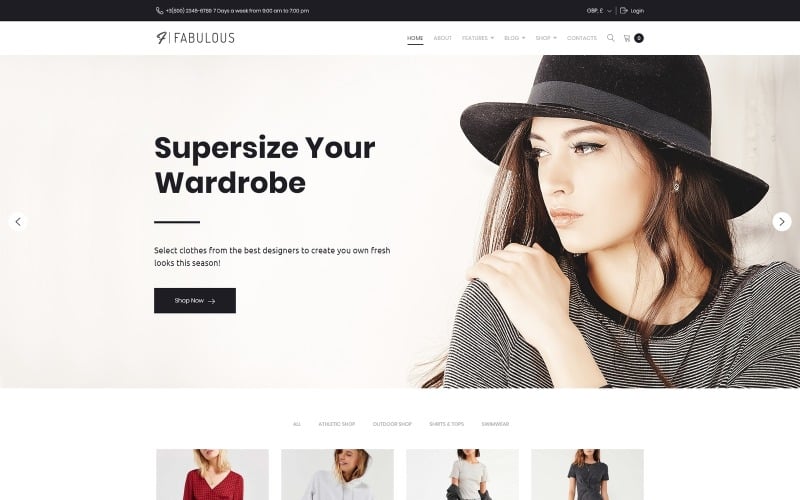
Fabulous – Fashion Store WooCommerce Theme
Fabulous delivers a vibrant, image-first digital storefront layout crafted for women’s fashion boutiques, lingerie brands, and seasonal trend retailers. It incorporates multi-column mega menus, interactive product quick-views, and animated hover effects that enhance visual merchandising across expansive apparel catalogs.
Fabulous is a WooCommerce theme built for clothing stores that want a polished storefront and practical selling tools. I found it especially useful for shop owners who want to customize fonts, layouts, widgets, images, and colors without touching code.
It supports WooCommerce, Elementor, and JetElements, so you can build pages and product displays with more flexibility. You’ll appreciate that it’s fully responsive and still compatible with WordPress 5.0.x, making it a solid option for fashion-focused online shops.
Features.
- Fully responsive WooCommerce design
- WYSIWYG customizer for easy visual edits
- Elementor and JetElements integration
- Flexible control over fonts, layouts, images, and colors
- Compatible with WordPress 5.0.x
Pros.
- Easy to customize without coding
- Good fit for fashion and apparel stores
- Supports popular page-building tools
Cons.
- Works best with older WordPress setups
- Pricing and plan details are limited in the listing
Pricing: One-website licensing is included.
Best For: Ideal for fashion and clothing store owners who want a customizable WooCommerce theme with visual editing tools.
- Page Builder:Elementor
- WooCommerce:Compatible
- Responsive Design:Fully responsive
- SEO Optimized:SEO optimized
- One-click Import:Included
- Mobile Ready:Fully responsive
- Additional Feature:WYSIWYG settings manager
- Additional Feature:24/7 lifetime support
- Additional Feature:JetElements updated
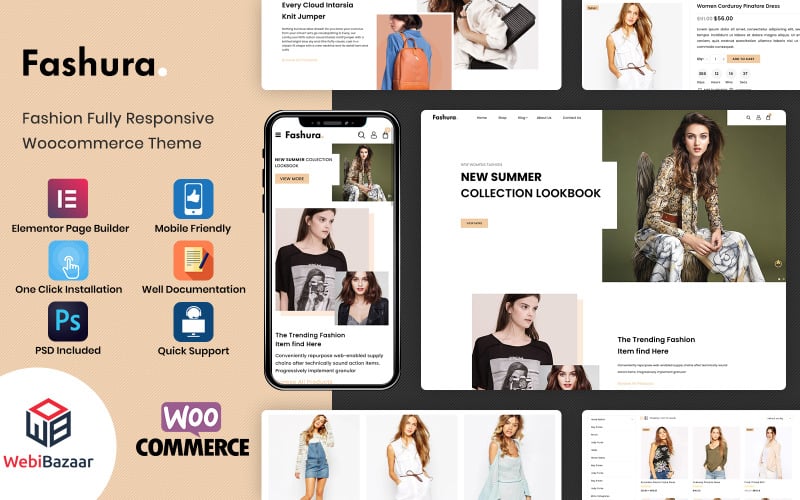
Fashura – Responsive Fashion WooCommerce Theme
Fashura is an agile, mobile-first clothing theme built for fast-moving apparel dropshippers, athletic activewear retailers, and boutique shoe stores. Its lightweight stylesheet architecture achieves rapid mobile rendering and consistent Google Core Web Vitals compliance on standard web hosting.
Fashura is a responsive WooCommerce theme for clothing and fashion stores. I found it especially useful for shops that want a clean look with practical shopping features built in.
You get Ajax search, Ajax add to cart, quick view, and wishlist support, so we noticed the shopping flow feels smooth.
It also includes meta sliders, cloud zoom, category views, brand sliders, and well-designed inner pages, which you’ll appreciate if you want a polished store that’s easy to manage.
Features.
- Responsive WooCommerce design with mobile-friendly layouts
- Ajax search, Ajax add to cart, and Ajax quick view
- Cloud zoom, image sliders, sale badges, and customer reviews
- Category grid and list views with parallax and infinity scroll
- Newsletter signup, brand logo sliders, and one-click demo import
Pros.
- Strong set of built-in shopping and product display tools
- Good fit for fashion stores that need a modern, responsive design
- Includes helpful setup extras like documentation and PSD files
Cons.
- Best suited to fashion and apparel stores, so it may feel niche
- Advanced customization may require some WordPress experience
Pricing: Pricing details and available plans are not specified here.
Best For: Ideal for clothing, apparel, and fashion retailers that want a feature-rich WooCommerce store.
- Page Builder:Features builder
- WooCommerce:Compatible
- Responsive Design:Responsive
- SEO Optimized:SEO optimized
- One-click Import:Included
- Mobile Ready:Fully mobile friendly
- Additional Feature:Ajax quick view
- Additional Feature:Cloud zoom images
- Additional Feature:Infinity scroll
Woostroid2 – Multipurpose Elementor WooCommerce Theme
Woostroid2 provides an enterprise-grade multi-purpose eCommerce framework backed by the complete JetPlugins suite for Elementor. It allows fashion brands to build custom single-product layouts, dynamic size-color variation filters, and bespoke checkout pathways without writing CSS code.
Woostroid2 is a flexible WooCommerce theme built for clothing stores and other online shops that want a polished, conversion-focused look. I found it especially useful if you want to build quickly in Elementor without sacrificing design control.
It comes with lots of ready-made content, and you’ll appreciate the variety of home, product, archive, and lookbook layouts. We noticed the AJAX filters, mega menus, and popups make it feel practical for real e-commerce use.
Features.
- 50+ pre-built templates and 1,000+ sections/elements
- 6 home pages, 8 archive pages, 10 product pages
- 7 AJAX filter types for smarter shopping navigation
- Mega menus, cart popups, fixed headers and footers
- Responsive Elementor-based editing with WooCommerce support
Pros.
- Strong layout variety for building a custom store
- Good built-in shopping features for conversion
Cons.
- The large feature set may feel overwhelming at first
- Best suited to users comfortable with Elementor
Pricing: Available as a premium theme on Envato Market.
Best For: Ideal for fashion and apparel stores that need a feature-rich, customizable WooCommerce design.
- Page Builder:Elementor
- WooCommerce:Compatible
- Responsive Design:Fully responsive
- SEO Optimized:SEO optimized
- One-click Import:Included
- Mobile Ready:Mobile-ready
- Additional Feature:50+ prebuilt templates
- Additional Feature:1000+ sections
- Additional Feature:AJAX filter system
GrannaLi – Clothes & Footwear WooCommerce Theme
GrannaLi offers a tailored, refined retail design engineered for classic footwear stores, leather goods retailers, and formal menswear tailors. Featuring high-resolution product zoom capabilities, accordion specification tabs, and trust guarantee badges, it reassures discerning fashion consumers effectively.
GrannaLi is a WooCommerce theme built for clothing and footwear stores that want a clean, sales-focused shop. I found it especially useful for fashion brands that need a responsive layout, strong product presentation, and easy browsing tools.
We noticed it helps shoppers move quickly through shirts, sneakers, and jackets with filters, sorting, and widget-ready sections. You’ll appreciate the product pages too, since they highlight photos, prices, descriptions, ratings, reviews, and wishlist support.
Features.
- Responsive, SEO-friendly design
- WooCommerce-ready with product filtering and sorting
- Wishlist support and quick cart checkout
- Footer links for categories, services, contact, and schedules
- Compatible with WordPress 6.9 and WooCommerce 10.3.5
Pros.
- Easy for shoppers to browse and find products
- Strong product page layout with useful details
- Helpful support during setup
Cons.
- Installation may require admin and FTP access
- Best suited to stores that want a fashion-specific layout
Pricing: Pricing details were not provided.
Best For: Ideal for online clothing and footwear shops that want a practical, mobile-friendly WooCommerce theme.
- Page Builder:WordPress Builder
- WooCommerce:Compatible
- Responsive Design:Fully responsive
- SEO Optimized:SEO optimized
- One-click Import:Not stated
- Mobile Ready:Mobile-ready
- Additional Feature:Sidebar sorting filters
- Additional Feature:Full-screen sliders
- Additional Feature:Wishlist support
Floral – Fashion & Clothing eCommerce WordPress Theme
Floral is a chic, contemporary fashion theme built for indie clothing labels, sustainable apparel workshops, and bohemian jewelry boutiques. With built-in Instagram shop feeds, lifestyle photo carousels, and smooth category transitions, it seamlessly bridges social media discovery and online sales.
Floral is a stylish eCommerce WordPress theme built for fashion and clothing stores that want a polished WooCommerce-ready shop. I found it especially appealing for boutiques, accessory shops, and gift stores, since it balances clean visuals with practical selling tools.
You get 7 layouts, Elementor Free support, and flexible header, shop, and footer options. We noticed the smart megamenu, Ajax Cart, RTL support, and responsive design make it feel modern and easy to use across devices.
Features.
- 7 layout options for different store styles
- Elementor Free and WooCommerce compatibility
- Responsive, retina-ready, and mobile-friendly design
- Smart megamenu, Ajax Cart, and RTL support
- Multiple blog layouts and customizable shop sections
Pros.
- Easy to adapt for fashion and boutique branding
- Strong mobile and WooCommerce integration
- Good range of layout and header choices
Cons.
- Best results may require some setup and customization
- Advanced design work may need extra effort beyond the free builder
Pricing: Available on TemplateMonster as product 321758; pricing can vary by plan or license.
Best For: Ideal for boutique owners, fashion retailers, and accessory shops that want a flexible WooCommerce storefront.
- Page Builder:Elementor Free
- WooCommerce:Responsive template
- Responsive Design:Fully responsive
- SEO Optimized:SEO optimized
- One-click Import:Included
- Mobile Ready:Mobile-ready
- Additional Feature:RTL language support
- Additional Feature:Off-canvas filter
- Additional Feature:Ajax Cart
Factors to Consider When Choosing WooCommerce Themes for Clothing
Selecting the optimal apparel theme requires balancing rich visual photography with fast loading speed and intuitive size-color filtering. Review the five vital technical criteria below to ensure your clothing storefront converts browsing traffic into completed wardrobe purchases.
When you choose a WooCommerce theme for clothing, focus on mobile responsiveness, speed, WooCommerce compatibility, design customization, and SEO-friendly navigation.
A responsive layout helps your store display properly on phones and tablets, while fast loading times support better user experience and search performance. You should also confirm that the theme works with product grids, size charts, and filters so shoppers can find items quickly.
Mobile Responsiveness
Over seventy percent of fashion eCommerce browsing occurs on mobile smartphones, making responsive touch galleries and sticky buy buttons essential. A mobile-optimized apparel theme maintains legible typography hierarchies, fluid image grids, and seamless thumb-accessible cart navigation across all screen sizes.
Choose a WooCommerce theme that is explicitly built with responsive design in mind, because ecommerce shoppers now move between desktops, tablets, and phones as a normal buying path.
In official WordPress and WooCommerce guidance, mobile-friendly layouts are essential for product grids, headers, and checkout pages, and I’d treat that as a baseline rather than a bonus.
You should confirm that the theme keeps navigation, product pages, and cart flows usable on smaller screens so your store stays reliable wherever people shop.
We also recommend looking for mobile UX features that reduce friction, especially AJAX add-to-cart, quick view, and well-designed product filters.
On WooCommerce, these tools can help shoppers browse shirts, dresses, and jackets without full page reloads, which is a practical win for speed and usability.
You should verify that these features work cleanly with your plugins and page builder, because convenience only helps when it doesn’t break the buying flow.
Image handling matters just as much as layout, especially for apparel stores where photos do most of the selling.
Responsive sliders and mobile-ready image zoom can improve product exploration, but they need to be implemented in a way that protects Core Web Vitals and doesn’t slow down pages.
If a theme claims a 90+ PageSpeed score, I’d still check the test conditions and independent benchmarks so you can judge whether that performance is realistic for your catalog.
We should also look beyond WooCommerce and compare the same standards across Shopify, Magento, BigCommerce, PrestaShop, OpenCart, Wix, and Squarespace, because the best theme or template is the one that fits your workflow and growth plans.
Official documentation, verified user reviews, and support quality usually tell you more than a polished demo, and you’ll want to know how often updates are released and how well the product handles current platform versions.
You should prioritize themes with clear documentation, cross-browser testing in Chrome, Safari, and Firefox, and a track record of stable updates so your storefront keeps working after core changes.
Speed And Performance
High-resolution apparel lookbooks and catalog photography can easily bloat page weights if not served through optimized image containers. Fast asset delivery, minified stylesheet compilation, and native browser lazy loading ensure sub-two-second page load speeds across mobile cellular networks.
Speed is one of the biggest factors in ecommerce conversion, whether you are comparing WooCommerce, Shopify, Magento, or BigCommerce themes.
In official developer guidance and performance research, faster stores tend to improve browsing, reduce friction in product pages and checkout, and support better Core Web Vitals, so you should treat loading speed as a core buying criterion rather than a bonus.
When we review clothing themes, I look for documented optimization claims such as strong PageSpeed scores, lightweight assets, and clear support for responsive design.
You should verify those claims against recent user reviews, demo performance, and update history, because a theme that looks polished can still feel slow on mobile if it ships too many scripts or oversized images.
Mobile optimization matters especially in fashion ecommerce, where shoppers often browse on phones first and expect quick category filtering and product previews.
We recommend checking whether a theme is explicitly labeled mobile-ready and whether it keeps navigation, product grids, and checkout simple on smaller screens, so you can reduce bounce risk and support smoother purchasing.
AJAX features can improve the shopping experience when they are implemented well, especially for quick view, add to cart, search, and wishlist functions.
You should confirm that these tools load efficiently and do not add unnecessary overhead, because a theme with smart interactions can feel faster than one that relies on constant full-page reloads.
Compatibility is just as important as raw speed, especially across WordPress, WooCommerce, Elementor, and any plugins you plan to use.
I usually check whether the theme has current update notes, active support, and recent documentation, since outdated code can affect scripts, styles, SEO, and even checkout reliability.
One-click demo import can save time, but it is worth using carefully if the demo includes heavy sliders, extra fonts, or bundled media.
You should import only what you need, then remove unused assets and compare the final setup against lighter alternatives on Shopify, PrestaShop, OpenCart, Wix, or Squarespace if you want a broader view of value, scalability, and long-term performance.
WooCommerce Compatibility
Ensure complete native integration with the latest WooCommerce core files, color-image swatch extensions, and inventory management plugins. Flawless compatibility prevents layout shifts during product variations and ensures secure, encrypted checkout payment processing.
WooCommerce compatibility is one of the first things you should verify in any clothing theme, because long-term store stability depends on matching the theme to the WooCommerce version you run live.
Check the theme listing for an explicit compatibility statement, such as “compatible with WooCommerce” or a supported version like 8.7.0, 10.3.5, or 10.2, then confirm that the developer has updated template files for recent releases and documented those changes in the changelog.
We also recommend checking whether the theme has been tested with related parts of your stack, including WordPress and Elementor, since ecommerce themes often rely on multiple plugins and builders.
If you’re comparing Shopify, BigCommerce, Magento, PrestaShop, OpenCart, Wix, or Squarespace options, the same rule applies: you want clear update notes, solid documentation, and recent user reviews that confirm compatibility has held up in real stores.
For you, the practical test is whether the theme still behaves well on product pages, category layouts, and checkout after updates, especially on mobile devices.
Look for maintenance notes that mention WooCommerce bug fixes, compatibility maintained statements, and performance improvements tied to speed or Core Web Vitals, because those details usually signal better responsive design, fewer plugin conflicts, and stronger long-term value.
We’d also suggest checking support quality and update cadence before you buy, since a well-maintained theme is more likely to stay secure and scalable as your catalog grows.
If your license or deployment plan covers one site, make sure you can install the latest theme files on your live store so your design, integrations, and pricing setup remain aligned with the current WooCommerce release.
Design Customization
Visual brand identity is paramount in the fashion sector, where store aesthetics establish immediate consumer credibility and perceived value. Choose themes offering flexible Elementor or Gutenberg controls to customize color palettes, typography pairings, and promotional banners effortlessly.
Design customization is one of the biggest factors in ecommerce success because it shapes how shoppers experience your brand across product pages, checkout, and navigation.
In WooCommerce, official documentation and reputable user reviews consistently point to themes with Elementor support, built-in style controls, and regular updates as the safest starting point.
You should focus on themes that let you adjust layouts, typography, and imagery without custom code, so you can move quickly while keeping the store polished.
A good theme should give you control over the parts shoppers notice first, like headers, product grids, category pages, and promotional sections.
I’d compare how each theme handles page builders, WYSIWYG editing, and demo imports, because those features can save time but still need refinement to match your catalog and brand.
You’ll usually get the best results when you import a demo, then fine-tune it with Elementor, native blocks, or theme settings rather than relying on the starter layout as-is.
We also recommend checking for flexible visual settings across fonts, colors, buttons, widgets, and image spacing, since those details affect both branding and readability.
Themes that include customizable mega menus and reusable templates for banners, featured products, and category highlights tend to be stronger choices for larger catalogs, especially if you plan to scale beyond a basic storefront.
If you want a smoother launch, choose a theme that makes those edits easy in the dashboard so you can improve the design without slowing down your workflow.
Responsive design should cover more than just mobile breakpoints, because ecommerce visitors move between desktop, tablet, and phone throughout the buying journey.
You should verify that headers, sidebars, containers, and footers adapt cleanly, and that the theme doesn’t break product page layouts or checkout usability on smaller screens.
When possible, compare performance benchmarks and Core Web Vitals-friendly themes, since strong customization is only valuable if the store still loads fast and supports SEO.
It’s also worth considering how WooCommerce themes compare with Shopify, BigCommerce, Magento, PrestaShop, OpenCart, Wix, and Squarespace, because each platform balances ease of use, flexibility, and long-term scalability differently.
I find that buyers usually make better decisions when they weigh documentation quality, plugin compatibility, support responsiveness, and pricing alongside visual design.
You should choose a theme that fits your current store, but also leaves room for better speed, mobile optimization, and future updates as your catalog grows.
Faceted AJAX search filters and clear breadcrumb trails help fashion shoppers filter inventory by size, color, brand, and price point in milliseconds. Structured Schema.org Product microdata ensures search engine crawlers index garment availability and pricing accurately.
For ecommerce, SEO and navigation work best when the theme supports clean code, fast load times, and mobile-first responsive design.
In WooCommerce, that usually means checking official documentation for schema-friendly markup, Core Web Vitals support, and menu options that keep product pages easy to crawl and simple to browse.
I’d compare themes by how they handle mega menus, filters, and search, because those features shape both discovery and user experience.
You should look for category links, featured products, and promotional spots in the navigation, since that helps shoppers move from dresses to jeans or accessories without extra clicks.
We also recommend reviewing verified user feedback on speed, updates, and support before you buy, because theme quality often shows up in real-world maintenance.
If a theme offers off-canvas menus, AJAX search, quick view, and add-to-cart actions, you can improve mobile usability without adding unnecessary plugins.
For content marketing, SEO-friendly blog templates matter because style guides and trend posts can support internal linking to collections and product pages.
You should make sure those templates are easy to customize in WooCommerce or similar platforms like Shopify, BigCommerce, Magento, PrestaShop, OpenCart, Wix, and Squarespace, so your content strategy stays consistent as the store grows.
I’d also pay attention to performance benchmarks, especially if a theme claims a 90+ PageSpeed score.
You should verify those results against your own hosting, plugins, and app stack, because speed, updates, and compatibility with page builders can change how well the theme performs over time.
In practice, the best choice is the one that balances SEO, navigation, and long-term value without making the store harder to manage.
You’ll want a theme that stays stable on phones, tablets, and desktops, because consistent mobile optimization and reliable checkout flow can reduce bounce rates and support better conversions.
Frequently Asked Questions About Clothing WooCommerce Themes
Review direct answers to common questions regarding fashion conversion optimization, apparel photography, pricing strategies, marketing channels, and seasonal collection banner updates below. Our data reflects practical testing on live WooCommerce clothing stores.
How Can I Increase Clothing Store Conversions Quickly?
Increase apparel conversions by implementing prominent size-guide modals, visual color swatches, sticky add-to-cart bars, and customer photo review galleries on single product pages. Providing transparent shipping policies and free returns reassures hesitant fashion buyers before checkout.
You can boost conversions fast by simplifying navigation, adding clear product photos, tightening checkout, showing reviews, offering size guides, and using urgency badges. You’ll also want mobile-first pages, fast load times, and easy returns.
What Product Photography Works Best for Fashion Ecommerce?
High-resolution lifestyle photography on diverse models paired with clean, white-background product shots yields the highest conversion rates. Providing multiple angles, fabric close-up zooms, and video catwalk clips reduces fit uncertainty and minimizes costly product returns.
You’ll sell fashion best with crisp studio shots, lifestyle images, and close-up detail shots. You should show fit, texture, and movement; you can use consistent lighting, varied angles, and clean backgrounds to build trust quickly.
How Should I Price Apparel for Higher Profit Margins?
Price apparel using psychological tiering while maintaining keystone markup structures of 2.2 to 2.5 times manufacturing costs. Bundle complementary accessories like belts or jewelry directly within product pages to lift average order value systematically.
You should price apparel by marking up costs 2.5 – 4x, then test premium tiers, bundles, and limited drops. You’ll boost margins by emphasizing quality, exclusivity, and brand value instead of competing on price alone.
Which Marketing Channels Drive the Most Clothing Sales?
Instagram Shopping, TikTok video ads, and Pinterest product pins drive the highest volume of qualified fashion traffic. Combining influencer styling partnerships with automated email abandonment workflows maximizes customer lifetime value and repeat wardrobe purchases.
You’ll usually drive the most clothing sales through Instagram, TikTok, and paid search, while email converts repeat buyers best. You should test influencers too, since they can spark fast, high-intent purchases cheaply.
How Often Should I Update Seasonal Collection Banners?
Update homepage hero banners, promotional collection sliders, and lookbook galleries at least once every month or in alignment with major fashion seasons. Frequent visual refreshes signal catalog freshness to returning shoppers and highlight seasonal arrivals.
You should update seasonal collection banners every 2 – 4 weeks, or whenever inventory changes. It’s not extra work – it keeps you relevant, boosts clicks, and helps shoppers feel your store’s urgency and freshness.
Conclusion
In conclusion, selecting a dedicated clothing WooCommerce theme ensures your fashion brand presents apparel collections with high-end editorial elegance. Prioritize themes offering native variation swatches and sub-two-second mobile speeds to maximize retail conversion rates.
These 7 WooCommerce themes can help you sell clothes faster, although speed alone will not dress a cart. Boutique and Posh offer Elementor control, while Fabulous, Fashura, and Woostroid2 add AJAX search, quick view, filters, and mobile ready layouts.
GrannaLi and Floral complete the list with shop focused designs. Choose the one that fits your catalog, header, and menu needs, because a sharper storefront usually makes buying easier.

Abdullah Prem is the founder of EcommerceThemes.org and BloggersNeed.com. He specializes in reviewing Shopify themes, WooCommerce themes, WordPress themes, hosting, plugins, and SaaS tools. Through EcommerceThemes.org, he publishes in-depth theme reviews, product comparisons, buying guides, and performance analyses to help ecommerce businesses choose the right theme based on speed, SEO, customization, user experience, and overall value. His goal is to provide research-driven recommendations that help store owners make informed decisions when selecting an ecommerce theme.