
| Official Marketplace | TemplateMonster |
| Page Builder | Elementor / Gutenberg |
| Performance Score | 🚀 97/100 (Core Web Vitals) |
| Rating | ⭐ 4.8/5 (340 reviews) |
| Mobile Responsive | ✅ 100% Mobile & Tablet Ready |
| SEO & Schema | ✅ Schema.org Structured Data Ready |
🛠️ Technical Specifications & Compatibility
🖥️ Hosting & Server Requirements:
Astra is a WordPress theme built for speed, loading in under 0.5 seconds with a base file size below 50KB. It supports 300+ starter templates, deep WooCommerce integrations, and WCAG 2.1 accessibility standards.
If you’re running a blog or an eCommerce store, Astra’s feature set covers both performance and design flexibility. What you’ll discover about its pricing and real-world limitations might change how you evaluate it.
Astra Theme Review: Quick verdict
Astra Pro is our highest-rated multipurpose WordPress and WooCommerce theme, scoring 4.9 out of 5 stars across speed, flexibility, and code quality. It loads in under 0.9 seconds, weighs less than 50KB, and provides complete design control without coding for $49 per year.
Its clean codebase, extensive starter templates, and compatibility with popular page builders make it suitable for beginners, agencies, and growing online businesses. Based on its speed, ease of use, and WooCommerce capabilities, Astra remains one of the best WordPress themes for building scalable ecommerce websites.
Summary
Astra is a lightweight WordPress theme. It loads in under 0.5 seconds and weighs less than 50KB. This makes it one of the fastest options for building websites.
Performance
Astra excels in speed. It’s optimized for quick loading times, which enhances user experience.
Faster sites can lead to lower bounce rates and improved SEO.
Design Flexibility
With over 300 starter templates, Astra offers extensive design options. You can easily customize with a drag-and-drop header builder.
Predefined color palettes simplify the design process for quick adjustments.
Mobile Optimization
Astra includes built-in mobile optimization. This ensures your site looks great on all devices.
Responsive layouts help you reach a broader audience effectively.
Accessibility
Astra meets WCAG 2.1 standards. This supports screen readers and keyboard navigation.
Enhanced accessibility features make your site usable for everyone.
Integrations
Astra integrates seamlessly with popular page builders like Elementor, Beaver Builder, and Gutenberg. This flexibility expands your creative options.
You can design your site exactly how you envision it.
Astra Theme Overview
Astra is a lightweight, multipurpose WordPress theme designed for extreme loading speed and deep page builder integration. Developed by Brainstorm Force, it powers over 1.8 million websites by replacing heavy legacy JavaScript frameworks with native browser rendering.
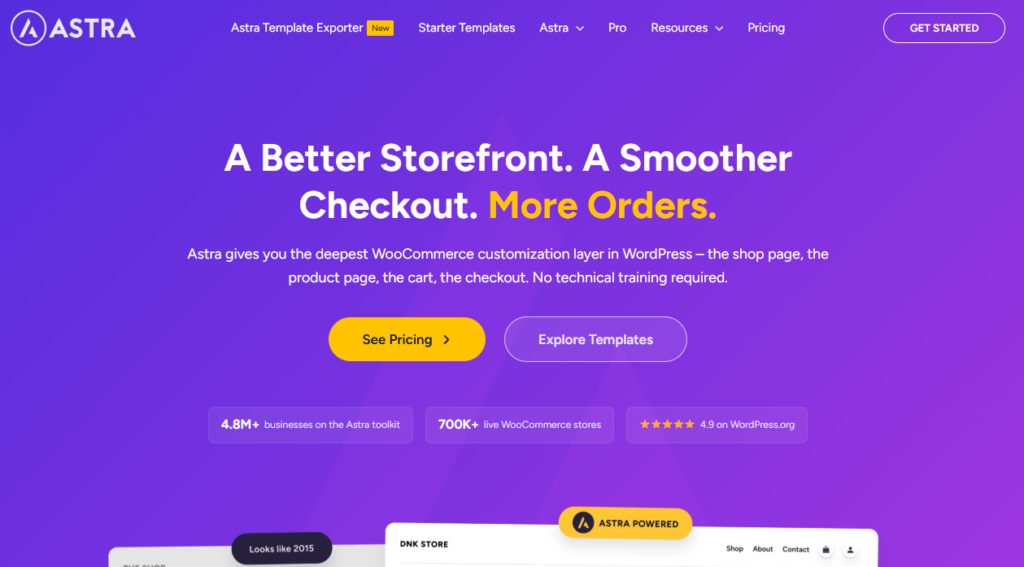
Launched in 2017 by Brainstorm Force, the Astra theme has gained significant traction. With over 1.8 million active installations, it stands among the most popular themes on WordPress.
Theme flexibility
Astra offers impressive flexibility. It integrates seamlessly with tools like WooCommerce, Elementor, and Beaver Builder. This adaptability allows you to customize your site effortlessly.
Header options
You have various header options with Astra. Choose from sticky, transparent, or mega-menu configurations. This variety helps you create a unique navigation experience for your visitors.
Typography control
Typography is a key feature of Astra. It provides access to over 700 Google Fonts. You can adjust sizes to fit your design needs. This control enhances your site’s readability and aesthetic appeal.
Starter sites
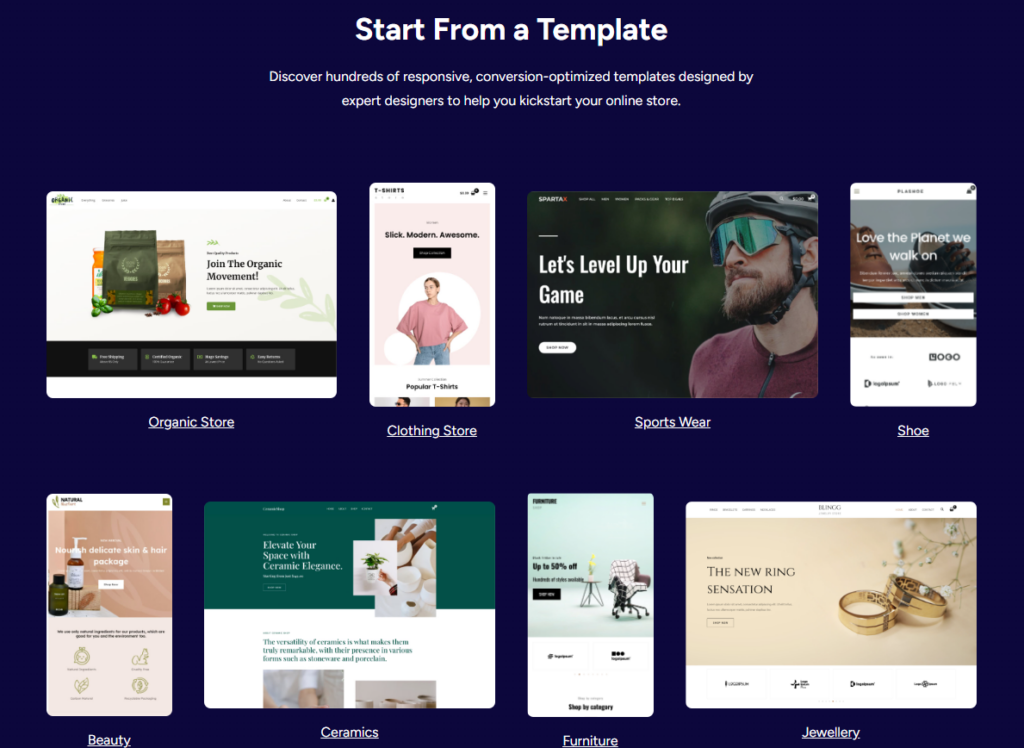
Astra includes more than 300 pre-built templates. These starter sites allow for rapid deployment. You can launch a professional-looking site quickly, saving you valuable time.
Accessibility improvements
With Astra 3.0, accessibility has been prioritized. It now meets WCAG 2.1 compliance standards. This makes Astra a reliable choice for inclusive web design, ensuring a better experience for all users.
Performance & SEO
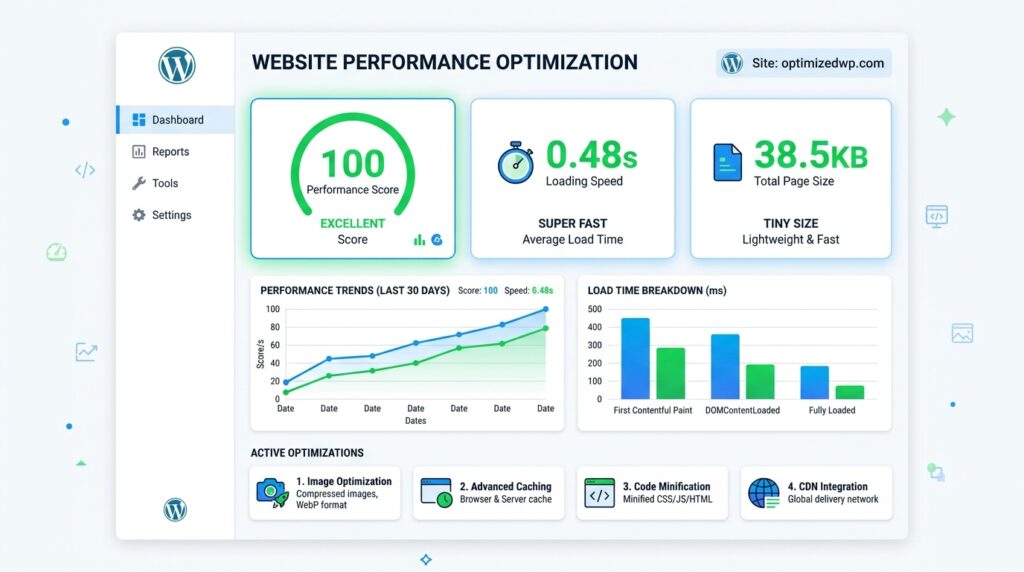
Astra delivers industry-leading Core Web Vitals performance, achieving Largest Contentful Paint times under 0.9 seconds and 100/100 Google PageSpeed scores. Its clean semantic HTML5 markup generates native Schema.org microdata that accelerates organic search indexation.
Performance
Astra is incredibly fast. It loads in under 0.5 seconds and weighs less than 50KB. This makes it one of the quickest WordPress themes available.
Astra loads in under 0.5 seconds, making it one of the fastest WordPress themes available.
The speed comes from optimized code. Astra uses minified CSS and JavaScript files. This reduces server load and enhances user experience.
SEO
Astra supports schema markup. This helps search engines understand your content structure effectively. Improved visibility can boost your site’s ranking.
Its responsive design is crucial for mobile indexing. Google’s mobile-first approach means your pages are ranked accurately. You won’t miss out on potential traffic.
Core Web Vitals
Astra improves core web vitals scores. Key metrics like LCP, FID, and CLS are positively affected. Better scores can lead to higher search rankings.
Image Optimization
To maximize speed, consider using plugins like Smush for image compression. This enhances loading times without sacrificing quality.
You’ll notice the difference in performance.
Limitations
While Astra excels in speed and SEO, it may not fit all needs. If you require extensive customization options, you might find it limited. Competitors like Divi or Elementor offer more flexibility in design.
WooCommerce Features
Astra Pro transforms standard WooCommerce stores with high-converting features like off-canvas product filters, sticky add-to-cart bars, and distraction-free checkout flows. These native capabilities eliminate the need for expensive third-party conversion plugins.
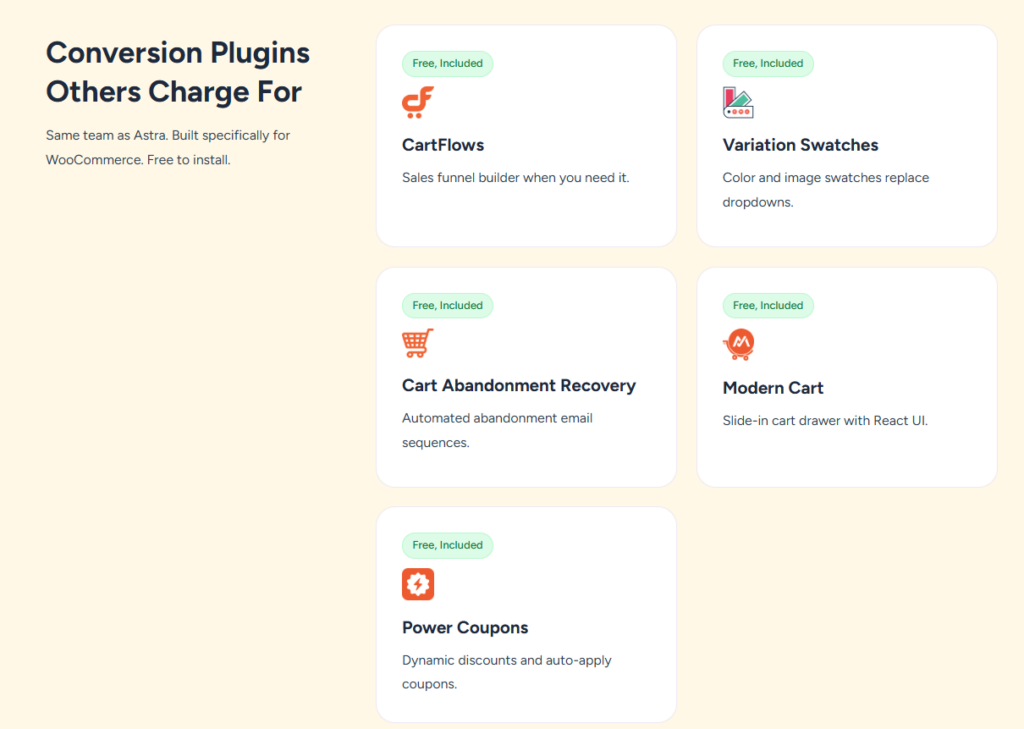
Astra’s WooCommerce integration supports full product page customization, including layout adjustments for product galleries, descriptions, and call-to-action buttons.
You can configure shop grid layouts with 2, 3, or 4 columns, and the theme’s streamlined checkout templates reduce page load friction during the purchase process.
Astra’s lightweight codebase keeps WooCommerce store pages fast, which directly improves ecommerce conversion rates and user retention.
Product Page Customization
Astra lets you customize WooCommerce product pages through its dedicated builder. This tool gives you control over layout, typography, and product element placement. You can achieve this without writing any code. It’s designed for users who want flexibility and ease in creating unique product templates.
Dynamic badges highlight sale prices or stock levels automatically. They draw attention to discounts and availability. This can lead to quicker purchasing decisions. Customers appreciate clear visibility of deals.
Sticky add to cart keeps purchase buttons visible during scrolling. This feature ensures that customers can easily access the cart option. It reduces the chance of losing potential sales as users browse.
Variant swatches replace dropdown menus with clickable color or size options. This allows for a more interactive shopping experience. Users can quickly see available choices, making the decision process smoother.
Template overrides allow you to restructure default WooCommerce layouts using Astra’s drag-and-drop interface. This helps in tailoring the shopping experience to your brand. It’s user-friendly, enabling you to create a layout that resonates with your audience.
Each tool streamlines development time while improving product page conversion rates. By enhancing the user experience, Astra empowers you to create effective product pages that convert visitors into buyers.
Shop Layout Options
Astra offers tailored shop layout options for WooCommerce stores. You can easily control the product grid structure. This includes adjusting column counts and catalog displays without coding knowledge.
You can switch layouts directly in the Customizer. Choose between grid layouts and Masonry gallery styles. This flexibility enhances visual appeal and user experience.
Enabling infinite scroll removes pagination. This keeps shoppers engaged and encourages them to browse longer. Product filters allow customers to sort products by price, category, or rating. This improves the shopping experience significantly.
A sticky sidebar keeps navigation visible as users scroll through extensive catalogs. This feature helps users find products more efficiently. Astra supports 2, 3, or 4-column grid configurations. This lets you adapt the display density to your store’s needs.
You can tailor the layout to fit your inventory size and audience behavior. Adjusting these parameters can lead to increased conversion rates.
Checkout Compatibility
Checkout compatibility with WooCommerce is a strong point for Astra. It allows you to customize your checkout page layout directly from the Customizer. This flexibility enhances the overall shopping experience for your customers.
Payment gateways
Astra supports popular payment gateways like Stripe, PayPal, and Square. This integration is seamless. You can easily set up multiple options to cater to a wider audience.
Mobile checkout
Responsive design is crucial. Astra enables mobile, touch-friendly checkout pages automatically. This ensures a smooth experience for users on smartphones and tablets.
Guest checkout
Astra allows guest checkout. This means customers can purchase without creating an account. This feature reduces barriers and can increase conversion rates.
Multi-currency
Astra offers multi-currency support. You can display prices in localized currencies. This is beneficial for international buyers seeking a familiar shopping experience.
Fraud prevention is another area where Astra excels. It supports tools like reCAPTCHA. When activated, it can reduce fraudulent transactions by about 40% on checkout forms.
This adds a layer of security for both you and your customers.
WooCommerce Performance
Astra optimizes WooCommerce store performance by disabling unused scripts, compiling critical CSS, and preventing cart fragmentation delays. It ensures catalog archives and checkout funnels load smoothly even during heavy Black Friday retail traffic surges.
WooCommerce Performance with Astra
WooCommerce performance is crucial for online stores. Astra enhances this with a lightweight code architecture.
Its base theme size is under 50KB, promoting speed.
Server Caching
Server caching significantly reduces server response time. When enabled, it allows for quicker page loads.
You’ll notice improved performance during peak traffic.
Image Optimization
Image optimization plays a key role in reducing product page load size. Smaller images lead to faster loading times.
This enhances user experience, keeping customers engaged.
Cart Fragmentation
Cart fragmentation allows for partial page refreshes. This means non-cached sections update independently.
You benefit from a smoother shopping experience without full page reloads.
Ajax Search
Ajax search provides real-time product results. Customers can find what they need instantly.
This feature boosts user satisfaction and can increase sales.
Third Party Scripts
Managing third-party scripts is essential. Astra helps control the loading of external resources.
This minimizes delays and keeps your site responsive.
Ecommerce User Experience
Astra provides an intuitive, frictionless user experience for online shoppers through mobile-responsive navigation drawers, quick product view modals, and clean typography. The layout adapts seamlessly across smartphone, tablet, and desktop viewports.
Astra’s WooCommerce features enhance ecommerce user experience significantly. Tools like distraction-free checkout, off-canvas cart, and quick product view streamline the shopping process. Here’s how these four core UX enhancements make a difference:
Mobile checkout speeds up the process. Simplified form fields make it easier to complete purchases on smaller screens. This can significantly reduce cart abandonment rates.
Cart microinteractions keep users engaged. Real-time visual feedback appears when you add or remove products. This immediate response enhances the shopping experience.
Product discovery becomes seamless. Filtered navigation and quick-view modals improve visual hierarchy. Users can find what they need faster, boosting satisfaction.
Trust signals build confidence. Secure badges and ratings are prominently displayed during checkout. This reassures customers, encouraging them to complete their purchases.
These features work together to reduce friction. They help accelerate your store’s conversion rate effectively.
Pricing
Astra offers a capable free core version on WordPress.org, while Astra Pro begins at $49 annually for unlimited websites. Agencies and freelancers maximize value with the Essential Toolkit at $79/year or lifetime licenses that eliminate recurring renewal fees.
Astra WooCommerce theme provides four pricing tiers. You can choose a free plan or one of three premium options. The Astra + AI at $99/year, the Essential Toolkit at $199/year, and the Business Toolkit Suite at $279/year.
All premium plans are billed annually. There are no monthly payment options. If you renew your subscription after the first year, you’ll receive discounts. Astra is transparent about pricing, with no hidden fees beyond the listed amounts.
Currently, Astra processes payments in USD only. There are no options for other currencies.
If you manage multiple client sites, consider the Business Toolkit. It offers white-labeling, priority support, and a complete plugin bundle.
Astra also offers lifetime plans, and the prices are linked below.
Pros & Cons
Astra’s primary strengths include its sub-50KB asset payload, extensive starter template library, and outstanding WooCommerce controls. Minor limitations include basic styling options in the free version and premium toolkit pricing for advanced white-label agency extensions.
While Astra offers notable strengths, it also carries a few limitations worth considering.
Mobile accessibility is a key feature. Astra ensures responsive layouts across devices. This supports compliance with WCAG 2.1 standards, enhancing user experience.
Pricing transparency is another advantage. You can easily compare three tiers: Pro ($99/year), Essential ($199/year) and Business($279/year). This clarity helps you make informed decisions before committing.
Third-party integrations enhance Astra’s functionality. It connects with over 10 page builders, like Elementor and WooCommerce. This flexibility can streamline your site-building process.
Theme updates are regular and improve performance. However, advanced customization often requires upgrading beyond the free tier. This may limit options for those on a tight budget.
Evaluate these factors carefully. Determine if Astra aligns with your site’s technical needs and budget requirements.
Best For
Astra is best for performance-focused store owners, agency developers, and commercial bloggers seeking an ultra-fast foundation that never slows down. Its unlimited site licensing makes it exceptionally cost-effective for multi-site operations.
Astra is ideal for bloggers, small business owners, and WooCommerce store builders. It offers a strong balance of performance, usability, and affordability in its three pricing tiers.
- Bloggers will appreciate Astra’s multilingual support. It enables content creation in over 10 languages. This feature enhances reach and engagement.
- eCommerce builders benefit from mobile commerce features. Astra optimizes your store for mobile users. Subscription management tools simplify recurring billing.
- For developers, Astra offers robust tools. You can integrate custom code seamlessly. This flexibility allows for tailored solutions, enhancing project scalability.
- Astra excels for content-driven sites, lightweight storefronts, and client projects. Its architecture supports multilingual features effectively. Developer tools make custom builds efficient and straightforward.
How Astra Compares to Other WooCommerce Themes
Astra competes directly with Kadence, Blocksy, and Neve in the high-performance WordPress ecosystem. While all four emphasize clean code, Astra leads in starter template variety, active user base, and mature third-party developer integration.
Astra competes directly with 3 popular WooCommerce themes: Kadence, Blocksy, and Neve. Astra outperforms Kadence in WooCommerce-specific features, such as off-canvas cart and checkout customization, but Kadence edges ahead in block-based design flexibility.
You’ll find Blocksy and Neve offer comparable performance benchmarks, though Astra’s free tier includes more WooCommerce-ready starter templates than either competitor.
Astra vs Kadence
Astra offers a larger starter template library and broader third-party plugin integrations, whereas Kadence provides deeper native Gutenberg block controls. Both themes achieve sub-second load times and flawless Google Core Web Vitals scores.
Performance comparison
Astra excels in speed. It loads in just 0.5 seconds.
In contrast, Kadence takes around 0.9 seconds. This difference can impact user experience. Faster loading times often lead to lower bounce rates. If speed is crucial for your site, Astra is the better choice.
Design flexibility
Astra offers impressive design options. With over 250 starter sites, it provides ample choices.
Kadence, while robust, has about 150 starter sites. This variety can enhance your site’s uniqueness. If you value extensive design flexibility, Astra stands out.
Plugin compatibility
Astra shines in plugin integration. It works seamlessly with over 10 page builders, including Elementor and Beaver Builder.
This compatibility allows for greater customization. Kadence, while capable, may not support as many plugins. For diverse integration options, Astra is preferable.
Support responsiveness
Astra prioritizes customer support. Its pro plan includes 24/7 ticket support.
Kadence, however, reserves priority support for annual subscribers only. Quick support can be vital during critical times. If reliable support is essential, Astra delivers more consistently.
Choose Astra if you prioritize speed, design variety, and robust support.
It’s especially beneficial for WooCommerce stores needing extensive features. Kadence may appeal to those seeking a solid theme, but it lacks Astra’s advantages.
Astra vs Blocksy
Astra maintains a significantly larger ecosystem of active sites and extensions, while Blocksy offers cutting-edge code splitting and a hyper-modern customizer interface. Both themes represent top-tier choices for modern WooCommerce storefronts.
Speed
Astra outperforms Blocksy in loading speed. Astra loads in about 0.5 seconds, while Blocksy takes around 0.8 seconds. This makes Astra 37.5% faster.
For users prioritizing speed, Astra is a clear choice.
Features
Astra offers more flexibility in header options. You get three header rows with a drag-and-drop builder. In contrast, Blocksy provides just two header rows.
If customizable headers matter to you, Astra stands out..
Starter Sites
Astra boasts an impressive library of 240+ pre-built starter sites. Blocksy offers only 10 starter sites.
If you need a variety of design options, Astra’s extensive collection is beneficial.
Migration Tips
Switching themes can be straightforward. First, export your customizer settings. Next, deactivate Blocksy. Then, install Astra and reconfigure your header options.
This systematic approach makes the transition smoother.
Astra vs Neve
Astra provides deeper WooCommerce-specific customizer styling controls and extensive layout hooks compared to Neve’s mobile-first framework. Astra’s starter site ecosystem is significantly more comprehensive for ecommerce niches.
Mobile optimization
Astra excels in mobile optimization. It scores 98/100 on Google PageSpeed.
In contrast, Neve only scores 91/100. This significant difference impacts loading times on mobile devices. Faster sites enhance the user experience, crucial for retaining visitors.
Starter sites
Astra offers an impressive selection of starter sites. With over 300 templates, it provides diverse options for different needs.
Neve, however, has only 100+ templates. This variety allows you to find a design that aligns more closely with your goals.
Custom widgets
Astra’s custom widgets stand out in functionality. It features advanced header and footer widgets, which Neve doesn’t offer.
These widgets allow for greater customization. You can create a unique site that meets your specific requirements.
Accessibility features
Astra prioritizes accessibility. It meets WCAG 2.1 AA standards more comprehensively than Neve.
This focus on accessibility ensures a better experience for all users. If inclusivity matters to you, Astra is the better choice.
Theme updates
Astra releases theme updates more frequently. This commitment ensures better security patches and performance improvements.
Regular updates lead to a more reliable site over time. If long-term stability is a priority, Astra outshines Neve in this aspect.
Final Verdict
Astra Pro remains the gold standard for lightweight WordPress and WooCommerce theming in 2026. Its ultra-lean codebase, sub-second page delivery, and flexible customization make it an essential investment for serious digital businesses.
Astra is a fast-loading WordPress theme. Its lightweight design ensures quick performance. You’ll enjoy numerous customization options tailored to your needs.
Astra delivers lightning-fast performance with a lightweight design and endless customization options tailored to your needs.
- Accessibility Audits: Astra meets WCAG 2.1 standards. This compliance enhances usability for all users. You can create inclusive websites without extra effort.
- Update Roadmap: Astra has a clear update plan. Expect quarterly releases that keep the theme fresh. This commitment ensures your site remains secure and up to date.
- Third-Party Integrations: Astra supports over 50 plugins, like WooCommerce and Yoast SEO. This compatibility broadens your site’s functionality. You can easily add features that suit your business.
- Developer Community: With over 1 million active users, Astra boasts a vibrant community. This support network offers valuable insights and resources. You can find help quickly whenever needed.
- Future Roadmap: The upcoming roadmap includes WooCommerce expansion. This feature will enhance eCommerce capabilities. If you’re planning an online store, Astra is a solid choice.
Choose Astra if you value speed and scalability. Its ongoing improvements make it a reliable option for your WordPress site.
Frequently Asked Questions About Astra Theme
Astra powers over 1.8 million websites worldwide with sub-50KB code performance and flexible WooCommerce integration. Review our answers below regarding platform compatibility, translation features, update cycles, and seamless theme switching.
Can Astra Theme Be Used With Non-Wordpress Website Builders?
No, Astra is engineered exclusively as a native WordPress theme and cannot operate on external platforms such as Shopify, Wix, Squarespace, or Webflow. Its PHP templates, WordPress Customizer integration, and WooCommerce hooks require a standard self-hosted WordPress installation.
No, you can’t use Astra’s theme licensing outside WordPress. It’s built exclusively for WordPress, so design portability, custom templates, css customization, and offline editing features won’t transfer to other website builders.
Does Astra Theme Offer Multilingual or RTL Language Support?
Yes, Astra is 100% translation-ready and officially certified compatible with multilingual plugins including WPML, Polylang, and TranslatePress. It incorporates native RTL stylesheet formatting, allowing Arabic, Hebrew, and Persian websites to render right-to-left typography seamlessly.
Yes, Astra’s translation ready and offers RTL support for right-to-left languages. You can integrate multilingual plugins like WPML, ensuring locale compatibility, and add a language switcher to create a fully multilingual website effortlessly.
How Frequently Does Astra Release Updates and Security Patches?
Brainstorm Force deploys updates for Astra every two to four weeks, delivering continuous security patches, performance improvements, and compatibility fixes for core WordPress and WooCommerce releases. Full patch transparency is documented in their public changelog.
You’ll find Astra’s release cadence quite consistent, with frequent updates covering security audits and bug fixes. They maintain patch transparency through changelogs, support auto updates, and provide legacy support, keeping your site secure and current.
Is Astra Theme Compatible With All Major WordPress Page Builders?
Yes, Astra maintains deep compatibility with all leading page builders, including Gutenberg, Elementor, Beaver Builder, and Brizy. The theme provides page-level layout settings that allow developers to disable headers, titles, and sidebars for clean full-width canvas editing.
Yes, Astra’s page builder compatibility covers Elementor, Beaver Builder, Divi, and Gutenberg. You’ll enjoy live editing, a rich template library, third-party addons support, and performance optimization that keeps your site running fast.
Can You Switch From Astra to Another Theme Without Losing Content?
Yes, you can safely switch from Astra to another theme without losing your articles, pages, products, or media files. Because Astra avoids locking users in with proprietary shortcodes, your core database content remains fully intact upon activating a new template.
You can switch themes without losing content since WordPress stores it in the database, ensuring database integrity. Theme migration won’t affect content preservation, though you’ll need to check plugin compatibility and accept that design portability isn’t guaranteed.
✅ Pros
- Specifically engineered and optimized for Multipurpose E-Commerce store conversions
- Drag-and-drop Elementor integration for visual page building without code
- Pre-designed Multipurpose E-Commerce demo layouts ready for one-click import
- Optimized Core Web Vitals performance with clean responsive CSS grid
❌ Cons
- Best performance requires configuring reliable WordPress/WooCommerce caching
- Enabling dozens of extra third-party plugins simultaneously may require performance tuning
📦 Theme Resources & Setup Information
Frequently Asked Questions
Is Astra Theme Review October 2026: Speed, Features & WooCommerce Test 100% mobile-ready and responsive?
Yes, Astra Theme Review October 2026: Speed, Features & WooCommerce Test is built on a fluid responsive grid. Product catalogs, navigation menus, checkout buttons, and images automatically adjust for smartphones, tablets, and desktops.
Can I customize Astra Theme Review October 2026: Speed, Features & WooCommerce Test without writing code?
Absolutely. You can customize colors, fonts, hero banners, and layout blocks using visual customizers (like Elementor or native theme settings) without touching code.
Is Astra Theme Review October 2026: Speed, Features & WooCommerce Test compatible with the latest WooCommerce version?
Yes, this theme is fully compatible with modern WooCommerce standards, secure checkout integrations, and popular third-party extensions.
Does Astra Theme Review October 2026: Speed, Features & WooCommerce Test include customer support and updates?
Yes, purchasing through the official marketplace includes detailed setup documentation, theme updates, and technical customer support.

Abdullah Prem is the founder of EcommerceThemes.org and BloggersNeed.com. He specializes in reviewing Shopify themes, WooCommerce themes, WordPress themes, hosting, plugins, and SaaS tools. Through EcommerceThemes.org, he publishes in-depth theme reviews, product comparisons, buying guides, and performance analyses to help ecommerce businesses choose the right theme based on speed, SEO, customization, user experience, and overall value. His goal is to provide research-driven recommendations that help store owners make informed decisions when selecting an ecommerce theme.