| Developer / Brand | Archetype Themes |
| Sold On | Shopify Theme Store |
| Page Builder | Shopify Online Store 2.0 theme editor |
| Rating | ⭐ 4.5/5 (our review score) |
| Mobile Responsive | ✅ 100% Mobile & Tablet Ready |
🛠️ Theme Specifications
Impulse is a premium Shopify theme by Archetype Themes, and this Impulse theme review covers its price, presets, features and live demo. The Impulse theme price is $500 one-time.
It is built for fashion, beauty and lifestyle stores that run frequent sales and need promo tools without extra apps.
Impulse Shopify Theme Specs at a Glance
The Impulse Shopify theme ships 4 presets, a full promo toolkit, a mega menu, enhanced search, collection filters, color swatches, quick view and a slide-out cart. It costs $500 one-time, runs on Online Store 2.0 sections and suits catalogs of 50 to several thousand products.
| Spec | Impulse |
|---|---|
| Price | $500 one-time, updates included |
| Developer | Archetype Themes |
| Presets | 4 (Impulse, Dune, Terrain, Apothecary) |
| Best catalog size | Medium to large |
| Promo tools | Promo tiles, popups, countdown timer, stock counter, badges |
| Navigation | Mega menu, sticky header, breadcrumbs |
| Product page | Swatches, size chart, quick view, before/after slider |
| Docs | Archetype Themes Impulse documentation |
| Latest version | 10.0.0, October 9, 2026 |
| Demo | Impulse demo and listing |
Impulse Theme Review: Features, Pros and Cons
In our Impulse review, the theme stands out for promotion and merchandising. Its promo tiles, popups, timers and stock counters cover what most stores pay apps for, while the mega menu and filters speed up discovery. The trade-off is clutter with every promo feature on.
Promotion and Urgency Tools
Impulse bundles promo tiles, announcement bars, popups, countdown timers, product badges and stock counters. These tools create urgency during sales without installing third-party apps, which keeps your store lighter and saves monthly app fees that often run $10 to $30 each.
In the demo, the promo bar and countdown sit above the fold on the homepage. Each tool turns on per section, so you control exactly where urgency appears.
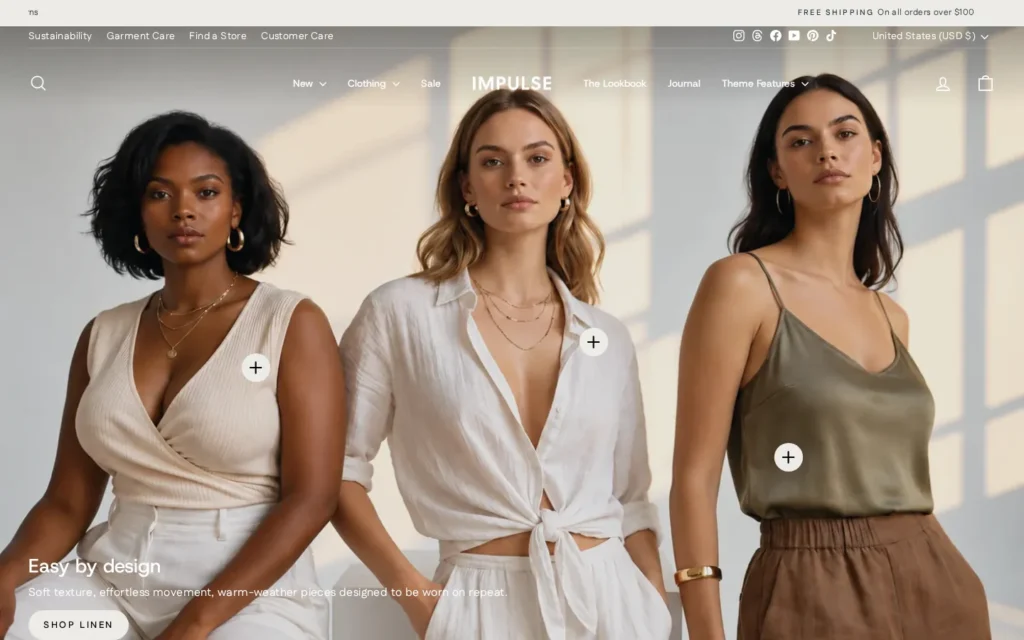
The homepage below shows how the promo tiles and centered mega menu work together on the Impulse preset.
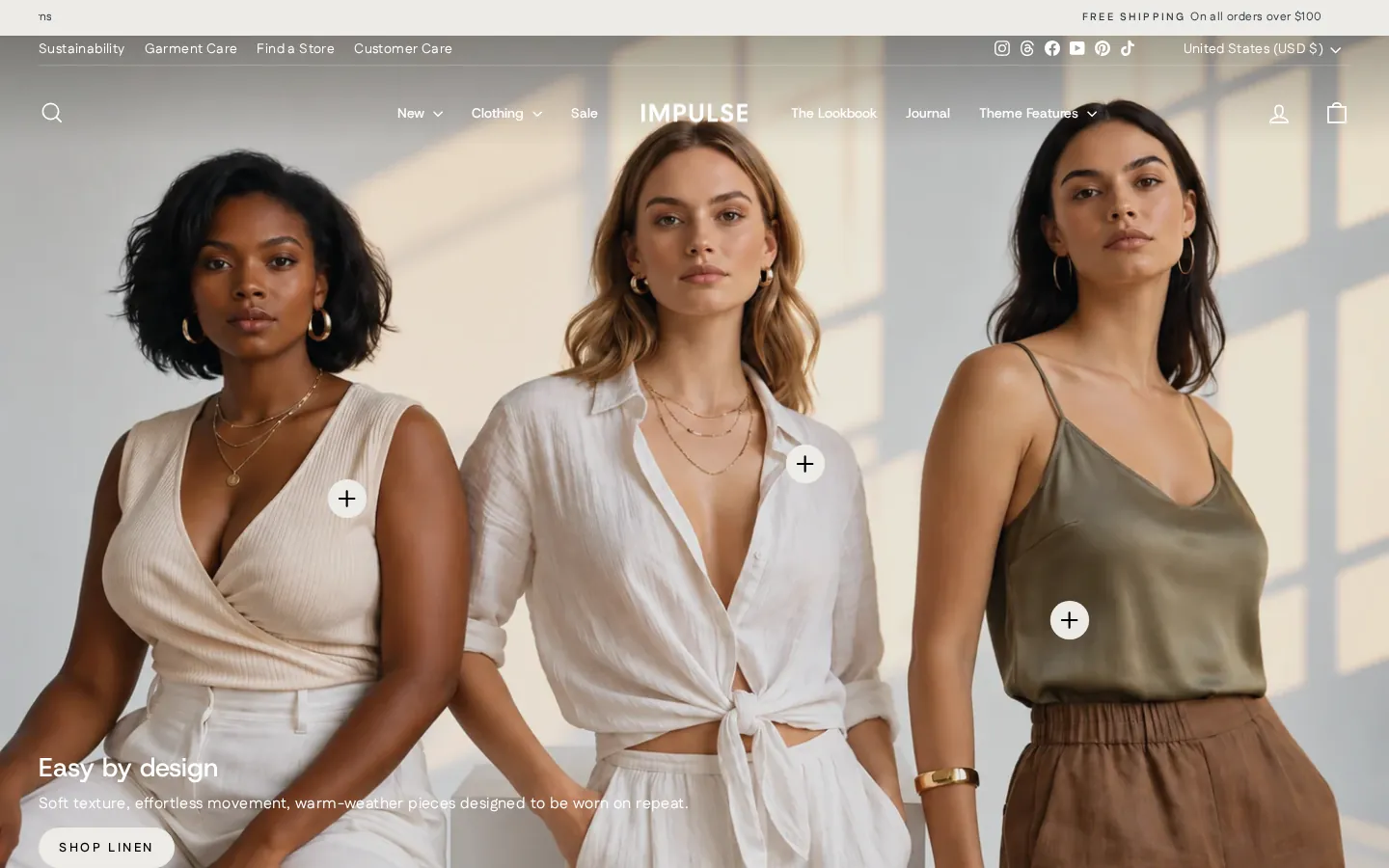
Impulse helps shoppers find products with a mega menu, enhanced predictive search, collection filtering and sorting, breadcrumbs and a sticky header. These tools matter most for stores with more than 100 products, where shoppers browse by category, size or color before buying.
Impulse Product Page Design
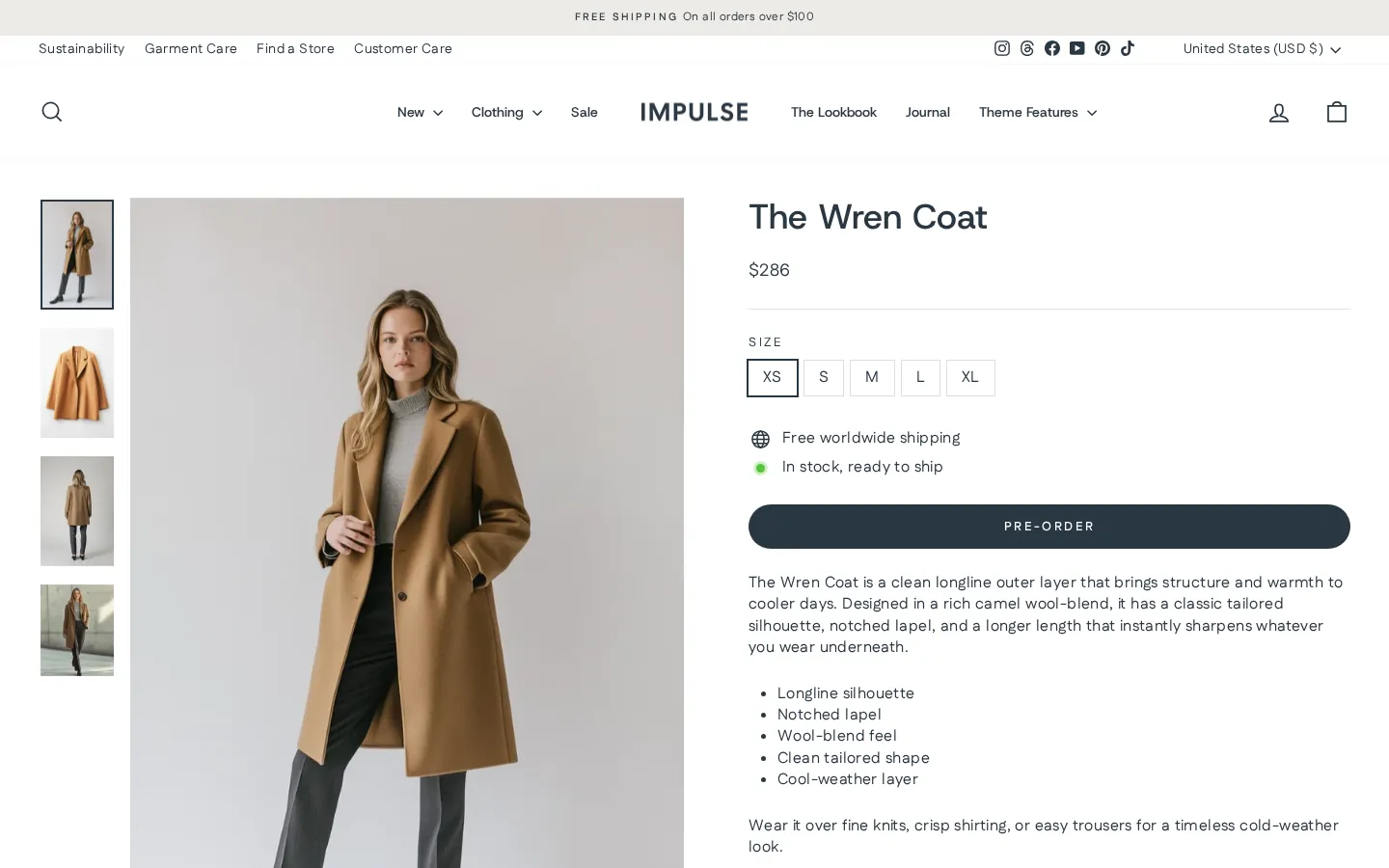
The Impulse product page supports color swatches, size charts, quick view, image zoom and a before/after slider. Fashion stores get sizing clarity, and beauty brands can show results visually, which reduces returns and answers buyer questions right on the page.
Here is a real Impulse product page from the demo store, with swatches and the buy box visible.
Impulse Mobile Experience and Live Demo
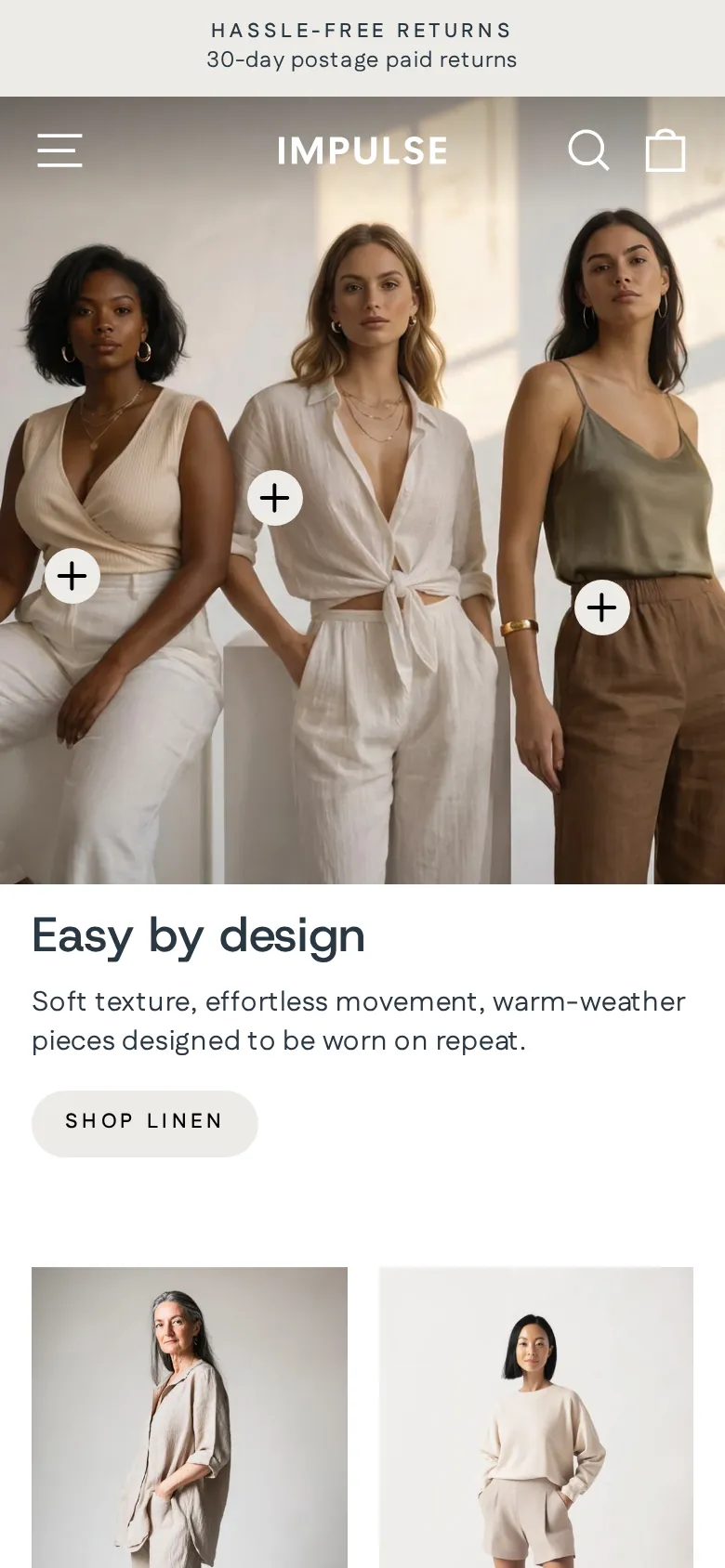
Impulse loads a slide-out cart, collapsible menu and sticky add-to-cart flow on mobile. Most Shopify fashion traffic arrives on phones, so these mobile patterns directly affect conversion. In our live demo test, the menu and cart opened smoothly without layout shifts.
The mobile capture shows the drawer menu and compact header on a phone-sized screen.
Impulse Theme Price: Is $500 Worth It?
The Impulse theme price is $500 one-time, which works out to about $41.67 per month over 12 months or $20.83 per month over 24 months. If it replaces two promo apps at $15 each, it pays for itself in about 17 months.
| Option | Upfront cost | Cost over 24 months |
|---|---|---|
| Impulse | $500 | $500 |
| Dawn (free) + 2 promo apps at $15/mo | $0 | $720 |
| Prestige | $400 | $400 |
| Symmetry or Broadcast | $420 | $420 |
Theme updates from the Shopify Theme Store are free. You pay once per store, not per year.
Who Should Use the Impulse Theme?
Impulse fits growing fashion, beauty and lifestyle brands that run frequent sales and carry medium to large catalogs. Brand-new stores with under 20 products, or luxury brands that avoid discount messaging, will usually get better value from a free theme or Prestige.
Impulse for Beginners
Beginners can use Impulse, but the feature depth means more settings to learn. If you have fewer than 20 products and no sales yet, start on free Dawn. Upgrade to Impulse once you run regular promotions and need urgency tools.
Impulse for Growing Stores
Growing stores get the most value from Impulse. Once you run weekly sales, need filters for 100+ products and pay for several promo apps, Impulse consolidates those tools into one theme and gives you a consistent, branded look across every campaign.
Growing fashion stores that want upsells with less discount messaging can compare our Palo Alto theme review. Palo Alto costs $420, holds a 94% positive rating from 313 reviews and offers shop the look and quick buy.
Impulse for High-SKU Brands
High-SKU brands benefit from the mega menu, predictive search and collection filters. These features let shoppers narrow thousands of products by size, color or type quickly, which keeps them browsing instead of bouncing away from long, unsorted collection pages on desktop or mobile.
Brands with very large catalogs should also read our Enterprise Shopify theme guide. Enterprise costs $420, about $80 less than Impulse, and Clean Canvas built it handmade without external libraries, so it suits big catalogs that put store speed first.
How to Try the Impulse Demo and Install It
You can try the Impulse theme free before paying. Add it to your Shopify theme library, preview it with your own products, then buy only when you publish. The process takes under 10 minutes, and customization depends on how many sections you set up.
- Open the Impulse theme listing on the Shopify Theme Store.
- Pick a preset: Impulse, Dune, Terrain or Apothecary.
- Click Try theme to add it to your library.
- Click Customize and load your own products and menus.
- Test filters and mobile layout with your real catalog.
- Click Publish and pay $500 once you are happy.
Common Mistakes With Impulse
The most common Impulse mistakes are buying before testing with your own catalog, switching on every promo tool at once, and skipping mobile checks. Each one hurts conversions, and all three are easy to avoid during the free preview before you publish.
- Buying before testing: preview with your real product count first.
- Too many promos: use one or two urgency tools per campaign.
- Ignoring mobile: check the cart drawer and menu on a real phone.
- Huge hero images: compress banners to keep pages loading fast.
Impulse vs Prestige, Symmetry and Broadcast
The closest Impulse alternatives are Prestige, Symmetry and Broadcast. Prestige costs $400 and suits luxury brands, Symmetry costs $420 and suits large catalogs, and Broadcast costs $420 and suits content-led stores. Impulse remains the best Shopify theme for promotion-heavy shops.
| Theme | Price | Developer | Rating | Best for |
|---|---|---|---|---|
| Impulse | $500 | Archetype Themes | 94% (1,304) | Sale-driven fashion and beauty |
| Prestige | $400 | Maestrooo | 91% (874) | Luxury brands |
| Symmetry | $420 | Clean Canvas | 94% (392) | Large catalogs |
| Broadcast | $420 | Presidio | 94% (285) | Storytelling brands |
Impulse vs Prestige
Prestige by Maestrooo costs $400 and holds a 91% positive rating from 874 reviews. It suits luxury and premium brands that want an editorial, quiet look with large imagery. Choose Prestige over Impulse if discount banners and countdown timers clash with your brand.
See the Prestige theme on Shopify to compare its presets.
Our full Prestige Shopify theme review covers its five presets and luxury merchandising tools, a useful read if your brand avoids discount messaging and wants editorial product pages instead of the promo-heavy layout Impulse uses.
Impulse vs Symmetry
Symmetry by Clean Canvas costs $420 and has a 94% positive rating from 392 reviews. It focuses on clean navigation and large catalog browsing. Choose Symmetry if you need strong filtering but run fewer promotions than a typical Impulse store does.
Preview the Symmetry Shopify theme with your own products.
For a deeper look at catalog navigation, read our Symmetry theme analysis, which explains its filtering and menus for stores that carry hundreds of products but run only occasional promotions compared with a typical Impulse store.
Impulse vs Broadcast
Broadcast costs $420 and holds a 94% positive rating from 285 reviews. It leans into storytelling, with sections for brand content and lookbooks. Choose Broadcast if your store sells through narrative and editorial content more than through sales and urgency.
Check the Broadcast theme demo for its storytelling sections.
Our Broadcast Shopify theme breakdown walks through its brand content sections and lookbooks, helpful for content-led brands deciding whether editorial pages or the urgency tools in Impulse will drive more of their sales.
Final Verdict: Impulse Theme Review
Impulse earns 4.5 out of 5 from us. It is the best Shopify theme for many sale-driven fashion and beauty stores, with promo tools that replace several apps. Try it free with your products first, and choose it if you run regular promotions.
Facts verified against the Shopify Theme Store listing on November 4, 2026.
✅ Pros
- Promo tools replace several paid apps
- Strong filters and mega menu for large catalogs
- 4 presets with one shared feature set
- Active developer with regular updates
- 94% positive merchant rating on Shopify
❌ Cons
- $500 is high for a brand-new store
- Promo features can clutter a store if overused
- Feature depth means a longer setup time
📦 Theme Resources & Setup Information
Frequently Asked Questions
What is the Impulse theme price on Shopify?
Impulse costs $500 as a one-time payment on the Shopify Theme Store. You can install it on one store, preview it free with your own products, and you only pay when you publish it as your live theme.
Who makes the Impulse theme?
Archetype Themes develops Impulse. The same studio builds Motion, Streamline and Expanse, and it ships regular updates. Version 10.0.0 was released on October 9, 2026.
What presets does the Impulse Shopify theme include?
Impulse includes 4 presets: Impulse, Dune, Terrain and Apothecary. Each preset is a starting design with the same feature set, so you pick the look closest to your brand and edit from there.
Is Impulse the best Shopify theme for large catalogs?
Yes. Impulse handles large catalogs well thanks to its mega menu, enhanced search, collection filters and sorting. Stores with hundreds of products get the most value from those discovery tools.
Can I try the Impulse live demo before buying?
Yes. Shopify lets you add Impulse to your theme library and preview it with your own products, menus and colors for free. You are only charged when you publish the theme.
Impulse vs Prestige: which Shopify theme is better?
Impulse is better for promotion-heavy stores that run frequent sales. Prestige suits luxury brands that want a quieter, editorial look and costs $100 less at $400.
What is the latest version of the Impulse theme?
The latest Impulse theme version is 10.0.0, released by Archetype Themes on October 9, 2026. Theme updates from the Shopify Theme Store are free once you buy Impulse.
Where is the Impulse theme documentation?
Archetype Themes hosts the Impulse documentation in its help center. It covers sections, templates, the mega menu, theme settings and developer JavaScript events.

Abdullah Prem is the founder of EcommerceThemes.org and BloggersNeed.com. He specializes in reviewing Shopify themes, WooCommerce themes, WordPress themes, hosting, plugins, and SaaS tools. Through EcommerceThemes.org, he publishes in-depth theme reviews, product comparisons, buying guides, and performance analyses to help ecommerce businesses choose the right theme based on speed, SEO, customization, user experience, and overall value. His goal is to provide research-driven recommendations that help store owners make informed decisions when selecting an ecommerce theme.