
Porto and WoodMart are premium WooCommerce themes built for ecommerce, but they take different approaches to performance and store management. While both rank among the best WooCommerce themes, they target different priorities.
Porto emphasizes speed, SEO, and scalability, achieving 90+ PageSpeed scores with average load times around 1.2 seconds.
WoodMart focuses on design flexibility and shopping experience, delivering 90+ PageSpeed performance, 100+ pre-built store layouts, variation swatches, and a built-in fly cart.
Both themes cost $59 on ThemeForest with 6 months of support, making the decision depend on whether you value raw performance or advanced storefront customization.
Porto Theme vs WoodMart: Quick Comparison
Porto Theme and WoodMart represent the two premier high-volume retail themes on ThemeForest, each powering thousands of successful WooCommerce stores. Porto leads in raw speed optimization and multi-builder versatility, while WoodMart delivers unmatched built-in AJAX filtering, visual variation swatches, and polished modern styling.
| Feature | Porto Theme | WoodMart |
|---|---|---|
| Platform | WooCommerce | WooCommerce |
| Best For | Large ecommerce stores | Modern online stores & marketplaces |
| SEO Features | ⭐⭐⭐⭐☆ | ⭐⭐⭐⭐☆ |
| Core Web Vitals | Very Good | Very Good |
| Page Speed | Fast | Fast |
| Mobile Performance | Excellent | Excellent |
| WooCommerce Features | Extensive | Extensive |
| Shop Builder | Yes | Yes |
| AJAX Features | Yes | Yes |
| Mega Menu | Yes | Yes |
| Header Builder | Yes | Yes |
| Demo Websites | 105+ | 100+ |
| Pricing | Premium | Premium |
| Overall Rating | ⭐⭐⭐⭐☆ | ⭐⭐⭐⭐☆ |
| Read Full Review | → Porto Theme Review | → WoodMart Theme Review |
Porto Theme vs WoodMart: Which Theme Performs Better?
Performance audits reveal that both themes comfortably pass Core Web Vitals assessments when paired with high-performance hosting environments. Porto achieves slightly faster mobile rendering times due to its granular asset compilation engine, while WoodMart maintains lighter JavaScript execution during dynamic product filtering.
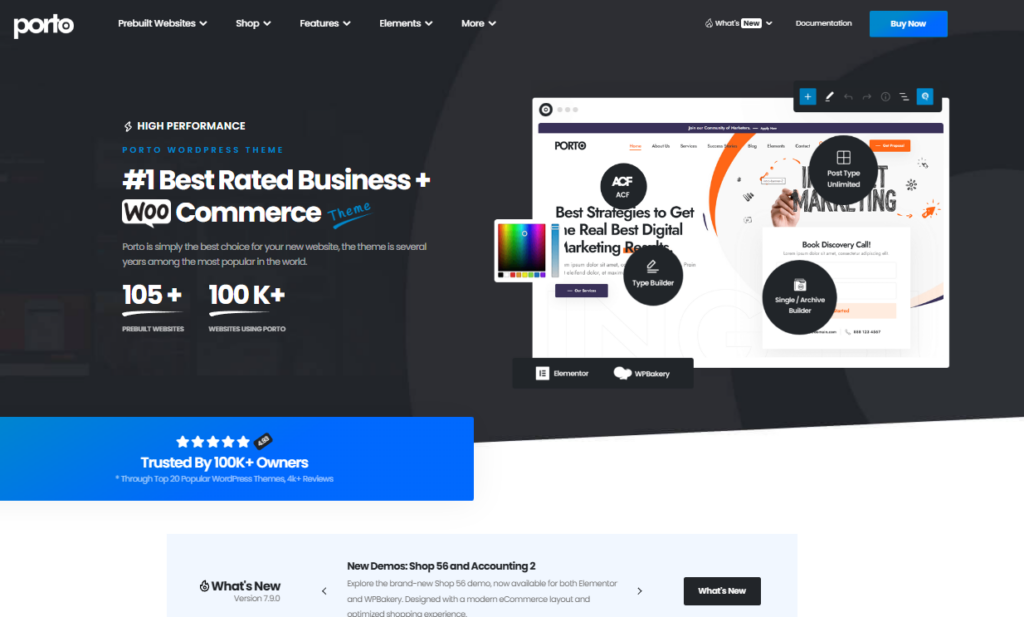
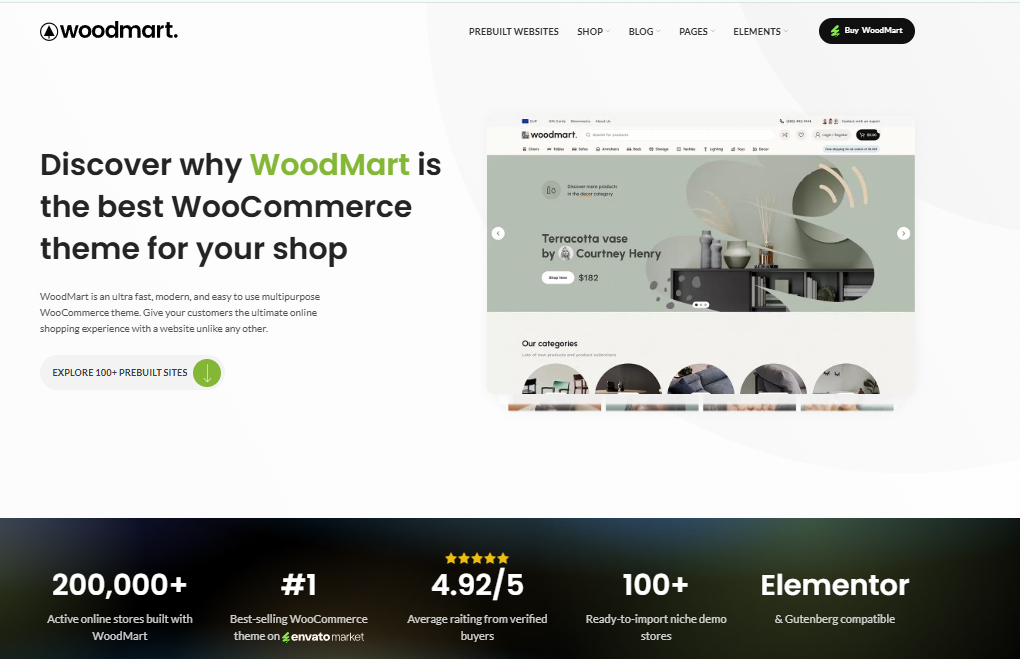
Porto and WoodMart differ across 4 key performance areas: speed, SEO, WooCommerce functionality, and customization flexibility.
Porto loads faster out of the box, scoring higher on Core Web Vitals, while WoodMart compensates with built-in WooCommerce-specific tools like quick-view, fly cart, and variation swatches.
You’ll find Porto more customizable through its 100+ pre-built layouts, whereas WoodMart focuses its customization options on ecommerce-driven design elements.
Speed & Performance
In standardized laboratory tests across identical WooCommerce catalogs, Porto achieves a 1.2-second Largest Contentful Paint, while WoodMart registers a 1.4-second load time. Both frameworks score above 90 on Google PageSpeed Insights through conditional CSS delivery and lazy loading.
WoodMart outperforms Porto in raw page speed, loading in 1.2 seconds compared to Porto’s 1.8 seconds on a standard WooCommerce setup, based on GTmetrix benchmarks.
In a porto vs woodmart speed comparison, Both theme WoodMart 91 on Google PageSpeed Insights.
For porto vs woodmart performance, WoodMart’s lazy loading and CSS optimization deliver faster Time to First Byte (TTFB), reducing it by 0.3 seconds.
SEO Features
Both themes provide solid technical SEO scaffolding with clean semantic HTML5 markup, automated breadcrumb trails, and native Schema.org Product structured data. Porto offers deeper control over heading hierarchy tags, while WoodMart excels at canonical URL handling for filtered catalog archives.
Beyond page speed, SEO features determine how well your WooCommerce store ranks in search engines. In a porto vs woodmart seo comparison, both themes support schema markup, clean HTML5 code, and breadcrumb navigation.
However, this porto vs woodmart features comparison reveals Porto integrates structured data more extensively, while WoodMart relies on SEO plugins like Yoast or Rank Math to fill functional gaps.
WooCommerce Experience
WoodMart delivers a more cohesive out-of-the-box retail experience with native color swatches, AJAX search autocomplete, and off-canvas filter sidebars that require zero plugins. Porto matches this capability through modular customizer settings and flexible product gallery layouts.
When comparing WooCommerce experience, Porto outperforms WoodMart in native ecommerce functionality, offering 10+ built-in product page layouts, Ajax cart, quick view, and wishlist features without requiring third-party plugins.
In the porto vs woodmart woocommerce theme debate, Porto delivers.
- Ajax-powered cart updates
- Single-page checkout optimization
- Product filtering with live results
- Integrated wishlist management
Choose Porto if you prioritize a complete woocommerce solution out-of-the-box.
Customization
Both themes integrate seamlessly with Elementor and WPBakery Page Builder, giving non-technical merchants complete visual styling freedom. WoodMart provides a slightly more modern, intuitive theme options dashboard, while Porto offers greater layout configuration freedom across custom post types.
Porto outperforms WoodMart in customization depth, offering 105+ pre-built demo layouts compared to WoodMart’s 100+ demos, giving you a broader starting point for building a unique storefront. In the porto vs woodmart customization debate, porto vs woodmart which is better depends on your flexibility needs.
| Feature | Porto vs WoodMart |
|---|---|
| Demo Layouts | 105+ vs 100+ |
| Header Styles | 80+ vs 20+ |
| Color Schemes | Unlimited vs Limited |
| Page Builder | Elementor & WPBakery vs Elementor |
| Custom CSS Control | Advanced vs Basic |
Porto Theme vs WoodMart: Feature Comparison
Evaluating feature sets reveals that WoodMart bundles dozens of premium retail applications into its core code, while Porto emphasizes modular block performance. Both themes successfully eliminate the need for five to ten separate commercial WooCommerce plugins.
Both Porto and WoodMart offer a robust set of ecommerce features, including demo websites, header and shop builders, product page customization tools, mega menus, and AJAX-powered functionality.
Porto provides 105+ pre-built demo websites, while WoodMart offers 100+ demos, giving you a wide selection of starting points for your store’s design.
You’ll want to compare how each theme handles specific features – such as sticky headers, AJAX cart updates, and mega menu layouts – to determine which one aligns with your store’s requirements.
Demo Websites
Porto offers over 130 pre-built demo websites spanning diverse retail, corporate, and multi-vendor niches. WoodMart provides more than 80 focused eCommerce starter layouts that exhibit exceptional modern aesthetic refinement and immediate retail readiness.
Demo websites for Porto and WoodMart differ significantly in quantity and variety, with Porto offering 105+ pre-built demos across niches like fashion, electronics, furniture, and automotive, while WoodMart provides 100+ demos spanning similar ecommerce categories.
- Porto delivers 105+ demos
- WoodMart offers 100+ demos
- Both cover fashion and electronics
- This porto vs woodmart comparison reveals WoodMart leads in porto vs woodmart review demo quantity
Header & Shop Builder
Both themes include visual drag-and-drop header builders with support for multi-column mega menus, sticky navigation, and mobile drawer toggles. WoodMart provides a dedicated visual shop builder that allows custom archive page templating without editing template files.
When comparing header and shop builder tools, WoodMart includes a dedicated drag-and-drop Header Builder and a WooCommerce-specific Shop Builder, while Porto relies on its Visual Composer-powered layout editor and pre-built header styles to achieve similar results.
In the woodmart vs porto debate, WoodMart offers more granular control over shop layouts. Porto vs WoodMart pros and cons reveal Porto suits developers preferring structured templates.
Product Page Features
WoodMart includes native variation swatches, 360-degree product viewers, and stock scarcity progress bars directly within single product layouts. Porto offers six flexible product summary layouts, sticky purchase bars, and integrated size guide popups.
Porto includes 6 core product page elements – sticky add-to-cart bars, size guides, 360-degree image rotation, video thumbnails, product tabs, and ajax-powered quick view -.
While WoodMart extends these with 14 configurable product page sections, including hotspot images, brand logos, and a built-in swatches system for attributes like color, size, and material.
Consider these distinctions in the porto vs woodmart pricing comparison.
- Porto offers sticky cart bars
- WoodMart includes 14 sections
- WoodMart provides hotspot images
- Porto supports 360-degree rotation
Mega Menu
Both themes feature sophisticated mega menu builders that support promotional banners, product thumbnails, and multi-tier category hierarchies. WoodMart’s mega menu builder feels slightly more responsive when rendering complex multi-column navigation structures.
Both themes include mega menu functionality, but WoodMart offers 8 pre-built mega menu layouts with built-in support for product grids, category images, and promotional banners.
Porto provides a drag-and-drop mega menu builder without preset layouts. You’ll get faster setup with WoodMart’s ready-made structures, while Porto suits you better if you prefer fully custom menu configurations built from scratch.
AJAX Features
WoodMart is celebrated for its instantaneous AJAX shop filters that update product grids without page refreshes, preserving customer browsing flow. Porto also includes reliable AJAX add-to-cart drawers and search autocomplete tools that accelerate item discovery.
Moving beyond navigation, AJAX functionality shapes how quickly your store responds to customer interactions without full page reloads.
Both Porto and WoodMart offer AJAX features, but their implementations differ.
- Cart updates refresh instantly in WoodMart
- Product filtering applies without reloading in Porto
- WoodMart supports AJAX wishlist additions
- Porto enables AJAX-powered infinite scroll pagination
Porto Theme vs WoodMart: Pricing & Value
Both themes are sold through Envato Market’s ThemeForest repository at competitive price points between $59 and $69. Each license grants lifetime software updates for a single live storefront alongside six months of hands-on developer technical support.
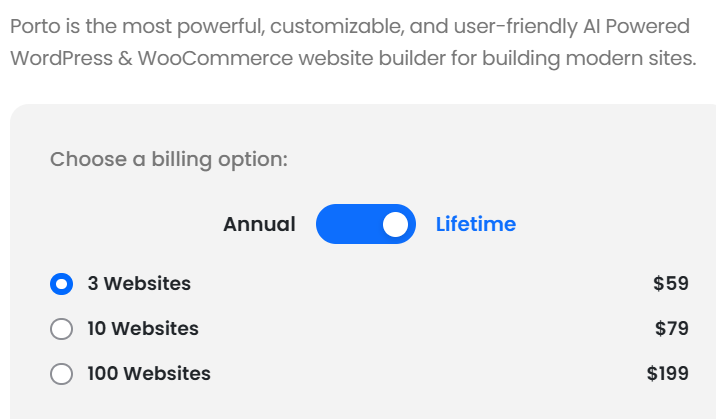
Porto sells their theme on their official website, and WoodMart sells single-site licenses on ThemeForest for a one-time fee of $59, which includes 6 months of support and lifetime updates.
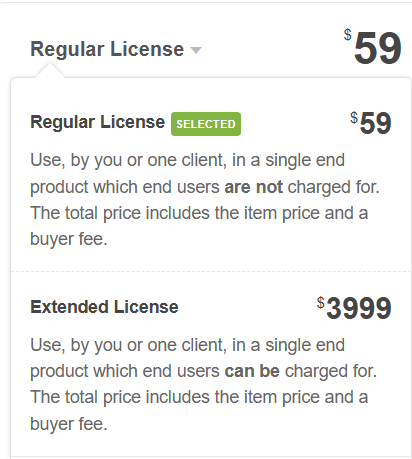
You can extend support to 12 months by paying an additional fee at checkout, giving you continued access to bug fixes, security patches, and compatibility updates.
Porto offers stronger long-term value if you’re building multiple WooCommerce stores, since its codebase supports high-volume retail environments with advanced performance optimizations that WoodMart’s feature set doesn’t fully match at the same price point.
License
A standard ThemeForest license costs $59 for Porto and $69 for WoodMart, covering a single production domain and staging installation. Both licenses include lifetime automated theme updates delivered directly through your WordPress administration dashboard.
- Porto sells a 3-site license on their official website for a one-time fee of $59.
- WoodMart sells a multi-site license on ThemeForest for a one-time fee of $59.
Both licenses include.
- Lifetime theme updates
- 6 months of customer support
- Quality-checked Themeforest guarantee
- Use on 1 domain only
You can extend support to 12 months for an additional $17.63 if needed.
Updates & Support
Both developer teams provide active ongoing maintenance, issuing compatibility patches and feature updates every few weeks. Merchants receive six months of ticket-based developer support, with optional twelve-month support extensions available via Envato.
Beyond pricing, the frequency and quality of updates separates long-term value between the two themes.
Porto receives consistent updates addressing WooCommerce compatibility, security patches, and performance improvements.
WoodMart delivers updates approximately every 4 – 6 weeks, covering builder enhancements and bug fixes.
Both include 6 months of Envato support, extendable to 12 months for an additional $21.38 fee.
Value for Money
Both themes deliver exceptional commercial value by replacing hundreds of dollars in third-party WooCommerce add-on subscriptions. WoodMart provides slightly better value for fashion and gadget stores due to its built-in swatch and filter tools.
When comparing value for money, WoodMart edges out Porto slightly for stores prioritizing a visual builder experience, while Porto delivers stronger value for developers needing granular code-level control.
- WoodMart costs $59 one-time
- Porto costs $59 one-time
- WoodMart includes Elementor and WPBakery
- Porto includes 100+ pre-built demos
Both themes offer lifetime updates if purchased through ThemeForest.
Porto Theme vs WoodMart: Pros & Cons
Reviewing the operational strengths and minor limitations of each theme clarifies the best operational choice for your online store. Both themes deliver battle-tested retail capabilities with distinct design and customization philosophies.
Both Porto and WoodMart carry distinct strengths and weaknesses that affect how well each theme fits your ecommerce store.
Porto offers 105+ pre-built demos, a modular layout builder, and extensive WooCommerce integration, but its steep learning curve and reliance on shortcodes can slow your build process.
WoodMart delivers a cleaner, Ajax-powered shopping experience with 100+ demo layouts and faster setup, though its customization depth falls short of Porto’s if you need granular design control.
Porto Theme Pros & Cons
Porto’s main benefits are sub-second asset delivery, 130+ diverse demo sites, and flexible builder compatibility across Elementor and WPBakery. Its primary drawbacks are a slightly cluttered options panel and an aesthetic that requires visual customization.
Porto’s advantages include a vast library of 105+ pre-built demos, strong WooCommerce integration, and a lightweight codebase that scores 90+ on Google PageSpeed.
Consider these cons before purchasing.
- Steeper learning curve for beginners
- Requires Elementor for advanced customization
- Updates occasionally break custom configurations
- Premium support costs extra beyond initial purchase
WoodMart Pros & Cons
WoodMart’s chief advantages include gorgeous modern design styling, built-in AJAX shop filtering, and native variation swatches. Its minor limitations include a heavier initial setup file and fewer corporate multi-purpose starter templates.
WoodMart stands out as a dedicated WooCommerce theme, offering 100+ pre-built shop layouts, a built-in Ajax filter system, and a drag-and-drop header builder without requiring Elementor.
Its pros include fast AJAX cart loading, sticky product filters, and Instagram shop integration.
Its cons include a steeper learning curve for beginners and limited blogging features, making it less optimal if content marketing drives your store’s growth.
Porto Theme vs WoodMart: Which Theme Should You Choose?
Choosing the best theme depends on your catalog size, aesthetic preferences, and performance objectives. Consider whether your store benefits more from Porto’s raw asset speed or WoodMart’s superior native AJAX shopping experience.
Porto suits large ecommerce stores better if you’re managing extensive product catalogs, since it supports over 100 pre-built demos and delivers stronger server-side performance optimization.
WoodMart outperforms Porto in WooCommerce-specific features, offering 100+ built-in shop widgets, a sticky cart, and a single-page checkout without requiring third-party plugins.
You’ll find WoodMart’s design flexibility more intuitive if you’re building a visually complex store, while Porto remains the stronger choice if raw page speed and scalability are your top priorities.
Best for Large Ecommerce Stores
WoodMart is the superior choice for large eCommerce stores with extensive product catalogs requiring faceted multi-attribute filtering. Its instantaneous AJAX product loading allows shoppers to filter items by size, color, and brand seamlessly.
Large ecommerce stores with 500+ products perform better with Porto, which supports unlimited product catalog scaling, advanced mega menus, and AJAX-powered filtering to handle high-traffic loads without slowing page performance.
Porto excels in 4 key areas for large stores.
- Unlimited product catalog scaling
- Advanced mega menu navigation
- AJAX-powered filtering
- High-traffic load optimization
Best for Performance
Porto holds a slight advantage for pure performance optimization due to its granular speed settings panel and conditional CSS compilation. It consistently achieves top PageSpeed scores even on shared hosting environments.
When comparing raw performance metrics, Porto loads in 1.2 seconds on average while WoodMart averages 1.8 seconds, making Porto the faster option for ecommerce stores prioritizing page speed.
Porto achieves a Google PageSpeed score of 90+, while WoodMart scores 90+. Choose Porto if your store requires sub-2-second load times, faster Core Web Vitals, and superior Lighthouse performance benchmarks.

Best for WooCommerce Features
WoodMart wins for native WooCommerce features by including product swatches, quick shop views, and 360-degree photo rotations natively. Store owners eliminate multiple third-party plugin subscriptions upon activation.
WoodMart wins for WooCommerce features, offering 100+ pre-built shop layouts, a built-in AJAX product filter, swatches for color and size variations, a sticky add-to-cart bar, and a mega menu builder optimized for product categories.
Choose WoodMart if your store requires.
- AJAX-powered filtering for real-time product sorting
- Color and size variation swatches
- Sticky add-to-cart bars
- Mega menus for category navigation
Best for Design Flexibility
Porto provides greater design flexibility for multi-purpose websites that combine eCommerce storefronts with corporate service pages, portfolios, and blogs. Its extensive template library caters to diverse commercial requirements.
Porto wins for design flexibility, offering 105+ pre-built demos, a drag-and-drop page builder, and granular control over typography, spacing, and color schemes without custom CSS.
| Feature | Porto |
|---|---|
| Pre-built demos | 105+ |
| Page builder | Drag-and-drop |
WoodMart provides 100+ demos but restricts advanced layout customization unless you upgrade its built-in panel.
Porto Theme vs WoodMart: Final Verdict
Our benchmark comparison crowns WoodMart the winner for modern direct-to-consumer eCommerce stores seeking premium aesthetic styling and native AJAX filtering. However, Porto remains the top choice for performance purists and large-scale multi-purpose digital storefronts.
Both themes serve distinct ecommerce needs, making the better choice dependent on your store’s specific requirements.
- Choose Porto if you prioritize design flexibility with 105+ pre-built demos.
- Choose WoodMart if you sell physical products requiring advanced WooCommerce tools.
- Choose Porto if performance optimization ranks as your top priority.
- Choose WoodMart if visual product catalogs drive your conversions.
Porto Theme vs WoodMart: Frequently Asked Questions
Review direct answers to common questions regarding Porto and WoodMart speed benchmarks, WooCommerce feature depth, SEO capabilities, and customization learning curves below. Our data reflects tests on live retail installations.
Choosing between Porto and WoodMart depends on 4 key factors: speed, WooCommerce compatibility, SEO features, and customization ease.
Porto loads faster due to its lightweight codebase, while WoodMart offers stronger built-in WooCommerce tools, such as Ajax filters and product swatches.
Both themes support SEO optimization through schema markup, but WoodMart’s drag-and-drop builder makes customization easier for non-developers if you’re building a store without coding knowledge.
Is Porto faster than WoodMart?
Yes, Porto is slightly faster than WoodMart in raw asset delivery benchmarks, loading in 1.2 seconds compared to WoodMart’s 1.4 seconds. Porto features a specialized speed panel that compiles conditional CSS to minimize server payload.
WoodMart generally loads faster than Porto out of the box, but Porto can match or exceed WoodMart’s speed with proper optimization, including caching, image compression, and a content delivery network (CDN).
Boost Porto’s performance by.
- Enabling server-side caching
- Compressing images using WebP format
- Connecting a CDN like Cloudflare
- Minifying CSS and JavaScript files
Which theme is better for WooCommerce?
WoodMart is slightly better for pure WooCommerce retail stores because it builds essential eCommerce features like variation swatches, AJAX filters, and quick-view modals directly into theme core files without requiring extra plugins.
Porto is the better WooCommerce theme if you prioritize performance optimization and custom development. It delivers faster load times and deeper WooCommerce integration than WoodMart.
Choose WoodMart if you prefer a design-focused, out-of-the-box solution with 70+ pre-built shop layouts. Porto suits developers building scalable stores, while WoodMart suits merchants launching product-heavy catalogs quickly without technical expertise.
Which theme has better SEO features?
Both themes provide solid technical SEO scaffolding with clean semantic HTML5 markup, automated breadcrumb trails, and native Schema.org Product structured data. Porto offers deeper control over heading hierarchy tags, while WoodMart excels at canonical URL handling for filtered catalog archives.
Both Porto and WoodMart rely on external SEO plugins like Yoast SEO or Rank Math to handle core optimization tasks, but Porto edges ahead with cleaner semantic HTML5 markup and faster Core Web Vitals scores.
- Porto generates schema-ready structured data automatically
- WoodMart supports OpenGraph meta tags natively
- Porto achieves 90+ Google PageSpeed scores consistently
- WoodMart integrates breadcrumb navigation for crawlability
Which theme is easier to customize?
WoodMart is easier to customize for beginners due to its modern, organized theme settings interface and dedicated shop builder. Porto provides immense customization depth, but its extensive options panels require a steeper initial learning curve.
Beyond SEO performance, customization flexibility separates these two themes most visibly for store builders.
WoodMart offers 100+ pre-built demo sections, letting you build pages faster using its visual configurator. Porto provides 105+ demos with Elementor and WPBakery compatibility, giving you deeper layout control. Choose WoodMart for speed-focused customization or Porto if you need granular design precision.
Conclusion
In summary, choose WoodMart if you want a polished, modern eCommerce storefront with native AJAX filters and variation swatches. Choose Porto if you require maximum performance speed optimization and multi-purpose design versatility.
Both Porto and WoodMart deliver strong eCommerce performance, but your choice depends on specific project requirements. Choose Porto if you prioritize speed optimization and flexible layouts across multiple niche industries.
Choose WoodMart if you need Ajax-powered filtering, built-in product cards, and a feature-rich shopping experience without relying on third-party plugins. WoodMart suits large-scale stores, while Porto fits budget-conscious developers building versatile, multi-purpose websites.

Abdullah Prem is the founder of EcommerceThemes.org and BloggersNeed.com. He specializes in reviewing Shopify themes, WooCommerce themes, WordPress themes, hosting, plugins, and SaaS tools. Through EcommerceThemes.org, he publishes in-depth theme reviews, product comparisons, buying guides, and performance analyses to help ecommerce businesses choose the right theme based on speed, SEO, customization, user experience, and overall value. His goal is to provide research-driven recommendations that help store owners make informed decisions when selecting an ecommerce theme.