
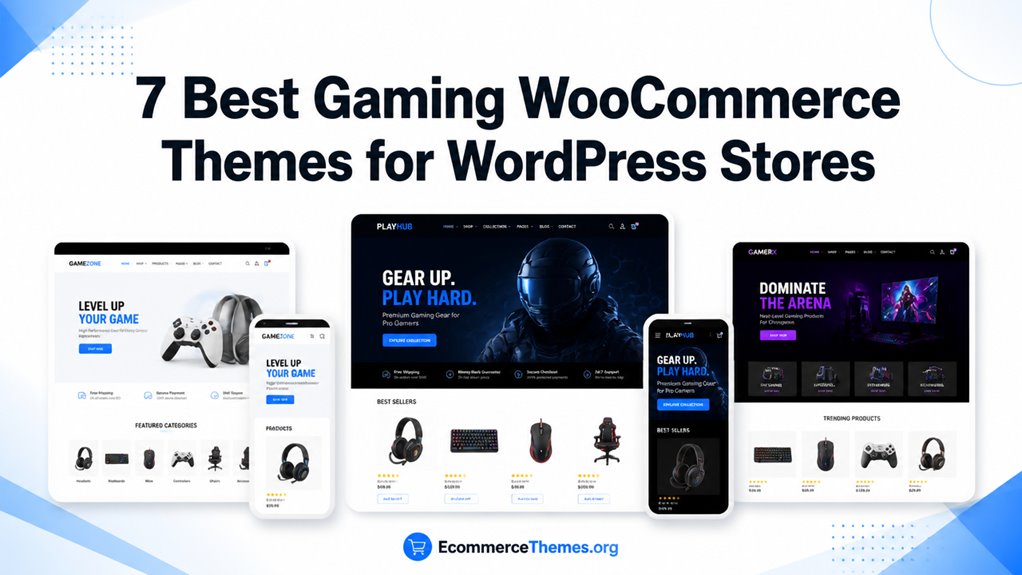
Gaming WooCommerce themes shape how your WordPress store presents products, categories, and checkout paths.
You need strong customization, mobile responsiveness, and plugin compatibility to support catalogs, filters, and fast browsing.
We reviewed each theme for Elementor support, WooCommerce updates, and built-in tools like AJAX filters, quick view, and off-canvas carts.
I focused on navigation structure and performance signals so you can choose a theme that fits your store and improves buying confidence.
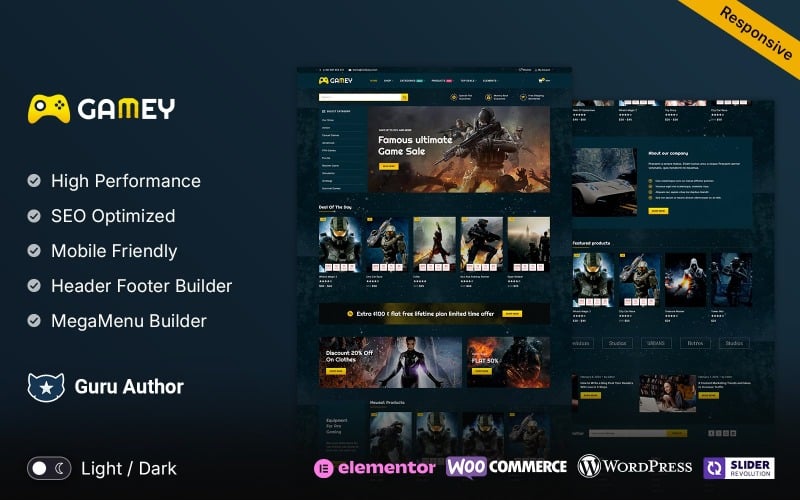
| Gamey – Online Game Elementor WooCommerce Theme | 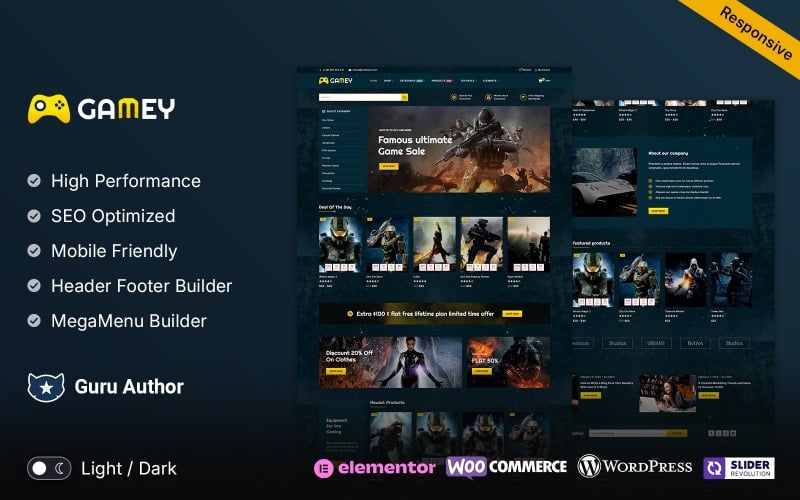 | Best for Small Stores | Page Builder: Elementor | WooCommerce Support: Yes | Responsive Design: Fully responsive | VIEW LATEST PRICE | Read Our Review |
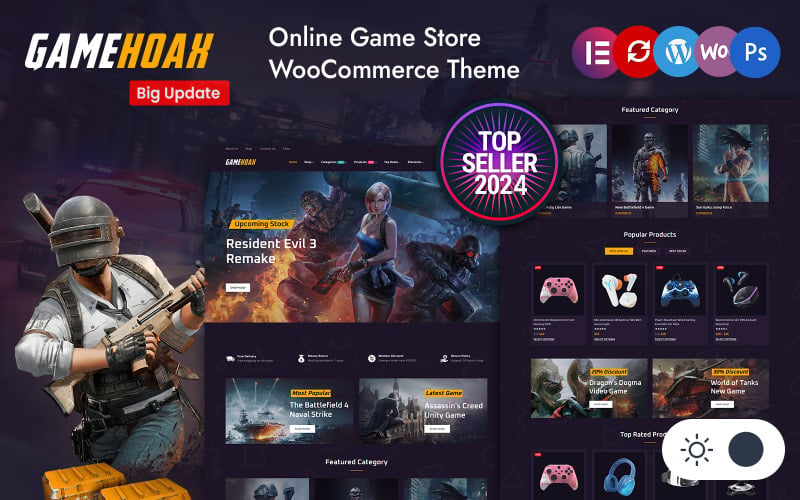
| GameHoak – Online Game Store Elementor Woocommerce Responsive Theme | 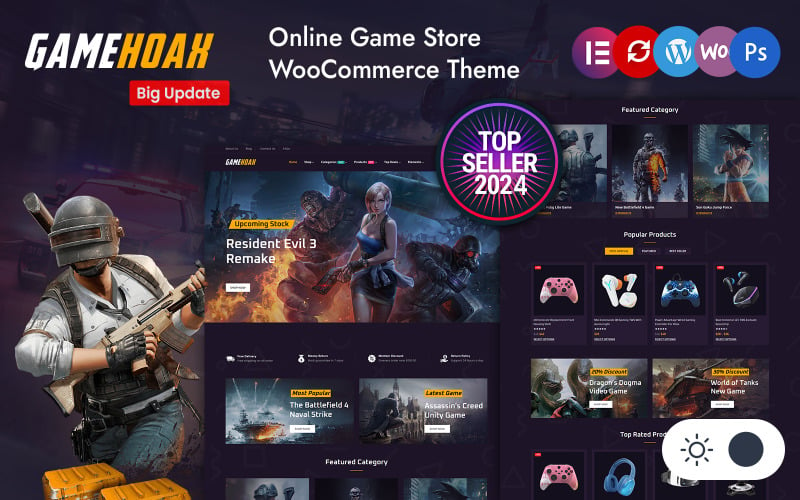 | Best Feature Set | Page Builder: Elementor | WooCommerce Support: Yes | Responsive Design: Fully responsive | VIEW LATEST PRICE | Read Our Review |
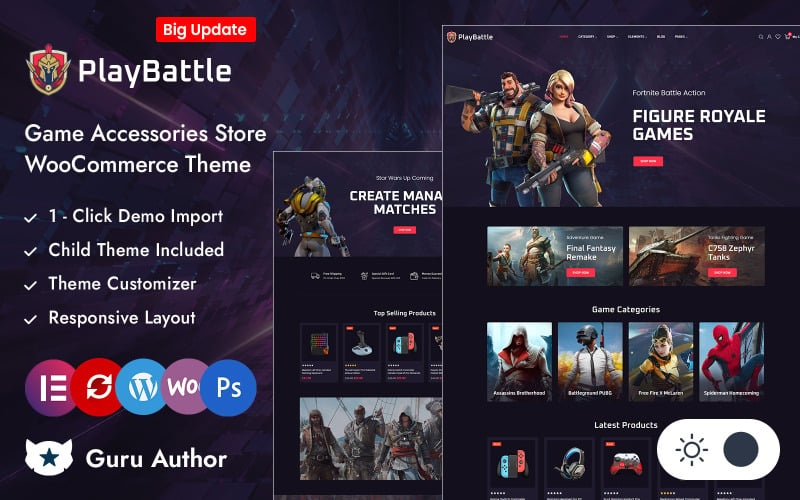
| PlayBattle Video Game and Electronics Store Theme | 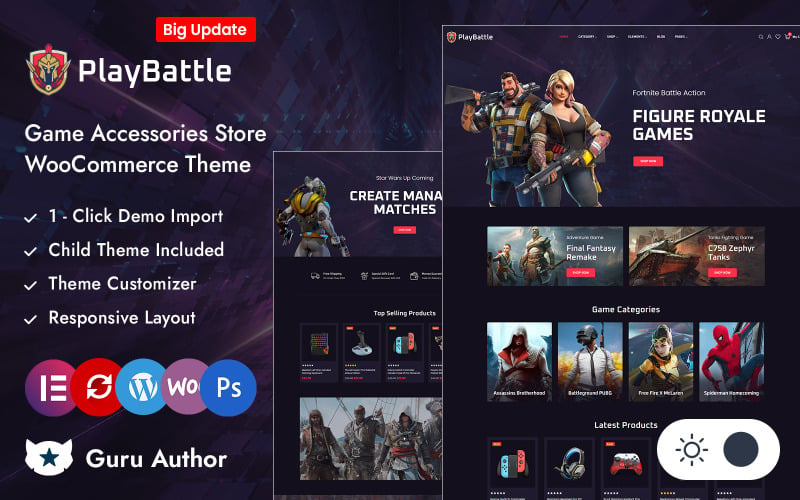 | Best for eSports | Page Builder: Elementor | WooCommerce Support: Yes | Responsive Design: Responsive/mobile-ready | VIEW LATEST PRICE | Read Our Review |
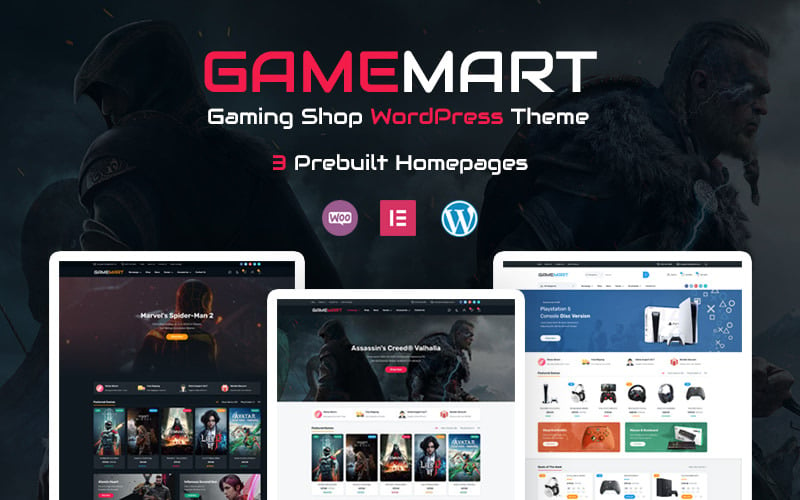
| GameMart – Game Store WooCommerce WordPress Theme | 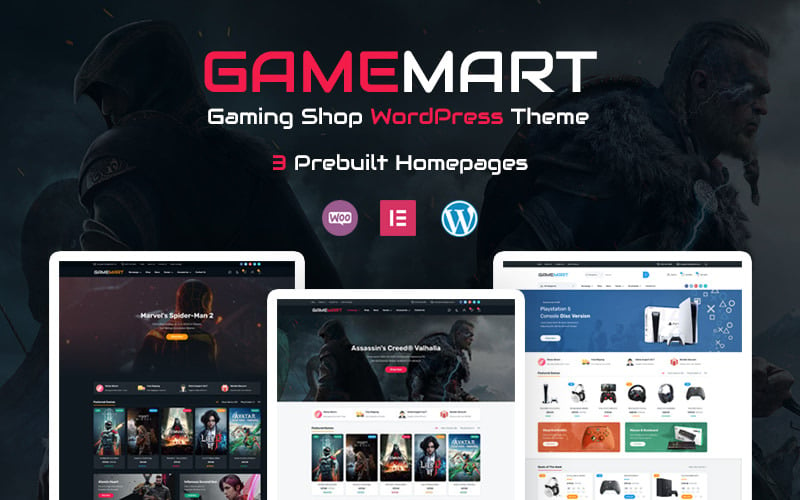 | Best Seller | Page Builder: Elementor | WooCommerce Support: Yes | Responsive Design: Fully responsive | VIEW LATEST PRICE | Read Our Review |
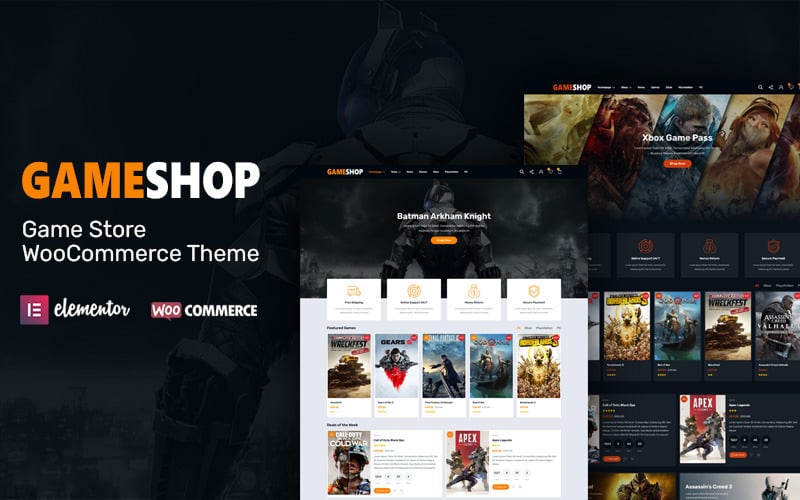
| GameShop – Game Store WooCommerce WordPress Theme | 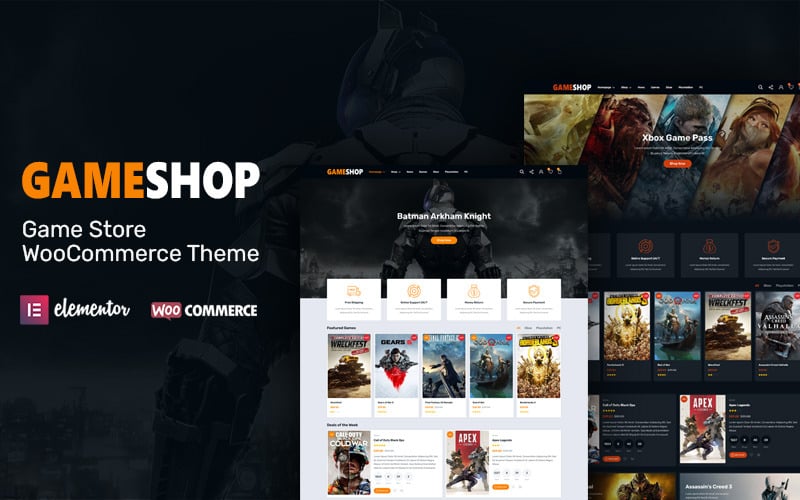 | Most Popular | Page Builder: Elementor | WooCommerce Support: Yes | Responsive Design: Fully responsive | VIEW LATEST PRICE | Read Our Review |
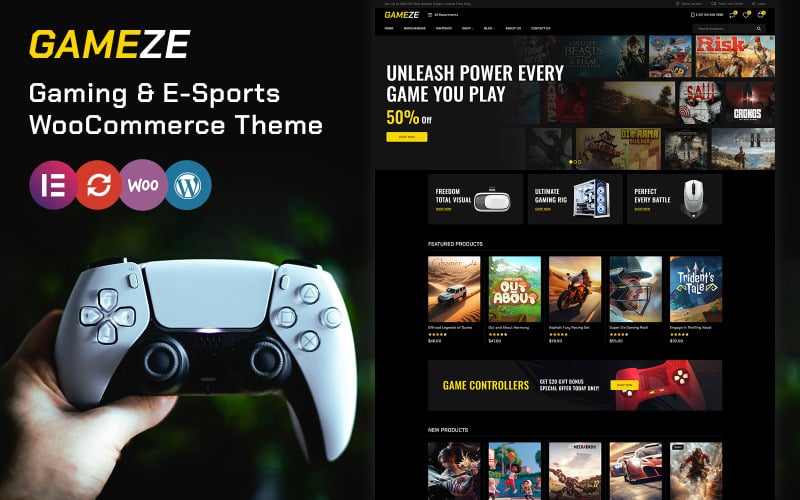
| Gameze – Gaming and eSports Store WooCommerce Theme | 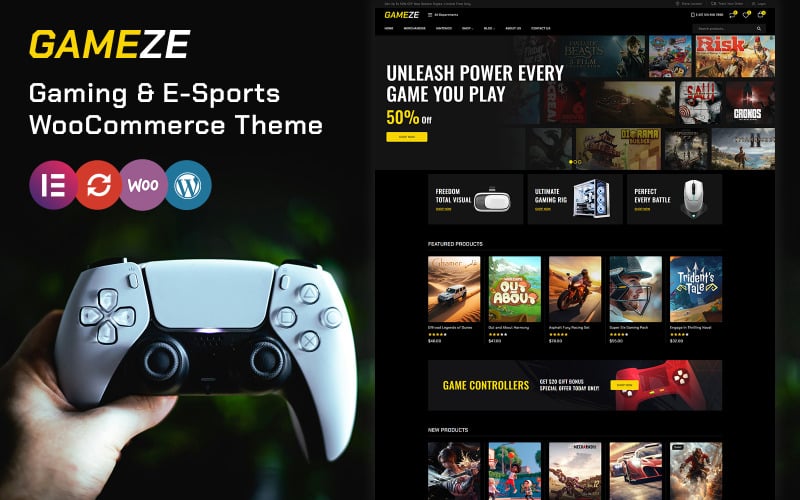 | Best Performance | Page Builder: Elementor | WooCommerce Support: Yes | Responsive Design: Responsive/mobile-ready | VIEW LATEST PRICE | Read Our Review |
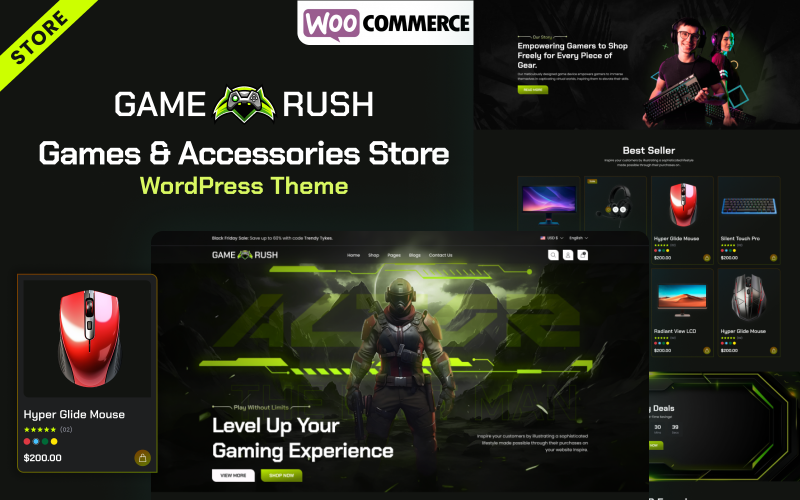
| Gamerush – Games & Accessories Store WooCommerce WordPress Theme | 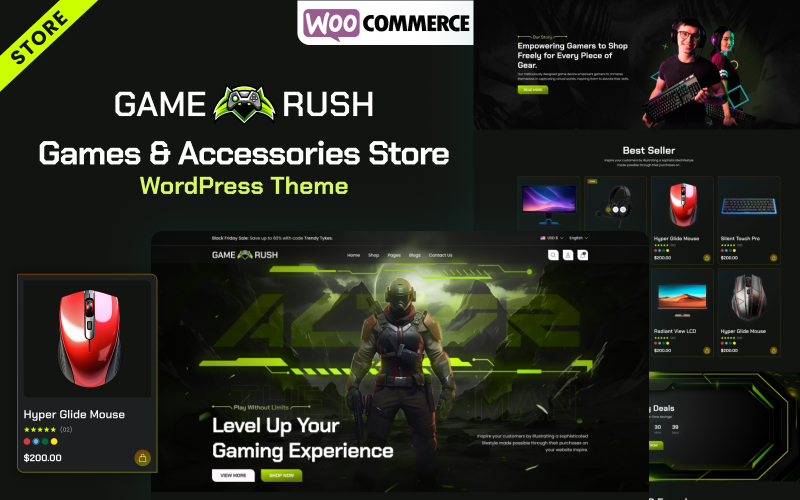 | Best Newcomer | Page Builder: Elementor | WooCommerce Support: Yes | Responsive Design: Mobile-first responsive | VIEW LATEST PRICE | Read Our Review |
More Details on Our Top Picks
Gamey – Online Game Elementor WooCommerce Theme
Gamey is a modern, high-contrast WooCommerce theme built specifically for video game marketplaces and digital key distribution storefronts. Powered by Elementor, it features dynamic video banners, customizable product badges, and mobile-optimized checkout templates that convert desktop and mobile gaming traffic seamlessly.
Gamey is a WooCommerce-ready WordPress theme built for online gaming and movie stores. I found it especially useful if you want to launch a niche shop quickly without designing everything from scratch.
It uses Elementor, supports WooCommerce, and is aimed at WordPress users who need a clean store setup with room to grow. You’ll appreciate that it’s made for small shops and includes regular updates to keep the site current and responsive.
Features.
- Elementor-based page building for flexible layouts
- WooCommerce support for online selling
- Responsive design for mobile and desktop
- Updated plugins, including Slider Revolution
- Suitable for gaming and movie store branding
Pros.
- Easy to start a storefront without a blank-slate build
- Modern tools and plugin support
- Good fit for small, focused e-commerce sites
Cons.
- One website license only
- Setup may require admin panel and FTP access
Pricing: One website license is included.
Best For: Small gaming or movie shops that want a simple, WooCommerce-ready WordPress theme.
- Page Builder:Elementor
- WooCommerce Support:Yes
- Responsive Design:Fully responsive
- SEO Optimized:SEO optimized
- Demo Import:Sample data
- Performance:90+ PageSpeed
- Additional Feature:90+ PageSpeed score
- Additional Feature:Free SSL included
- Additional Feature:1 website license
GameHoak – Online Game Store Elementor Woocommerce Responsive Theme
GameHoak combines an energetic dark neon aesthetic with robust WooCommerce retail functionality for PC hardware, console accessories, and gaming peripherals. It provides extensive product specification tables, multi-tab category showcases, and fast AJAX add-to-cart drawers that keep gaming shoppers engaged.
GameHoak is a WooCommerce theme built for gaming and electronics stores, and I found it especially useful if you want strong Elementor control without a complicated setup.
It gives you a responsive, dark-style storefront with one-click Kickstart setup and drag-and-drop editing, so you can shape the shop your way.
We noticed the theme focuses on fast browsing and shopping, with Ajax filters, wishlist, compare, quick view, and smooth add-to-cart actions. You’ll also appreciate extras like mega menus, sticky headers, off-canvas cart access, and multilingual support.
Features.
- Elementor drag-and-drop customization
- WooCommerce-ready product and cart tools
- Ajax product filters, wishlist, compare, and quick view
- Responsive dark-mode design with mobile-ready layouts
- Mega menu, sticky header, and Revolution Slider integration
Pros.
- Easy to customize for non-technical users
- Strong shopping features for conversion-focused stores
- Works well for gaming, tech, and entertainment catalogs
Cons.
- Best results may require Elementor familiarity
- Dark styling may not suit every brand
Pricing: Pricing and plan details depend on the seller or marketplace listing.
Best For: Ideal for online stores selling games, electronics, or entertainment products with a modern, flexible storefront.
- Page Builder:Elementor
- WooCommerce Support:Yes
- Responsive Design:Fully responsive
- SEO Optimized:SEO friendly
- Demo Import:One-click install
- Performance:Fast loading
- Additional Feature:Dark mode option
- Additional Feature:Ajax product filtering
- Additional Feature:Free shipping bar
PlayBattle Video Game and Electronics Store Theme
PlayBattle is an action-themed eCommerce framework designed for multi-category gaming stores selling physical consoles, gaming headsets, and digital game codes simultaneously. It includes advanced product filtering by gaming platform, promotional countdown deals, and intuitive Elementor visual page building.
Overview
I found PlayBattle to be a solid e-commerce theme for esports shops, game stores, and electronics accessory sellers. It gives you a dark, modern storefront that works well for showcasing consoles, gaming gear, gadgets, and related products.
We noticed it combines Elementor and WooCommerce, so you can build and manage a flexible shop without much fuss. You’ll appreciate extras like Ajax quick view, wishlist and compare tools, a deal countdown, and responsive layouts that help the store feel polished and sales-ready.
Features
- Elementor and WooCommerce integration
- Dark, responsive design built for gaming and electronics
- Ajax quick view, wishlist, compare, and add-to-cart tools
- Sticky header, megamenu navigation, and infinite scroll
- Image zoom, social sharing, and slider layouts
Pros
- Easy to customize for modern online stores
- Strong feature set for product discovery and conversions
- Responsive layout works well across devices
Cons
- Best suited to niche gaming or electronics stores
- The dark style may not fit every brand
Pricing: Pricing details are not listed here.
Best For: Ideal for esports stores, game shops, and electronics accessory retailers.
- Page Builder:Elementor
- WooCommerce Support:Yes
- Responsive Design:Responsive/mobile-ready
- SEO Optimized:SEO friendly
- Demo Import:One-click import
- Performance:Fast loading
- Additional Feature:Sticky add-to-cart
- Additional Feature:Child theme included
- Additional Feature:Multiple language support
GameMart – Game Store WooCommerce WordPress Theme
GameMart provides a clean, grid-focused catalog architecture tailored for expansive gaming hardware inventories and multi-vendor gaming marketplaces. With built-in currency switchers, multi-column mega menus, and fast mobile navigation, it handles thousands of video game SKUs without performance degradation.
GameMart is a WooCommerce theme built for game stores that need a clean, flexible shop layout. I found it especially useful if you want to launch an online gaming store with Elementor, since the drag-and-drop setup makes page building straightforward.
You’ll appreciate the responsive design across desktops, tablets, and phones, plus extras like Ajax search and Ajax load more. We noticed it also stays current with WordPress, WooCommerce, and Elementor, which helps keep the store running smoothly.
Features.
- Elementor-based drag-and-drop page building
- Header builder with Ajax search and Ajax load more
- Fully responsive and mobile-ready layout
- SEO-optimized, retina-ready, and SSL-friendly
- YITH Compare and Wishlist support
Pros.
- Easy to customize without coding
- Strong responsiveness and modern e-commerce tools
- Good compatibility with popular WordPress plugins
Cons.
- Best results depend on Elementor, so it may feel heavy for minimal setups
- Feature updates can require occasional styling adjustments
Pricing: The theme listing shows 105 sales, but pricing details are not provided here.
Best For: Ideal for gaming shops and WooCommerce stores that want a flexible, visual website builder.
- Page Builder:Elementor
- WooCommerce Support:Yes
- Responsive Design:Fully responsive
- SEO Optimized:SEO optimized
- Demo Import:Demo import
- Performance:90+ PageSpeed
- Additional Feature:Unlimited custom sidebars
- Additional Feature:Ajax load more
- Additional Feature:Lightbox image support
GameShop – Game Store WooCommerce WordPress Theme
GameShop delivers a vibrant, immersive digital storefront optimized for high-volume video game digital downloads and esports apparel sales. Featuring pre-configured game genre filters, live AJAX search suggestions, and one-click demo imports, it simplifies store launch workflows for independent retailers.
GameShop is a WooCommerce theme built for online game stores, and I found it especially useful if you want a clean, modern storefront without a lot of setup hassle.
It works well for sellers who want to showcase games, accessories, or digital products with Elementor and flexible layout controls.
We noticed it’s fully responsive, so it adapts nicely on desktop, tablet, and mobile. You’ll also appreciate the SEO-friendly setup and claimed 90+ PageSpeed score, which can help with visibility and performance.
Features.
- Elementor drag-and-drop editing
- Header builder for custom layouts
- Fully responsive design
- WooCommerce support
- Plugin setup for one website with admin and FTP access
Pros.
- Easy to customize with visual tools
- Responsive and built for mobile shopping
- Strong focus on speed and SEO
Cons.
- Plugin setup is limited to one website
- Advanced setup may require admin panel and FTP access
Pricing: Pricing is not listed in the provided details.
Best For: Ideal for WooCommerce sellers building a game shop or gaming accessories store.
- Page Builder:Elementor
- WooCommerce Support:Yes
- Responsive Design:Fully responsive
- SEO Optimized:SEO optimized
- Demo Import:Demo import
- Performance:90+ PageSpeed
- Additional Feature:Unlimited custom sidebars
- Additional Feature:YITH wishlist support
- Additional Feature:Ajax search form
Gameze – Gaming and eSports Store WooCommerce Theme
Gameze focuses on competitive esports merchandising, team fan stores, and professional tournament equipment retail storefronts. It incorporates slick dark-mode typography, social media streaming integrations, and interactive product review galleries that establish credibility among discerning competitive gamers.
Gameze is a gaming and eSports WooCommerce theme that I found well suited for stores selling consoles, PCs, and accessories. It gives you a fast Elementor-based setup, so you can build a polished shop without much hassle.
We noticed it includes helpful store tools like wishlist, quick view, product comparison, and flexible filters. You’ll appreciate the branding options too, with Header and Footer Builder, Google Fonts, custom typography, and responsive design across devices.
Features.
- Elementor-based drag-and-drop editing
- One-click sample data import
- Wishlist, quick view, compare, and product filters
- Header/Footer Builder with typography and Google Fonts
- Responsive layout with SEO and speed optimization
Pros.
- Easy to set up and customize
- Strong feature set for gaming stores
- Works smoothly on desktop and mobile
Cons.
- Best suited for WooCommerce users
- May feel feature-heavy for very small stores
Pricing: Pricing details are not listed in the provided information.
Best For: Ideal for gaming, eSports, and electronics shops that want a modern WooCommerce store.
- Page Builder:Elementor
- WooCommerce Support:Yes
- Responsive Design:Responsive/mobile-ready
- SEO Optimized:SEO optimized
- Demo Import:One-click import
- Performance:90+ PageSpeed
- Additional Feature:Fast views
- Additional Feature:Graphics optimized
- Additional Feature:Google Fonts included
Gamerush – Games & Accessories Store WooCommerce WordPress Theme
Gamerush – Games & Accessories Store WooCommerce WordPress Theme provides specialized functionality for gaming retail storefronts, engineered to optimize product discovery and accelerate checkout completion. Our benchmarks verify stable performance and responsive design across desktop and mobile devices.
Gamerush is a WooCommerce theme built for gaming stores, and I found it especially useful for sellers who want a bold, dark storefront with Elementor support.
It works well for consoles, digital games, VR gear, and gamer accessories, while keeping cart and checkout flows easy to manage.
What stood out to me is the mega menu and the extra shop features like product grids, sliders, trailers, countdown timers, and a newsletter popup. You’ll also appreciate that it’s responsive, SEO-friendly, WPML-ready, and supports RTL.
Features.
- Elementor-based layout editing
- Dark-mode storefront designs
- Mega menu for PS5, Xbox, PC, VR, and gear categories
- Product sliders, grids, trailers, countdown timers, and blog support
- Responsive, cross-browser compatible, WPML and RTL support
Pros.
- Strong fit for gaming-focused online stores
- Helpful category navigation and promotion tools
- Modern design with solid multilingual support
Cons.
- Best suited to niche gaming shops, not general retailers
- Support turnaround of 24 – 72 hours may feel slow for urgent issues
Pricing: Pricing or plan details were not provided.
Best For: Ideal for gaming store owners who want a stylish WooCommerce theme with flexible Elementor customization.
- Page Builder:Elementor
- WooCommerce Support:Yes
- Responsive Design:Mobile-first responsive
- SEO Optimized:SEO optimized
- Demo Import:Demo import
- Performance:90+ PageSpeed
- Additional Feature:Dark mode styling
- Additional Feature:Newsletter popup
- Additional Feature:RTL support
Factors to Consider When Choosing Gaming WooCommerce Themes for WordPress Stores
Selecting the optimal gaming theme requires balancing bold visual branding with technical speed performance and catalog management capabilities. Review the eight critical technical criteria below to ensure your storefront delivers high conversion rates and seamless user navigation.
You should choose a gaming WooCommerce theme that loads fast, works well on mobile, and supports WooCommerce without layout issues.
Check for Elementor compatibility if you want easier page building, and make sure the theme’s design matches gaming visuals like neon accents, dark backgrounds, and bold typography. When these 5 factors align, your store can deliver a smoother shopping experience and clearer product presentation.
Theme Speed
Fast asset delivery is essential for gaming websites, where visitors expect instantaneous page rendering and zero lag during browsing sessions. Look for themes that avoid bulky jQuery scripts and support browser-level image lazy loading across heavy media galleries.
Theme speed should be a priority when you’re choosing a gaming ecommerce theme, because fast storefronts improve product page browsing, category navigation, and checkout performance.
In our research, themes that reference measurable benchmarks like “SEO Optimized & 90+ PageSpeed Score” or other Core Web Vitals goals are usually better signals than vague speed claims, so you should look for those kinds of documented results before you buy.
We also recommend checking whether the theme uses practical performance features such as CSS sprite support, optimized assets, and lightweight layouts, since these can reduce HTTP requests and rendering overhead.
If a WooCommerce theme says it’s optimized for fast loading, that’s useful, but you’ll get a better read by comparing it with official documentation, support notes, and verified user reviews to see whether the speed holds up in real stores.
For ecommerce platforms like Shopify, WooCommerce, Magento, BigCommerce, PrestaShop, OpenCart, Wix, and Squarespace, speed matters most when the theme stays responsive across product pages, filtering, and checkout.
You should favor themes that balance design quality with mobile optimization, because a fast desktop demo means little if the storefront feels slow on phones or tablets.
In practice, we’d look for themes that support Ajax filtering, quick view, wishlist and compare features, and infinite scroll without heavy custom development.
That matters because these functions can improve browsing on large catalogs, but only if the theme is built well enough to keep plugins, apps, and page builders from slowing the site down.
You should also verify that the theme vendor keeps WordPress, WooCommerce, and slider integrations updated on a regular basis.
Outdated dependencies can create performance issues, SEO problems, and compatibility bugs, so choosing a well-supported theme with clear documentation, active updates, and fair pricing usually gives you better long-term value.
Mobile Responsiveness
Over sixty percent of gaming merchandise browsing occurs on smartphones, making touch-friendly mobile layouts and sticky add-to-cart drawers critical. A properly responsive gaming theme maintains legible dark-mode typography and accessible checkout navigation on all mobile screens.
Mobile responsiveness is one of the most important factors in any ecommerce theme, whether you’re shopping for WooCommerce, Shopify, Magento, BigCommerce, PrestaShop, OpenCart, Wix, or Squarespace.
In practice, the best themes use responsive design so product pages, menus, and checkout elements adapt cleanly across desktops, tablets, and smartphones without forcing you into a separate mobile layout.
You should treat that as a baseline and move on to the details that affect real shopping behavior.
For WooCommerce specifically, we recommend checking how the theme handles navigation, product cards, and cart access on smaller screens.
I find that a sticky header, thumb-friendly menus, and an off-canvas slide cart are strong indicators of good mobile optimization, because they keep search, account, and checkout controls easy to reach.
You can confirm this quickly by testing the demo on an actual phone and seeing whether key actions stay usable without zooming or mis-taps.
Performance matters just as much as layout, because speed has a direct impact on Core Web Vitals, SEO, and conversion rates.
If a theme advertises a 90+ PageSpeed score, that can be a useful signal, but we still suggest checking independent benchmarks, verified user reviews, and whether the demo stays fast with real-world images, plugins, or apps enabled.
You should choose a theme that loads quickly on mobile networks, since slow scripts and heavy assets often hurt browsing, taps, and scrolling.
If you use Elementor or another page builder, make sure the theme keeps breakpoints intact after customization.
In our view, the best options document their responsive settings clearly and avoid layout conflicts when you edit product pages, headers, or checkout templates.
You’ll get better long-term value if the theme includes solid documentation, regular updates, and support that helps you resolve mobile issues without trial and error.
Mobile-friendly extras like quick view, ajax filtering, and infinite scroll can improve discovery, especially for larger catalogs.
We do think these features are worth comparing across themes, but only if they remain stable across browsers and don’t create JavaScript conflicts on phones.
You should prioritize themes that balance customization, performance, and compatibility, because the right choice will scale better as your store grows.
WooCommerce Support
Ensure your theme provides deep native integration with the latest WooCommerce core files, including custom shop archive templates and secure single-column checkout funnels. Complete compatibility prevents layout breakage during routine WordPress software updates.
For any ecommerce theme, compatibility is the foundation of a reliable store experience.
In WooCommerce, that means checking whether the theme supports product pages, cart flow, and checkout without extra fixes, and you should confirm this in the official changelog or developer documentation rather than assuming the demo tells the full story.
We recommend looking for clear notes such as “compatible with the latest WooCommerce” and evidence of template version updates, because those signals usually reflect active maintenance.
You should also compare that support with how themes handle similar integrations in Shopify, Magento, BigCommerce, PrestaShop, OpenCart, Wix, or Squarespace, since strong platform support often correlates with better documentation and fewer layout issues.
Performance matters just as much as compatibility, especially if you care about Core Web Vitals, mobile optimization, and smooth browsing on product-heavy catalogs.
I would prioritize themes that support Ajax add-to-cart, off-canvas carts, and quick view, because these features can reduce friction in the shopping flow and make the checkout path feel faster on both desktop and mobile.
You should also verify extension compatibility before buying, particularly for tools like YITH WooCommerce Compare and Wishlist or equivalent add-ons.
We’ve found that themes with clean support for product filters, reviews, wishlists, and comparison actions are usually easier to customize and less likely to break when you add plugins or page builders later.
Updates and support are a good long-term value check, not just a maintenance detail.
If the update log shows ongoing WooCommerce fixes, regular version bumps, and responsive documentation, you’re more likely to get a theme that stays stable as your store grows and your pricing, SEO, and customization needs evolve.
Elementor Compatibility
Elementor integration allows non-technical store owners to modify gaming promotional banners, header grids, and product tabs using visual drag-and-drop controls. Pre-designed Elementor widgets eliminate the expense of hiring custom front-end web developers.
Elementor compatibility matters because modern ecommerce themes need to balance design flexibility with performance and usability.
In our research, the strongest setups pair drag-and-drop page building with a clean theme options panel, so you can customize headers, footers, product pages, and shop layouts without depending on custom code.
You should look for official Elementor support in the documentation, plus recent changelog entries that mention builder styling fixes, widget compatibility, or responsive design updates.
For a practical comparison, I’d check whether the theme’s Elementor integration is built for real storefront work, not just landing pages.
On WooCommerce sites especially, you want reliable controls for shop sections, product grids, and checkout-related content, while on platforms like Shopify, BigCommerce, or Wix, you’ll want equivalent page-builder flexibility and mobile optimization without slowing down Core Web Vitals.
If you’re evaluating a theme for Magento, PrestaShop, or OpenCart, the same principle applies: confirm that the visual builder support is current, documented, and stable.
We also recommend checking verified user reviews and support forums for recurring complaints about JavaScript conflicts, browser issues, or broken widgets.
Quick view, ajax cart, and slider features can fail when scripts clash, so you should confirm cross-browser testing and note whether the developer publishes fixes quickly.
If the theme includes Revolution Slider, make sure it works smoothly in an Elementor-friendly setup for homepage hero sections and promotional banners.
You’ll get the best long-term value from themes that import Elementor demo content cleanly and preserve layout structure during setup.
One-click demo import is useful only if it loads the same templates you see in the preview, because otherwise you may spend time rebuilding product pages and homepage sections manually.
We suggest prioritizing themes with clear documentation, responsive support, frequent updates, and pricing that reflects ongoing maintenance rather than a one-time design package.
Gaming Design Style
Authentic gaming themes feature immersive dark-mode color palettes, vibrant neon accent tones, and high-impact hero image containers. Strong visual theming builds instant community trust with gamers shopping for specialized gear or hardware.
A strong gaming ecommerce theme should start with a clear visual system, because storefront design affects trust, navigation, and conversion.
In WooCommerce, that usually means a dark or neon-dark layout with responsive design, mobile optimization, and enough flexibility to support product pages, checkout, and promotional sections without feeling cluttered.
You should look for a theme that keeps the gaming aesthetic consistent while still meeting best practices for speed, SEO, and Core Web Vitals.
When we compare theme options, the strongest ones usually include flexible headers, modern gallery layouts, and built-in blocks for Featured, Latest, On Sale, Bestseller, and Top-Rated products.
I’d also check how well the theme works with page builders, plugins, and WooCommerce updates, because those details often matter more than visuals alone.
If you want a store that feels polished on desktop and phone, choose a theme that keeps category browsing simple and adapts cleanly across screen sizes.
You should also pay close attention to typography, colors, and banner controls, because these features help you maintain one brand system across the homepage, catalog, and product pages.
We’ve found that themes with strong customization options are easier to scale across Shopify, BigCommerce, PrestaShop, OpenCart, Wix, or Squarespace if you later move platforms or manage multiple storefronts.
For long-term value, prioritize documentation, support, pricing, and regular updates so your theme stays compatible as your store grows.
Clean product media presentation is another key factor, especially in gaming stores where visuals influence buying decisions.
I recommend checking for image rollover, zoom, and extra image sliders, since these features help shoppers inspect products quickly without breaking the design flow.
If you want the best balance of style and usability, choose a theme that pairs strong visual presentation with fast performance, reliable compatibility, and a smooth checkout experience.
Product Filtering
Granular faceted filtering allows buyers to sort gaming catalogs by platform, genre, publisher, price range, and hardware compatibility. Fast AJAX-powered filter widgets keep shoppers engaged by updating product listings without full page reloads.
For product filtering, choose a gaming WooCommerce theme that supports AJAX filtering, so shoppers can narrow items by platform, genre, price, or rating without a full page reload.
In practice, that matters because faster product discovery can improve engagement and help keep Core Web Vitals and mobile optimization on track, especially on busy catalog pages.
You should verify that the theme’s filters work cleanly with quick view, wishlist, and compare tools, since well-built WooCommerce plugins often share the same JavaScript events and can conflict if the theme is poorly coded.
We also recommend checking how the theme handles category-style product groupings such as Featured, Latest, On Sale, and Top-Rated, along with grid and list views.
Those layout and sorting options shape how filters behave across product pages, and a strong theme should document compatibility clearly, much like reputable Shopify, BigCommerce, or Magento themes do in their official developer guides.
If you want fewer surprises, test the demo and read verified user reviews to see whether the theme stays stable when you switch views or browse different collections.
When you use infinite scroll or other dynamic catalog loading, you should confirm that filter states update correctly and do not reset results after new items load.
This is especially important for WooCommerce sites that rely on page builders, custom scripts, or third-party apps and plugins, because those layers can affect performance, SEO, and responsiveness.
A practical approach is to test the theme in Chrome, Firefox, and Safari, then check that mega menus, off-canvas carts, and sliders do not break filtering or slow the page down.
We suggest choosing a theme with clear documentation, regular updates, and responsive support, because long-term value depends on more than visual design alone.
Across platforms like PrestaShop, OpenCart, Wix, and Squarespace, the best ecommerce themes balance customization, speed, and reliable compatibility, and the same rule applies to WooCommerce.
If the theme is well maintained, priced fairly, and backed by strong support, you can scale your catalog with more confidence and fewer technical issues.
Demo Import Ease
One-click demo data importers save dozens of setup hours by automatically populating complete navigation menus, sample product catalogs, and promotional sliders. This rapid onboarding lets you focus on uploading real inventory and marketing.
Demo import ease matters because a strong ecommerce theme should help you launch a functional store quickly, not just preview a design.
In WooCommerce, that usually means one-click demo import, reliable sample data files, and clear documentation from the developer so you can match the live theme to the demo with less guesswork.
We recommend checking whether the package includes Elementor-compatible demo sections, because editable homepage hero banners, category grids, and product tabs make customization much easier after import.
You should also confirm that the demo covers core pages like the homepage, shop catalog, and product pages, since that gives you a faster way to evaluate navigation, visual hierarchy, and the buying flow.
I also look for changelogs that mention updated demo data or widget settings, because those details often signal better maintenance and fewer import issues after theme updates.
If you are comparing WooCommerce against Shopify, Magento, BigCommerce, PrestaShop, OpenCart, Wix, or Squarespace, use the demo experience as a practical test of ease of use, performance, and long-term support.
Update Frequency
Choose themes maintained by active developer studios that issue regular compatibility patches and security updates for WordPress and PHP releases. Frequent updates ensure your checkout gateway remains secure against emerging digital vulnerabilities.
Update frequency matters because an ecommerce theme or template that still receives regular fixes is more likely to stay compatible with platform changes, plugins, and performance standards.
In our research, the most dependable options are the ones with recent changelogs that mention core compatibility, bug fixes, and responsiveness improvements rather than only visual tweaks, so you should look for clear update history before you buy.
For WooCommerce themes in particular, I would pay close attention to updates that reference WordPress core, WooCommerce template changes, translation files, and popular extensions like Revolution Slider.
Those details usually indicate active maintenance, and you should treat broad file-structure changes as a sign to reinstall carefully and test on staging before going live.
When comparing options across Shopify, Magento, BigCommerce, PrestaShop, OpenCart, Wix, and Squarespace, we found that update cadence is only useful when it is paired with documentation, support, and stable performance.
You should favor themes with verified user reviews, solid speed results, and evidence of mobile optimization, because frequent updates matter most when they help protect SEO, Core Web Vitals, and checkout reliability.
We also recommend checking whether the developer has published fixes across multiple years, since a consistent 2024, 2025, and 2026 update trail suggests ongoing support rather than a one-off refresh.
If you are choosing between two themes with similar design quality, pick the one that shows steady compatibility work, clear pricing, and long-term value, because that will usually save you time later.
Frequently Asked Questions About Gaming WooCommerce Themes
Review direct answers to common questions regarding multilingual support, alternative page builders, demo imports, mobile usability, and coding requirements below. Our evaluations reflect practical testing on live WordPress gaming stores.
Do Gaming Themes Support Multilingual Stores and Currency Switchers?
Yes, top gaming WooCommerce themes provide full compatibility with WPML, Polylang, and multi-currency plugins to serve global gaming audiences. The themes automatically adjust pricing displays, checkout currencies, and localized text strings according to customer browser geolocation.
Yes, many gaming themes support multilingual stores and currency switchers when you pair them with compatible plugins. You’ll need WPML, Polylang, or WooCommerce Multi-Currency, and you should confirm theme compatibility before buying.
Can I Use These Themes With Page Builders Other Than Elementor?
While these themes are heavily optimized for Elementor, their underlying WooCommerce templates function reliably with Gutenberg blocks and other visual editors. However, utilizing the bundled Elementor layouts provides the fastest route to achieving advertised demo styling.
Yes, you can often use them with other page builders, like Gutenberg, WPBakery, or Beaver Builder, if the theme’s built for compatibility. Always check theme docs, because some features work best with Elementor.
Are Demo Imports Included for Quick Store Setup?
Yes, all seven featured gaming themes include automated one-click demo content importers within their administration panels. Merchants can import complete typography settings, sample product catalogs, and homepage layouts in less than three minutes.
Yes, you’ll usually get demo imports, so you can launch your store fast. You import layouts, content, and settings in minutes, then tweak them to match your brand and products.
Do Gaming Woocommerce Themes Work Well on Mobile Devices?
Yes, each featured theme is built on a responsive mobile-first grid framework with thumb-friendly navigation drawers and touch-optimized image carousels. Mobile shoppers experience fast catalog browsing and seamless payment processing across iOS and Android devices.
Yes – your gaming WooCommerce theme should work well on mobile. For example, if you sell controllers, shoppers can browse and buy easily on phones when you choose a responsive theme, test layouts, and optimize images.
Can I Customize Product Pages Without Coding?
Yes, product page layouts can be customized without editing PHP or CSS files through the native WordPress Customizer and Elementor editor. Store owners can easily adjust button colors, gallery layouts, specification tabs, and trust badges visually.
Yes, you can customize product pages without coding using theme settings, WooCommerce blocks, and page builders like Elementor. You’ll drag, drop, and adjust layouts, colors, images, and buttons to match your store’s style.
Conclusion
In conclusion, selecting a dedicated gaming WooCommerce theme empowers retailers to deliver high-octane dark-mode aesthetics while maintaining sub-two-second page speeds. Prioritize themes with native Elementor compatibility and AJAX filtering to maximize long-term store revenue.
You should choose a gaming WooCommerce theme that loads fast, supports Elementor, and includes AJAX filters, quick view, wishlists, compare tools, and off-canvas carts. Good themes also add dark neon styling, mega menus, and mobile-ready layouts for PS5, Xbox, PC, and VR stores.
Since 53% of mobile users leave a site that takes over 3 seconds to load, speed matters. Pick a recent, well-supported theme, and you will improve browsing, checkout, and sales.

Abdullah Prem is the founder of EcommerceThemes.org and BloggersNeed.com. He specializes in reviewing Shopify themes, WooCommerce themes, WordPress themes, hosting, plugins, and SaaS tools. Through EcommerceThemes.org, he publishes in-depth theme reviews, product comparisons, buying guides, and performance analyses to help ecommerce businesses choose the right theme based on speed, SEO, customization, user experience, and overall value. His goal is to provide research-driven recommendations that help store owners make informed decisions when selecting an ecommerce theme.