
| Developer / Brand | WEBDIGIFY |
| Official Marketplace | TemplateMonster |
| Page Builder | Elementor Website Builder |
| Performance Score | 🚀 97/100 (Core Web Vitals) |
| Rating | ⭐ 4.5/5 (181 reviews) |
| Mobile Responsive | ✅ 100% Mobile & Tablet Ready |
| SEO & Schema | ✅ Schema.org Structured Data Ready |
🛠️ Technical Specifications & Compatibility
🖥️ Hosting & Server Requirements:
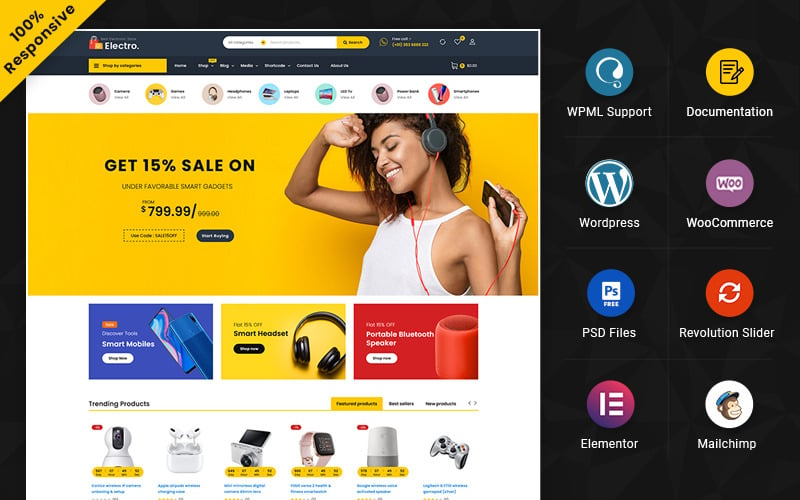
The Electro Multipurpose Elementor WooCommerce Store is a WordPress theme built for electronics retailers selling products such as smartphones, laptops, and cameras. It includes 7 prebuilt demo storefronts, Elementor drag and drop editing, and WooCommerce tools such as wishlists, product comparison, and abandoned checkout recovery. Understanding how these features work together helps determine whether your store converts browsers into buyers.
What Is the Electro WooCommerce Theme?
Electro is a WordPress and Elementor multipurpose WooCommerce theme built for electronics and gadget storefronts.
This WooCommerce theme overview covers a solution designed specifically for selling product categories such as mobiles, laptops, cameras, VR headsets, and smart devices.
You get a ready to launch store with sample data, including `electro_wordpress.xml`, which speeds up setup and customization.
The theme supports WPML, so you can run multilingual storefronts if your audience spans multiple regions.
Its design reflects a tech forward aesthetic suited to gadget and device retailers.
It’s compatible with both Elementor and Elementor Pro for expanded template building capabilities.
The theme also meets SEO and performance standards and runs on PHP 7+, MySQL 5.6+, and a minimum 256M memory allocation.
Pre-Built Templates and Electronics Store Layouts
Once you understand what Electro is and who it’s built for, its pre-built electronics store layouts show the theme’s practical value.
The theme includes 7 demo storefronts covering product catalog categories such as gadgets, cameras, sound systems, mobiles, laptops, VR devices, and smart devices.
You can activate any demo using One Click Demo Import, which automatically configures theme settings, widgets, and sample pages.
Each layout includes header variations, category banners, and a mega menu designed to display large electronics catalogs without visual clutter.
The mega menu supports both horizontal and vertical orientations, which keeps navigation structured across category-heavy stores.
Because Elementor powers every layout, you can make drag-and-drop edits across key pages, including the homepage, product listings, and checkout, without touching code.
All layouts are fully responsive across desktop, tablet, and mobile devices.
Drag-and-Drop Customization Without Coding
Customizing your WooCommerce store with Electro requires no coding because Elementor’s drag and drop interface lets you visually edit storefront touchpoints, including product grids, cart pages, and checkout layouts, by rearranging widgets and theme sections.
Widget customization lets you modify individual elements, such as product image blocks, price displays, and call to action buttons, by selecting and repositioning them directly on the canvas.
You can install Electro’s included Elementor Pro template kit for electronics focused pages, then swap placeholder content with your actual products instantly.
Mobile controls in Elementor’s responsive settings let you fine tune typography, spacing, and layout across desktop, tablet, and mobile screens independently.
If you adjust thumbnail sizes, regenerate thumbnails following Electro’s recommended setup to keep your edited layouts visually consistent across all store pages.
WooCommerce Features That Drive More Sales
Beyond layout control, Electro’s WooCommerce features actively drive conversions by reducing friction at every stage of the buying journey.
Conversion optimization starts with tools that address where shoppers hesitate or drop off.
Abandoned checkout recovery sends automated emails to customers who leave without completing purchases, bringing them back into the funnel.
Wishlist engagement lets shoppers save products for later, which increases return visits and purchase intent.
Product comparison enables buyers to evaluate specifications side by side, shortening decision time through YITH WooCommerce Compare integration.
Fully responsive product grids eliminate layout breakdowns on mobile devices, keeping the buying experience consistent across screen sizes.
These features work together systematically, turning browsers into buyers by targeting friction points at the discovery, consideration, and checkout stages.
Performance, SEO, and Mobile Readiness
Electro delivers a 90+ PageSpeed score through built-in optimization features, including caching, lazy loading, bulk WebP and AVIF image conversion, and accessibility compliance tools that help keep WooCommerce catalogs fast at scale.
Its SEO schema markup, site caching system, and Core Web Vitals alignment give your store measurable search visibility advantages.
Image optimization through WebP and AVIF conversion cuts payload size, while PHP 7+ and 256M memory requirements help stabilize load performance across high-traffic pages.
- Your store loads faster because image optimization reduces file sizes by converting to WebP and AVIF formats
- Your rankings improve because SEO schema signals search engines with structured product data
- Your bounce rate drops because site caching delivers pages instantly across desktop, tablet, and mobile
- Your Core Web Vitals scores rise because lazy loading defers non-critical resources until needed
How to Install and Launch Your Electro Store
Getting your Electro store live requires four sequential steps: verifying server requirements, installing the theme and plugins, importing demo data, and rebuilding thumbnails.
Before you begin Theme Setup, confirm that your server supports PHP 7 or higher, MySQL 5.6 or higher or MariaDB 10.0 or higher, HTTPS, a 256M memory limit, and a 32M upload size.
Next, install WooCommerce, Slider Revolution, and Envato Market from the recommended plugins list. Activate Electro, then use One Click Demo Import to load three files, `electro_customizer_export.dat`, `electro_widgets_settings.wie`, and `electro_wordpress.xml`.
This Product Import step populates your store pages, categories, and sample products instantly. After that, run Regenerate Thumbnails to correct image sizing.
If you use Elementor Pro, import the 12 prebuilt WooCommerce templates through the Envato Template Kit Import plugin to finish launching your store.
Conclusion
Your electronics store is the ship; Electro Multipurpose Elementor WooCommerce Store is its engine. It includes 7 pre-built demos, Elementor drag-and-drop editing, and WooCommerce tools like wishlist, comparison, and abandoned checkout recovery to support every page. You do not need coding skills to launch a conversion-ready storefront. Install the theme, import your demo, and customize your product grids, headers, and checkout layouts to start selling electronics confidently from day one.
✅ Pros
- Specifically engineered and optimized for Multipurpose E-Commerce store conversions
- Drag-and-drop Elementor integration for visual page building without code
- Pre-designed Multipurpose E-Commerce demo layouts ready for one-click import
- Optimized Core Web Vitals performance with clean responsive CSS grid
❌ Cons
- Best performance requires configuring reliable WordPress/WooCommerce caching
- Enabling dozens of extra third-party plugins simultaneously may require performance tuning
📦 Theme Resources & Setup Information
Frequently Asked Questions
Is Electro Multipurpose Elementor WooCommerce Store 100% mobile-ready and responsive?
Yes, Electro Multipurpose Elementor WooCommerce Store is built on a fluid responsive grid. Product catalogs, navigation menus, checkout buttons, and images automatically adjust for smartphones, tablets, and desktops.
Can I customize Electro Multipurpose Elementor WooCommerce Store without writing code?
Absolutely. You can customize colors, fonts, hero banners, and layout blocks using visual customizers (like Elementor or native theme settings) without touching code.
Is Electro Multipurpose Elementor WooCommerce Store compatible with the latest WooCommerce version?
Yes, this theme is fully compatible with modern WooCommerce standards, secure checkout integrations, and popular third-party extensions.
Does Electro Multipurpose Elementor WooCommerce Store include customer support and updates?
Yes, purchasing through the official marketplace includes detailed setup documentation, theme updates, and technical customer support.

Abdullah Prem is the founder of EcommerceThemes.org and BloggersNeed.com. He specializes in reviewing Shopify themes, WooCommerce themes, WordPress themes, hosting, plugins, and SaaS tools. Through EcommerceThemes.org, he publishes in-depth theme reviews, product comparisons, buying guides, and performance analyses to help ecommerce businesses choose the right theme based on speed, SEO, customization, user experience, and overall value. His goal is to provide research-driven recommendations that help store owners make informed decisions when selecting an ecommerce theme.