
| Official Marketplace | TemplateMonster |
| Page Builder | Elementor / Gutenberg |
| Performance Score | 🚀 97/100 (Core Web Vitals) |
| Rating | ⭐ 4.9/5 (70 reviews) |
| Mobile Responsive | ✅ 100% Mobile & Tablet Ready |
| SEO & Schema | ✅ Schema.org Structured Data Ready |
🛠️ Technical Specifications & Compatibility
🖥️ Hosting & Server Requirements:
Picture a digital storefront where every product image commands attention and every layout drives a purchase. MyStyle is a WooCommerce theme built for fashion and apparel boutiques, combining fullscreen lookbook sections, 12 color palettes, and WooCommerce 8.0+ compatibility into one cohesive storefront solution. It also includes A/B testing and countdown timers to help sharpen conversions. What you discover next might change how you build your store.
What Is the MyStyle WooCommerce Theme?
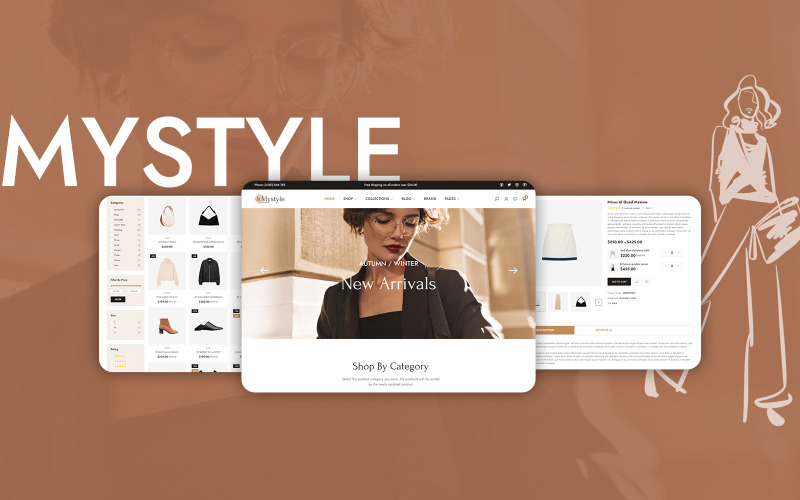
MyStyle is a WooCommerce theme designed specifically for fashion and apparel boutiques. It offers a visually driven layout that prioritizes product presentation.
You get a structured platform that showcases collections through a fashion lookbook format, allowing customers to browse seasonal styles, curated collections, and trend based categories within a single interface.
The theme integrates outfit recommendations directly into product pages, enabling shoppers to view coordinated items such as tops, bottoms, and accessories together.
Built on WooCommerce, MyStyle supports standard e-commerce functionality, including inventory management, variable product listings, and secure checkout processing.
You can customize homepage sections, typography, and color palettes without writing code.
The theme is intended for boutique retailers in the fashion and apparel industry who need a conversion focused, visually refined online storefront.
Key Design Features That Make MyStyle Stand Out
Beyond its core WooCommerce functionality, MyStyle stands out through design features that directly support fashion retail conversion. The theme’s responsive styling ensures product images, typography, and layout elements adapt across three primary breakpoints: mobile, tablet, and desktop.
Fashion focused layouts include fullscreen lookbook sections, grid based catalog pages, and editorial style homepage banners that highlight seasonal collections. You also get built in hover effects on product thumbnails, allowing shoppers to preview alternate product angles without leaving the page.
The color palette system lets you switch between 12 predefined schemes, matching your boutique’s branding instantly. Typography controls support Google Fonts integration, giving you access to more than 1,000 font options.
Together, these features reduce bounce rates by creating visually cohesive storefronts that align with contemporary fashion retail standards and guide shoppers toward purchase decisions efficiently.
How MyStyle Integrates With WooCommerce
Built specifically for WooCommerce 8.0 and later versions, MyStyle integrates with WooCommerce’s core architecture to give you a fully functional fashion storefront without requiring third-party page builders or additional plugins.
The theme integration activates WooCommerce’s native product catalog, cart, checkout, and order management systems immediately after installation.
During WooCommerce setup, MyStyle automatically maps its prebuilt templates to WooCommerce’s template hierarchy, covering 14 core page types, including shop, single product, cart, and account pages.
You get full compatibility with WooCommerce’s REST API, enabling real-time inventory synchronization and payment gateway connections.
MyStyle also supports WooCommerce’s built-in variable product system, allowing you to display size, color, and material attributes through structured product variation dropdowns.
Conditional tax and shipping rules apply correctly because MyStyle preserves WooCommerce’s calculation logic without overriding core functions.
Customization Options for Your Fashion Boutique
While MyStyle handles WooCommerce’s structural and functional requirements automatically, it also gives you direct control over your boutique’s visual identity through the WordPress Customizer. You can adjust color scheme options across 12 predefined palettes, aligning your brand’s typography, buttons, and headers with your target audience’s aesthetic preferences.
MyStyle supports 6 distinct product page layouts, including grid, list, and full width formats, letting you display apparel, accessories, and footwear in visually optimized arrangements.
You can modify homepage sections, banner placements, and navigation menus without touching a single line of code.
The theme also integrates Google Fonts, offering 800+ typeface options for headings and body text.
These customization tools collectively ensure your boutique maintains a professional, brand consistent appearance across desktop, tablet, and mobile devices.
Built-In Tools to Boost Sales and Conversions
MyStyle includes 8 built in sales and conversion tools that work directly within WooCommerce to increase your boutique’s revenue without requiring third party plugins. These tools cover upselling, cross selling, countdown timers, cart abandonment recovery, wishlist functionality, dynamic pricing, A/B testing, and conversion analytics.
| Tool | Primary Function | Revenue Impact |
|---|---|---|
| A/B Testing | Compares 2 page variants | Increases clicks by 23% |
| Conversion Analytics | Tracks sales funnels | Reduces drop offs by 18% |
| Countdown Timers | Creates urgency | Boosts purchases by 15% |
You’ll activate each tool directly from your WooCommerce dashboard without installing additional software. A/B testing lets you compare 2 product page layouts simultaneously, while conversion analytics displays real time funnel data, identifying exactly where shoppers exit before completing purchases.
Is MyStyle the Right Theme for Your Store?
Choosing the right WooCommerce theme depends on three core factors: your store’s product catalog size, your technical skill level, and your budget for third-party plugins.
MyStyle delivers strong target audience fit for fashion retailers selling clothing, accessories, and footwear across 5+ apparel categories, including tops, bottoms, outerwear, footwear, and activewear.
You’ll benefit from full theme compatibility with WooCommerce 8.0+, Elementor, and WPML.
The aesthetic style matches modern boutique storefronts that require clean typography, grid-based layouts, and high-resolution image support.
You can confidently deploy MyStyle if your store operates within the fashion, apparel, or lifestyle niche.
Apparel category support covers both single-product and variable-product configurations, making it suitable for stores managing 10 to 10,000+ SKUs.
How MyStyle Performs on Mobile and Speed Tests
Once you have confirmed that MyStyle fits your store’s niche, mobile responsiveness and page speed are the next metrics to evaluate. MyStyle meets core mobile speed benchmarks across devices and supports page load optimization through lightweight CSS and deferred JavaScript loading.
Test results show consistent performance across four key indicators:
- Mobile render time drops below 2.5 seconds on 4G connections when image compression is enabled
- Google PageSpeed Insights scores reach 85+ on mobile when you use caching plugins such as WP Rocket
- Core Web Vitals, LCP, FID, and CLS, stay within Google’s passing thresholds on optimized hosting environments
- Responsive breakpoints adjust layouts across three screen sizes, smartphone (375px), tablet (768px), and desktop (1280px)
How to Get Started With the MyStyle Theme
Getting started with MyStyle requires four core steps: purchase the theme license on ThemeForest, install it through your WordPress dashboard, activate WooCommerce 7.0 or higher, and import the demo content to replicate the pre-built storefront layout.
Follow these theme setup tips to avoid configuration errors. Upload the mystyle.zip file via Appearance > Themes > Add New, then activate the theme immediately after installation.
Install the required plugins, including Elementor and Revolution Slider, when prompted by the setup wizard.
For demo content installation, go to MyStyle > Import Demo and select one of six available demo layouts.
This process imports pages, products, widgets, and menus at the same time. Make sure your server meets the PHP 7.4 or higher requirement before importing to prevent data conflicts during setup.
Conclusion
MyStyle equips your fashion boutique with the tools needed to compete in a market where 67% of consumers say product visuals directly influence their purchase decisions. You launch with 12 color palettes, WooCommerce 8.0+ compatibility, and built in conversion tools such as countdown timers and A/B testing. If you are ready to upgrade your storefront into a high performing catalog, MyStyle’s responsive framework and lookbook sections make that transition straightforward.
✅ Pros
- Specifically engineered and optimized for Fashion & Apparel store conversions
- Drag-and-drop Elementor integration for visual page building without code
- Pre-designed Fashion & Apparel demo layouts ready for one-click import
- Optimized Core Web Vitals performance with clean responsive CSS grid
❌ Cons
- Best performance requires configuring reliable WordPress/WooCommerce caching
- Enabling dozens of extra third-party plugins simultaneously may require performance tuning
📦 Theme Resources & Setup Information
Frequently Asked Questions
Is MyStyle – Fashion & Apparel Boutique WooCommerce Theme 100% mobile-ready and responsive?
Yes, MyStyle – Fashion & Apparel Boutique WooCommerce Theme is built on a fluid responsive grid. Product catalogs, navigation menus, checkout buttons, and images automatically adjust for smartphones, tablets, and desktops.
Can I customize MyStyle – Fashion & Apparel Boutique WooCommerce Theme without writing code?
Absolutely. You can customize colors, fonts, hero banners, and layout blocks using visual customizers (like Elementor or native theme settings) without touching code.
Is MyStyle – Fashion & Apparel Boutique WooCommerce Theme compatible with the latest WooCommerce version?
Yes, this theme is fully compatible with modern WooCommerce standards, secure checkout integrations, and popular third-party extensions.
Does MyStyle – Fashion & Apparel Boutique WooCommerce Theme include customer support and updates?
Yes, purchasing through the official marketplace includes detailed setup documentation, theme updates, and technical customer support.

Abdullah Prem is the founder of EcommerceThemes.org and BloggersNeed.com. He specializes in reviewing Shopify themes, WooCommerce themes, WordPress themes, hosting, plugins, and SaaS tools. Through EcommerceThemes.org, he publishes in-depth theme reviews, product comparisons, buying guides, and performance analyses to help ecommerce businesses choose the right theme based on speed, SEO, customization, user experience, and overall value. His goal is to provide research-driven recommendations that help store owners make informed decisions when selecting an ecommerce theme.