
| Official Marketplace | TemplateMonster |
| Page Builder | Elementor Visual Page Builder |
| Performance Score | 🚀 97/100 (Core Web Vitals) |
| Rating | ⭐ 5/5 (1 reviews) |
| Mobile Responsive | ✅ 100% Mobile & Tablet Ready |
| SEO & Schema | ✅ Schema.org Structured Data Ready |
🛠️ Technical Specifications & Compatibility
🖥️ Hosting & Server Requirements:
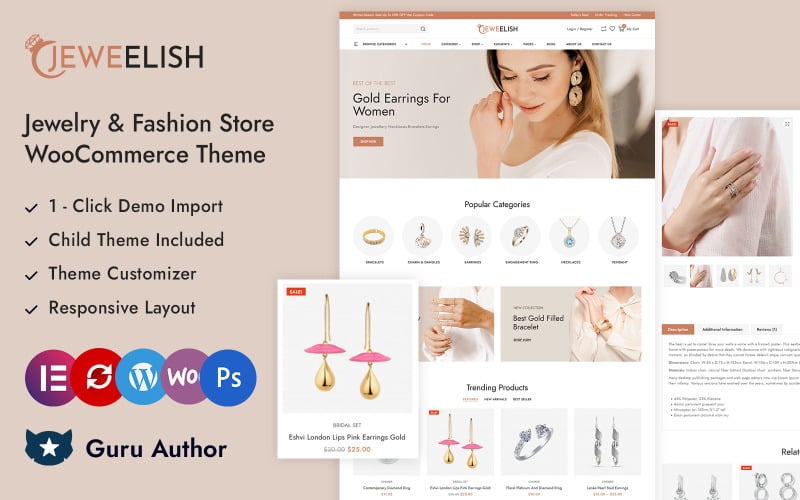
Jeweelish is a WooCommerce theme built for jewelry and diamond stores, so you can present rings, necklaces, bracelets, and earrings in a polished storefront. It includes mega menus, AJAX filtering, infinite scroll, quick view, product zoom, sticky add to cart, and wishlist and compare tools. It also comes with a child theme, demo import, and installation support, which helps you launch faster. The real advantage shows up when you start shaping how shoppers move through your catalog.
What Jeweelish Theme Offers
Jeweelish Theme offers a luxury focused Elementor and WooCommerce storefront for jewelry and diamond shops, so you can present rings, necklaces, bracelets, earrings, gold, and silver in a polished online catalog. You also get product quickview for fast item checks, wishlist compare tools for side by side selection, and AJAX add to cart for smoother purchasing.
Its vertical and horizontal mega menus help you organize categories, while the advanced AJAX filter lets you sort by price, material, gemstone, and rating.
Use infinite scroll to load more products without page breaks, and switch to the dark mode switcher for a darker storefront layout.
On product pages, zoom, an image slider, a sticky add to cart bar, and social share buttons keep shoppers engaged.
Why Jeweelish Fits Jewelry Stores
It fits jewelry stores because it’s built for selling rings, necklaces, bracelets, earrings, ornaments, gold, and silver in a storefront that reflects luxury buying behavior. You present luxury branding with polished layouts, and you guide collection curation across categories such as rings and necklaces.
- You support gemstone discovery with AJAX filters for price, material, gemstone, and rating.
- You strengthen customer trust with quick view, wishlist, compare, and product zoom.
- You improve browsing with vertical and horizontal mega menus, plus category navigation.
- You keep shoppers engaged with WooCommerce, Elementor, infinite scroll, SEO friendly markup, and a 90+ PageSpeed claim.
You also add dark mode for low light viewing, which helps if your customers shop at night.
Key Storefront Features in Jeweelish
Key storefront features in Jeweelish center on luxury presentation, fast navigation, and conversion tools for a jewelry and diamond WooCommerce shop. You get a polished Diamond Focus homepage, a calm dark mode, and a Luxury Layout that feels refined on every screen. The vertical and horizontal mega menus help you move from rings to necklaces, bracelets, and earrings in seconds.
| Feature | Benefit | Result |
|---|---|---|
| Quick View | See details fast | Less friction |
| Wishlist Compare | Save and review | Smarter choices |
| AJAX add to cart | Add instantly | Faster checkout |
| Sticky cart | Stay oriented | More confidence |
You can launch faster with 1 click demo data import, while mobile optimization and SEO friendly structure support visibility and smooth browsing.
How Jeweelish Handles Products and Filters
For jewelry catalogs, this WooCommerce theme handles products with AJAX filtering that lets you narrow results by price, material, gemstone, and rating without a full page reload. You stay on the archive page, use quick filtering, and compare rings, necklaces, bracelets, and earrings with Facet compatibility.
- Filter by 4 core facets: price, material, gemstone, rating.
- Open quick view to inspect images and item details instantly.
- Browse Featured, Latest, On Sale, Bestseller, and Top Rated archives.
- Move from category navigation to checkout faster with AJAX add to cart.
You also get a responsive mega menu for category paths, so results update fast when you switch between product groups and facet sets.
Wishlist, compare, and zoom actions support your browsing flow, and if you refine your search first, you reduce friction before adding items to cart.
Jeweelish Design Options and Customization
Jeweelish gives you control over storefront design through the WordPress Theme Customizer, where you can set unlimited colors and fonts to match a luxury jewelry brand without coding.
You can manage brand customization by choosing light or dark mode, then refine pages with Elementor after a one-click demo import.
For navigation, Jeweelish supports vertical and horizontal mega menus, so you can organize product categories like rings, necklaces, bracelets, and earrings with clear mega menu styling.
You can also add sticky menu and sticky add to cart elements on product pages to keep key actions visible.
These layout controls let you shape the storefront hierarchy, from global colors to page level sections, while keeping the buying flow streamlined and consistent.
Jeweelish Mobile and SEO Advantages
Built for mobile and search performance, Jeweelish gives your jewelry store a responsive experience with a dedicated mobile optimized layout, so shoppers can browse product categories, view items, and interact with menus smoothly on phones and tablets.
You improve mobile UX with faster taps, clear product cards, and dark mode for low light browsing.
- Use advanced AJAX filtering for rings, necklaces, and earrings.
- Let quick view and AJAX add to cart shorten the path to purchase.
- Support an SEO structure that keeps categories, product pages, and metadata organized.
- Benefit from a light theme that targets a 90+ PageSpeed Score and can help Core Web Vitals.
This setup reduces reloads, keeps screens consistent, and supports search visibility while you sell jewelry online.
What’s Included With Installation Support
Installation support includes FTP upload of the Jeweelish theme files, WordPress admin setup, plugin installation and configuration, a child theme, and 1 click demo data import for one website only.
You get a setup walkthrough that covers your single domain, so the service stays focused on one store.
During installation, the team places the theme on your hosting, enters WordPress admin, and configures required plugins on your site.
You won’t receive the installation files separately, because support handles them directly.
The included child theme protects your edits to templates, styles, and layout settings when updates arrive.
A demo import can match the live demo’s structure, colors, and product display faster, so you can start with a ready made storefront and adjust it after setup.
Best Ways to Launch With Jeweelish
To launch with Jeweelish quickly, install the Elementor and WooCommerce theme using the one click demo data import. Then adjust the storefront in the theme customizer so your jewelry shop matches the demo layout, colors, and typography from day one.
Follow this launch checklist to reduce setup steps and stay on track. Use the demo import steps, then verify theme licensing for one website before upload.
- Import demo content and confirm pages, products, and menus.
- Set unlimited colors, fonts, and light and dark mode in the customizer.
- Enable vertical and horizontal mega menu plus AJAX filters for price, material, gemstone, and rating.
- Activate quick view, wishlist, compare, AJAX add to cart, and sticky add to cart on product pages.
Finish your go live workflow by installing the required plugins in admin, then publish.
Conclusion
Jeweelish helps you launch a polished jewelry store with a focused WooCommerce setup. You can showcase rings, necklaces, bracelets, and earrings with quick view, filters, infinite scroll, and sticky add to cart tools that keep shoppers moving. Its mobile friendly design and SEO ready structure support faster discovery across devices. With demo import, a child theme, and installation support, you will hit the ground running and keep your storefront shining from day one.
✅ Pros
- Specifically engineered and optimized for Multipurpose E-Commerce store conversions
- Drag-and-drop Elementor integration for visual page building without code
- Pre-designed Multipurpose E-Commerce demo layouts ready for one-click import
- Optimized Core Web Vitals performance with clean responsive CSS grid
❌ Cons
- Best performance requires configuring reliable WordPress/WooCommerce caching
- Enabling dozens of extra third-party plugins simultaneously may require performance tuning
📦 Theme Resources & Setup Information
Frequently Asked Questions
Is Jeweelish Jewelry and Diamond Store WooCommerce Theme 100% mobile-ready and responsive?
Yes, Jeweelish Jewelry and Diamond Store WooCommerce Theme is built on a fluid responsive grid. Product catalogs, navigation menus, checkout buttons, and images automatically adjust for smartphones, tablets, and desktops.
Can I customize Jeweelish Jewelry and Diamond Store WooCommerce Theme without writing code?
Absolutely. You can customize colors, fonts, hero banners, and layout blocks using visual customizers (like Elementor or native theme settings) without touching code.
Is Jeweelish Jewelry and Diamond Store WooCommerce Theme compatible with the latest WooCommerce version?
Yes, this theme is fully compatible with modern WooCommerce standards, secure checkout integrations, and popular third-party extensions.
Does Jeweelish Jewelry and Diamond Store WooCommerce Theme include customer support and updates?
Yes, purchasing through the official marketplace includes detailed setup documentation, theme updates, and technical customer support.

Abdullah Prem is the founder of EcommerceThemes.org and BloggersNeed.com. He specializes in reviewing Shopify themes, WooCommerce themes, WordPress themes, hosting, plugins, and SaaS tools. Through EcommerceThemes.org, he publishes in-depth theme reviews, product comparisons, buying guides, and performance analyses to help ecommerce businesses choose the right theme based on speed, SEO, customization, user experience, and overall value. His goal is to provide research-driven recommendations that help store owners make informed decisions when selecting an ecommerce theme.