
| Official Marketplace | TemplateMonster |
| Page Builder | Elementor / Gutenberg |
| Performance Score | 🚀 97/100 (Core Web Vitals) |
| Rating | ⭐ 4.8/5 (340 reviews) |
| Mobile Responsive | ✅ 100% Mobile & Tablet Ready |
| SEO & Schema | ✅ Schema.org Structured Data Ready |
🛠️ Technical Specifications & Compatibility
🖥️ Hosting & Server Requirements:
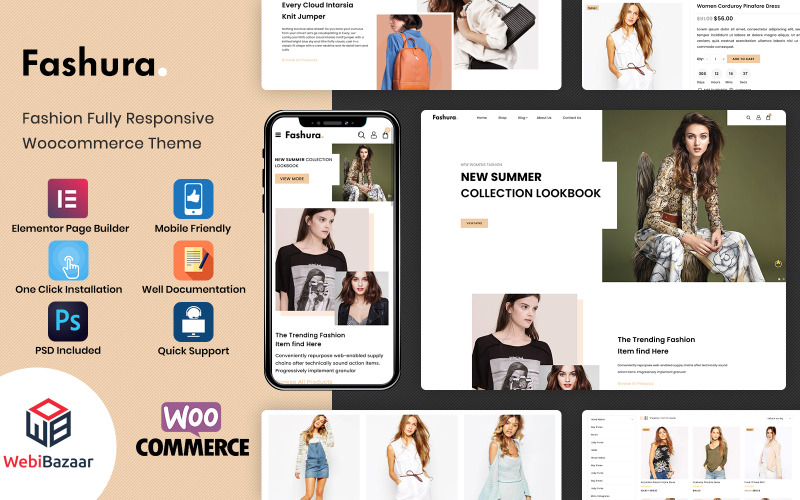
Fashura is a WooCommerce theme with 10+ importable fashion demos and Elementor editing, so you can launch a clothing, accessories, or jewelry store with a structured setup. It pairs AJAX quick view, add-to-cart, wishlist, compare, and product filters with a retina-ready design and mobile-friendly layouts for shirts, watches, and cosmetics. If you want a store that balances speed, control, and conversion tools, the next details show where it stands out most.
What Makes Fashura a Fashion WooCommerce Theme?
Fashura is a WooCommerce-focused fashion theme built for online stores that sell clothing, accessories, watches, jewelry, swimwear, cosmetics, and eyewear. It includes a fashion homepage foundation designed for fast launches, plus 10+ importable demos through WordPress 1-Click Installation.
The theme is fully responsive and retina-ready, so your catalog displays cleanly on desktop, tablet, and phone. You can also improve mobile performance with layouts that adapt to smaller screens without disrupting product browsing.
Fashura includes conversion widgets such as sale badges, a deals countdown timer, and customer reviews, which help build trust while shoppers browse. It also offers multiple shop layouts, 04+ product styles, AJAX quick view, AJAX add-to-cart, accurate filtering, cloud zoom, and 1-click model views.
Fashura’s Best Homepage Layouts
Fashura’s best homepage layouts give you 10+ importable fashion demo designs, so you can launch a store in minutes with WordPress’s 1-Click Demo Import. You also get homepage layout options that fit fashion brand styles like minimal, bold and trendy, and classic boutique.
Because many demos use Elementor, you can drag and drop sections, product blocks, and banners without rebuilding the page from scratch.
Each homepage includes WooCommerce modules such as featured product sliders, top-rated grids, category carousels, and sale countdown promos, so you can showcase merchandise clearly.
Since every demo is fully responsive and retina-ready, you keep product visibility strong across desktop and mobile browsing. That setup helps you match your store identity fast while preserving a polished storefront structure.
Why Fashura Looks Great on Every Device
It looks sharp on every screen because Fashura is fully responsive and retina-ready, so its fashion pages keep crisp product images and clean layouts on desktops, MacBooks, tablets, and phones. You get Retina clarity on high-density displays, while the adaptive grid rearranges banners, categories, and featured items without breaking structure.
On smaller screens, touchscreen usability stays strong, so taps, swipes, and quick actions feel natural. Elementor lets you shift sections for mobile view, and that helps you keep effortless navigation across device widths.
Fashura’s responsive code also stays optimized for speed, so page behavior remains smooth when shoppers move between browsers and screens. Because the theme is cross-browser tested, you avoid common layout shifts and keep a consistent storefront experience everywhere.
Fashura Shop Features for Faster Selling
To sell faster, you can use Fashura’s WooCommerce shop layouts, AJAX tools, and product discovery features to shorten the path from browsing to checkout. You get shop layout flexibility with grid, list, 3 column sidebar, 4 column, and full width views that match your merchandising plan.
| Feature | Use | Benefit |
|---|---|---|
| AJAX Quick View | preview items | keeps shoppers in flow |
| AJAX Add to Cart | add products instantly | removes page loads |
| Wishlist + Compare | save and review items | supports decision making |
| Product filters + countdown timers | narrow results and spotlight deals | increases urgency |
Accurate filtering returns fast results, while hot deal timers highlight sale items. These cart conversion tools help you guide shoppers from search to order without extra steps.
Product Pages That Show Items Better
Product pages in Fashura show items better with Cloud Zoom, an additional images slider, and quick access shopping tools.
You can inspect stitching, texture, and hardware through the product zoom gallery, then move through alternate angles without opening a new page.
The AJAX quick view lets you preview product details and add to cart faster from listings.
Each discounted item can display a sale badge, so you spot promotions while browsing.
Custom product tabs keep sizing, materials, and care details organized, while the Model view option adds a dedicated point of view section with “1 click to view the product items on the models.”
WooCommerce also connects wishlist and customer review tools, so you compare products and decide with less friction.
Built-In Trust Signals That Boost Conversions
Fashura builds trust with visible proof on every shopping screen. You see social proof from customer reviews and comments, and review credibility rises because shoppers read real feedback beside each item. Quick view, wishlist, compare, and AJAX add to cart reduce friction, so you can evaluate products faster and see a clearer lift in conversions.
| Signal | What you see | Result |
|---|---|---|
| Reviews | Ratings, comments | Stronger trust |
| Badges | Sale markers, trust badges | Clear offer proof |
| Models | 1 click product views | Fit and style validation |
| Urgency | Countdown timers | Faster action |
These details support your decision path. If a discounted item feels time limited, you can act sooner. Because model visuals, quick interactions, and trust badges work together, you get confidence without leaving the listing page.
How Fashura Handles Search and Filtering
Fashura handles search and filtering with AJAX powered tools that let you narrow WooCommerce products without leaving the page.
You get Ajax live search that refreshes matches as you type, plus a short result set that keeps browsing fast.
On shop and category pages, you can use sorting and attribute filtering for size, color, price, and stock status, so you reach instant refinement without reloading.
Fashura’s accurate filtering system returns quick results, helping you move from broad collections to specific items in fewer steps.
When you want deeper browsing, grid or list layouts with multiple column counts keep filtered products readable.
Ajax quick view also works with search and filtering, so you can preview a matching item immediately and decide whether to open the product page.
Fashura Customization With Elementor
You can customize the storefront with Elementor by dragging and dropping Fashura’s headers, sliders, product grids, and banners into place, then adjusting each section to match your brand.
You can edit 10+ homepage demo layouts, so you don’t need to start from scratch.
Use layout presets to switch between shop grids, lists, 3 column, 4 column, or full width pages, then place quick view and AJAX add to cart blocks where they fit best.
Each responsive section updates for desktop, tablet, and mobile breakpoints, and you can refine spacing, colors, and typography with quick styling controls.
In product, promotion, and wishlist or compare areas, you keep the theme’s conversion tools organized inside Elementor compatible sections.
Because the design is retina ready, your storefront stays sharp while you tailor fashion content to your catalog.
Demo Import, Setup, and Required Plugins
After installing Fashura (ID: 220944), start with the theme setup wizard to complete the guided setup and import demo content through WordPress 1-Click Installation.
It handles the demo import and checks the plugin requirements for you, so you don’t need to upload plugin files manually.
Before importing, install and activate WooCommerce through Plugins → Add New, because store features depend on it.
If you skip the wizard, go to Tools → Import → WordPress → Run Importer and upload the demo XML import file from the theme’s demo folder.
You should also install any extra plugins named in the documentation, such as Elementor for layouts, so the imported pages and product templates load correctly on your site.
Support, Compatibility, and Theme Updates
Support and updates for this theme focus on compatibility, documentation, and direct helpdesk access. You can check the compatibility matrix for Elementor plus WooCommerce 9.x.x to 5.x.x and WordPress 6.9.x to 4.9.x.
The theme remains fully responsive and retina ready, so your store keeps its layout on phones, tablets, and desktops.
Update WordPress and every required plugin to the latest versions for better performance and security updates.
If you need setup or configuration help, use the documentation or submit a ticket through the helpdesk, and you can email [email protected].
The WooCommerce Themes Experts service may also need your WordPress admin panel and FTP access when it uploads new templates.
Core shop features, such as wishlist, compare, and quickview, remain supported.
Conclusion
Fashura helps you launch a polished fashion store fast. Its 10+ demos, Elementor editing, and mobile-ready layouts give you a clear path from setup to sales. In one store launch, a team cut homepage build time from 8 hours to 2 by importing a demo and swapping in products, like replacing a sketch with a finished runway look. You still need solid photos and product data, but Fashura gives you the framework to sell.
✅ Pros
- Specifically engineered and optimized for Fashion & Apparel store conversions
- Drag-and-drop Elementor integration for visual page building without code
- Pre-designed Fashion & Apparel demo layouts ready for one-click import
- Optimized Core Web Vitals performance with clean responsive CSS grid
❌ Cons
- Best performance requires configuring reliable WordPress/WooCommerce caching
- Enabling dozens of extra third-party plugins simultaneously may require performance tuning
📦 Theme Resources & Setup Information
Frequently Asked Questions
Is Fashura – Responsive Fashion WooCommerce Theme 100% mobile-ready and responsive?
Yes, Fashura – Responsive Fashion WooCommerce Theme is built on a fluid responsive grid. Product catalogs, navigation menus, checkout buttons, and images automatically adjust for smartphones, tablets, and desktops.
Can I customize Fashura – Responsive Fashion WooCommerce Theme without writing code?
Absolutely. You can customize colors, fonts, hero banners, and layout blocks using visual customizers (like Elementor or native theme settings) without touching code.
Is Fashura – Responsive Fashion WooCommerce Theme compatible with the latest WooCommerce version?
Yes, this theme is fully compatible with modern WooCommerce standards, secure checkout integrations, and popular third-party extensions.
Does Fashura – Responsive Fashion WooCommerce Theme include customer support and updates?
Yes, purchasing through the official marketplace includes detailed setup documentation, theme updates, and technical customer support.

Abdullah Prem is the founder of EcommerceThemes.org and BloggersNeed.com. He specializes in reviewing Shopify themes, WooCommerce themes, WordPress themes, hosting, plugins, and SaaS tools. Through EcommerceThemes.org, he publishes in-depth theme reviews, product comparisons, buying guides, and performance analyses to help ecommerce businesses choose the right theme based on speed, SEO, customization, user experience, and overall value. His goal is to provide research-driven recommendations that help store owners make informed decisions when selecting an ecommerce theme.